
Your MLS decides what you may publish. MLSImport gives you the switches to honour those rules, and it does not apply them for you, so the settings on each import task are what keep the site compliant.
Three things need checking: the two internet display flags, the attribution fields your board requires, and which fields you selected to import in the first place.
How do I keep imported listings compliant with my MLS display rules?
Set up each import task to match your board’s rules, then check the live pages yourself. MLS Import gives you the controls, and it does not make compliance automatic. There is no one disclaimer that fits every MLS, so work in this order:
- Get your board’s current display rules in writing, from every MLS whose homes you show. Ask for the exact disclaimer words, the broker credit, the logo rules and how fast changes and removals must reach your site. Keep a copy for future audits.
- Set the three things above on every import task, as the sections below explain.
- Set Select Status and Protected Statuses so sold, expired and withdrawn homes come down when your board says. See protected statuses.
- Check one real listing from the feed through to the page. A successful import is not a compliance test. Look at the courtesy line, the disclaimer and the logo on search result cards, map cards and the listing page, on a phone and a computer. Many boards want the courtesy line on cards and map pop-ups, not only on the listing page. Check a listing from another broker too.
- Ask your board to review the pages before launch. Repeat the check whenever you add a task or change the theme or page layout.
For what most boards require on each type of page, see MLS/IDX compliance rules for WordPress sites.
The two internet display flags
RESO gives sellers two opt outs, and both arrive on the listing as a true or false field.
- InternetEntireListingDisplayYN. False means the seller has asked that the listing not be published on the internet at all.
- InternetAddressDisplayYN. False means the listing may be published but the street address may not.
Both appear on the import task as settings you can turn on. Setting one to yes adds a filter so only listings the seller has allowed are requested from the MLS.
What “no” actually means
Setting either flag to no does not ask for the opted out listings. It removes the filter entirely, so the request comes back with everything the MLS is willing to send, including listings a seller asked to keep off the internet.
That asymmetry is the single most important thing on this page. A flag left at no is not a neutral default. It is the setting under which opted out listings are imported and published.
Setting both flags to no is a valid diagnostic when listings you expect are missing, because it proves whether the MLS is excluding them on those fields. Set them back the moment the test answers the question. A diagnostic left in place is a compliance exposure, not a harmless setting.
Every task, not only the first one
The flags are stored on each import task, so a task added months later starts from its own defaults rather than inheriting the first one’s. The task the setup wizard creates for you turns the entire listing flag on. A task you build by hand needs it set.
The check is quick. Open each import task and confirm both flags read the way your board requires, then do it again whenever a new task is added.
Turning a flag on later does not remove listings that were imported while it was off. The daily reconciliation pass removes properties whose listings have left the MLS, and an opted out listing is still in the MLS, so it is never flagged as gone. Those properties have to be removed with the delete tool on the Tools tab or by hand.
Attribution and disclaimer
Most boards require the listing office, and often the listing agent, to appear on every listing you display, along with a disclaimer naming the source of the data. Those are ordinary RESO fields, including AttributionContact and Disclaimer, and they are imported only if you select them on the Select Import Fields screen.
Once you select them, MLS Import maps them into the MLS Attribution section of the property page. The steps are below.
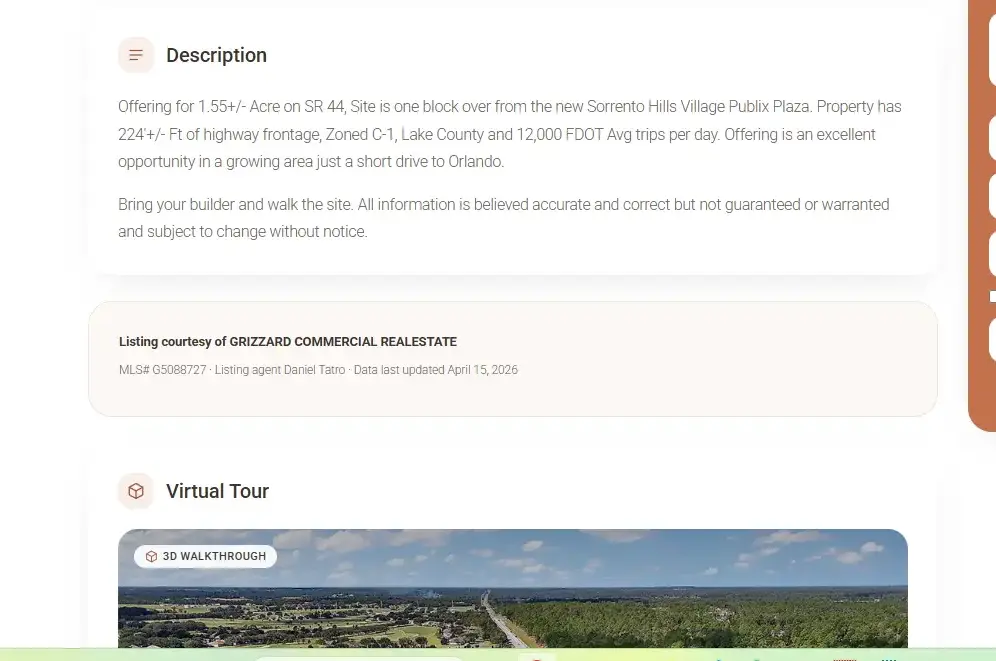
Step 1: Import the attribution fields
- Open MLS Import Settings, then Select Import fields.
- Search for “attribution” and switch on Import it? for every attribution field your feed has. Besides AttributionContact, the usual ones are ListOfficeName, ListAgentFullName and any field with your board’s name in front of it.
- Untick Hidden from Public? for those fields. A hidden field is saved but never shows on the page.
- Give each one a Front End Label that reads the way your MLS wants, for example “Courtesy of”.
- Run the import task again. Listings already on your site only get the new fields when they are imported again.
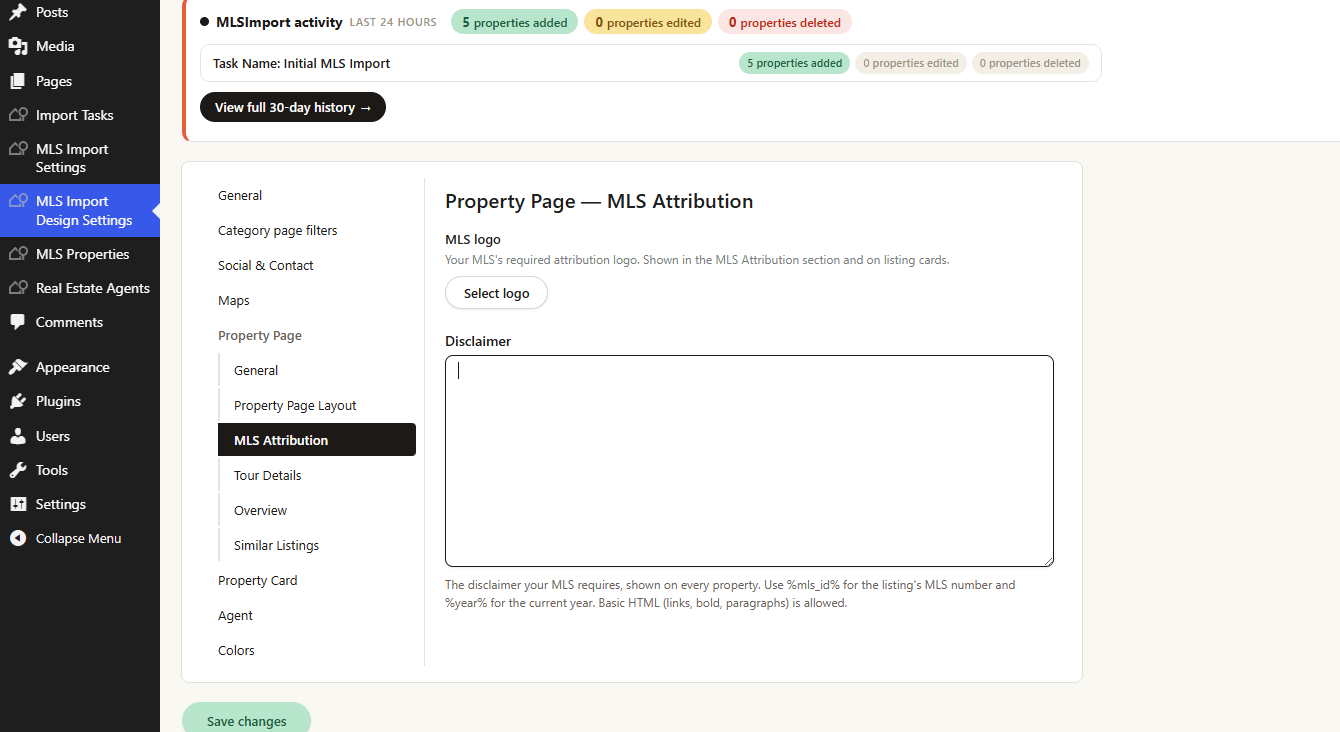
Step 2: Add the disclaimer and MLS logo (Standalone mode)
- Go to MLS Import Design Settings, the Property Page tab, then MLS Attribution.
- Upload the MLS logo your board asks for. It shows in the attribution section and on your listing cards.
- Paste your board’s exact wording into Disclaimer, without rewording it, plus any extra text your board wants. Use %mls_id% for the listing’s MLS number and %year% for the current year. Links and bold text are allowed.
- Save. The disclaimer box ships empty on purpose, so nothing prints until you fill it in.
Step 3: Check where it shows
- In Arrange Sections (Property Page, Property Page Layout), make sure MLS Attribution is in the Enabled list. Building your own property template? Place the section yourself, as shown in property page building blocks.
- On WpResidence, Houzez, Real Homes or WpEstate, the attribution fields print in the theme’s details block. To put one in a set spot, map it to a theme field that prints there. See mapping for WpResidence, WpEstate and Real Homes and mapping to Houzez fields.
- If your board wants a last updated date, keep the Updated tile in the Overview strip of the property page.
Attribution empty on some listings? Test with ListOfficeName and ListAgentFullName first. They are filled on nearly every feed. If they show up and your attribution field does not, that field is empty in your MLS data, not misconfigured.
Showing Canadian DDF listings? CREA’s display rules also ask for a linked Powered by REALTOR.ca logo, your brokerage name and the trademark statement on every page. See what a DDF site needs to display.
Data that must not be published
The RESO field list includes fields written for members only, private office remarks among them. The plugin will import any field you select, store it as post meta, and leave it to the theme whether it appears on the page.
The reliable control is not to select the field. A field you import and then hide in a template is still in your database, still readable by anything that queries post meta, including page builders, export tools and search plugins, and still one theme change away from being visible.
Two more RESO flags are worth importing if your board uses them: the automated valuation display flag and the consumer comment flag. They are not query filters, so honouring them is a matter of reading the field and deciding what your page shows.
Frequently asked questions
Does MLSImport know my board’s rules?
No. It gives you the fields and the filters. The rules come from your MLS or data licence, and the setup has to match them.
My MLS says the entire listing filter is not supported. What then?
Some servers do not accept that filter, and for those the plugin does not send it. Ask your board how opt outs are handled on their feed, because the answer decides whether you need a different filter or a manual process.
Can I show the address on a map but hide it in text?
Not through the flag. The address display flag controls whether you request those listings at all. A partial display is a template decision, and it has to satisfy your board rather than the plugin.
Who is responsible if something is displayed that should not be?
The site owner, under the data licence signed with the MLS. That is why the settings above are worth a scheduled review rather than a one time setup.
Does MLS Import add the Equal Housing Opportunity logo?
No. The Equal Housing Opportunity logo and the fair housing statement are not fields in your MLS feed, so they do not arrive with the listings. Add them once in your theme, in the footer or near your listings, wherever your board asks for them.
Can my MLS fine me for sold or expired homes left on my site?
Yes. A board can enforce its display rules when a site shows sold or expired homes as active. The violation, the time you get to fix it and the fine are set locally, so ask your MLS for its current rules. MLS Import checks your MLS for changed listings every hour, and the daily check, once you turn it on, removes listings that have left the MLS. Both run only while your site’s cron fires. NAR’s IDX policy asks for a refresh at least every 12 hours, and your board may set a stricter one. After a known status change, check that the page changed too.
Can I show sold listings on my website for market reports?
Only if your board allows it, so ask first: whether your feed includes sold records, whether the sale price may appear, how long sold homes may stay up and what credit they need. If the board says yes, add Closed to both Select Status and Protected Statuses on the import task. Label those pages Sold and keep them out of your for-sale search, so buyers never take a sold home for one they can tour. Date every market report. The full setup is in closed and off market listings.
Related
- Listings you expect are not being imported
- Attribution fields and courtesy of text
- The Select Import fields screen
- Deleting properties safely
- Controlling which listings are imported
Send us your board’s display rules and we will tell you which task settings cover them.
Moving your brokerage off a hosted IDX? Board rules are the biggest thing that becomes your job. See the risks of moving from hosted IDX to imported listings.
