
IDX Compliance Rules for WordPress Sites
Last updated: June 14, 2026
Getting board-approved for IDX felt like the hard part, until you opened the compliance checklist. The gap that trips up most sites is easy to miss: attribution that shows on the detail page but goes missing from the search-results cards, enough to draw a board notice with your license attached. The idx compliance rules for WordPress sites come down to a few non-negotiables your board enforces on every listing page.
You need broker attribution (“Courtesy of [Listing Broker]”) on every view, a board-verbatim MLS disclaimer plus copyright line, any required logos (including Equal Housing Opportunity), and a last-updated timestamp. Most boards want data updates every 12 to 24 hours, and the strictest markets push for near-real-time refreshes (confirm the exact interval with your own board, since cadence is set by board policy, not by your software).
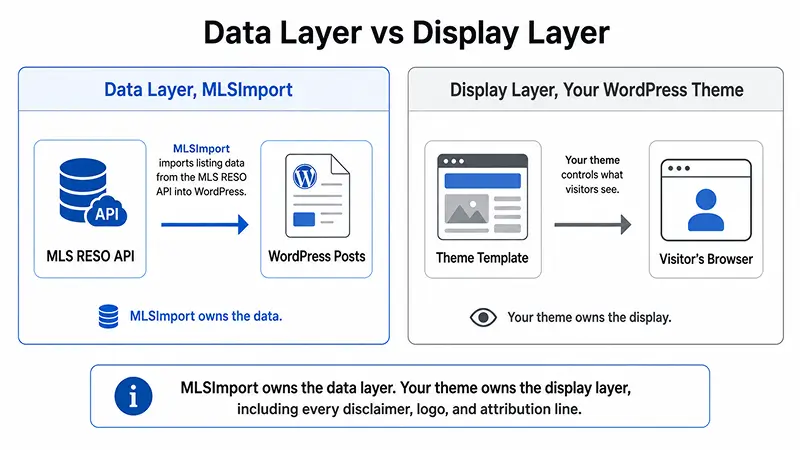
Off-market listings (sold, expired, withdrawn, pending) must come down within roughly 24 hours, and you need written board approval before launch. The work splits cleanly: an import plugin like MLSImport keeps the data layer current, while you configure the display layer (disclaimers, logos, branding) in your theme.
What Do MLS Display Rules Actually Require?
Every MLS board that offers IDX requires any WordPress site displaying its listings to carry broker attribution on every view, a verbatim board-approved disclaimer, required logos (including Equal Housing Opportunity), a data-freshness deadline, and an off-market removal window. These rules apply to search grid cards, map thumbnails, and detail pages alike, not just the detail page.
The Eight Universal Display Requirements
- Broker attribution on every listing view. Search grids, map cards, and detail pages all need it, not detail pages alone. The typical pattern is “Courtesy of [Listing Broker]” or “Listing courtesy of [Brokerage].”
- MLS disclaimer and copyright. Use your board’s exact wording (often “Information deemed reliable but not guaranteed”), plus an MLS copyright line. Do not paraphrase it. Even small edits can fail an audit.
- Last-updated timestamp. Required on detail pages, and many boards want it on search results too.
- Data freshness. Boards typically require updates at least every 12 to 24 hours; some say “no older than 12 hours.”
- Off-market removal. Sold, expired, withdrawn, and pending listings must come down within roughly 24 hours. Confirm your board’s exact window.
- Equal Housing Opportunity logo and fair-housing statement. Both must appear somewhere visible. This is not a feed field, so you add it in your theme.
- Required board logos. The MLS logo and/or REALTOR® logo wherever your board requires; some boards want it per listing, some site-wide.
- No alterations to required fields. You cannot rewrite MLS remarks, change bed counts, hide the listing broker name, or strip required fields.
The No-Mixing Rule
Here’s the one that catches people: you can’t blend your own off-MLS or pocket deals into the same search as IDX listings. Visitors have to always be able to tell which source a listing comes from. Price and geography filters are fine.
What’s not allowed is filtering a general search page to hide other brokers’ valid listings. The easiest way to respect this is to name your pages clearly, “MLS Search” and “Our Exclusive Listings,” and never filter the main MLS page to exclude other offices.
Photo and Watermark Rules
Don’t re-watermark, crop out, or rebrand MLS photos, because boards do check for photo alterations during compliance reviews. “Virtually staged” labels, overlays, and any watermarks the MLS applies have to stay intact. MLSImport serves photos straight from the MLS or its CDN rather than copying them into your WordPress media library, which preserves those watermarks and cuts hosting load.
Get started today: Pull up your MLS board’s IDX handbook and copy the official disclaimer wording, the exact text that has to go into your theme verbatim, before you write a line of code.
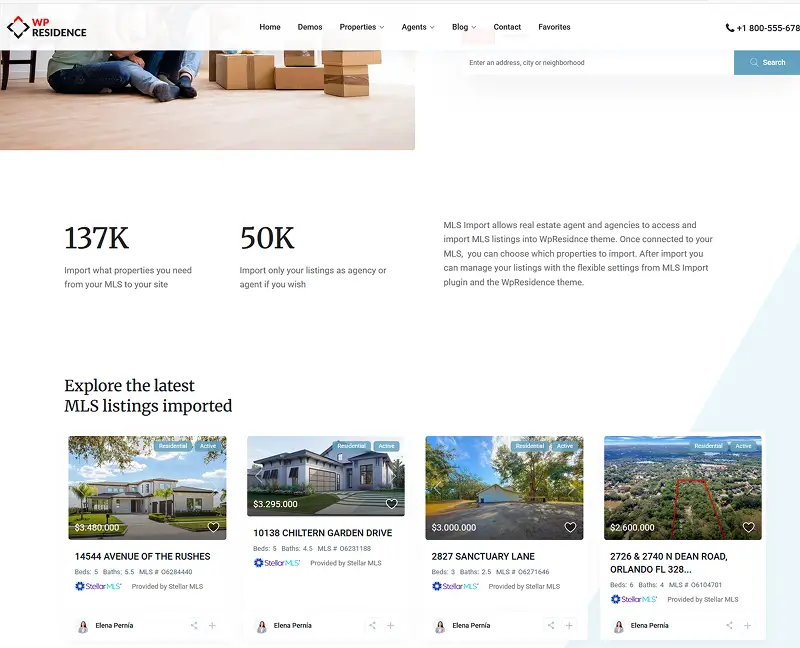
Who Is Responsible for IDX Compliance: You, Your Broker, or the Plugin?
Compliance is three-way: the broker signs the IDX agreement and holds board-level responsibility, the agent’s license is on the line for every display choice on the site, and the plugin vendor handles data accuracy but cannot give legal advice or position your disclaimer for you. Nobody gets to fully hand their part to someone else.
The broker is the MLS “participant.” They sign the IDX agreement, accept final responsibility, and their name and logo must appear on the site. Even a solo agent needs a participating broker on file before applying.
The agent is still personally on the hook. You own the display, the wording, and where IDX data lands on your site. If the disclaimer is missing on your pages, the board notice comes to you, not to the plugin vendor.
The plugin vendor (MLSImport) is the data custodian. The support team can tell you which RESO fields map to which credit and which template files or hooks to use for placement. What they can’t do is give legal advice or guarantee your board’s disclaimer wording is correct. Their job is data accuracy; yours is display accuracy.
- Broker, signs the IDX agreement and accepts board responsibility; their name and logo must appear.
- Agent, owns the site display and wording choices; the license is on the line.
- MLSImport, handles data import, sync, and field mapping; cannot give legal advice or place your disclaimer.
Get started today: Ask your broker to confirm they’re a signed MLS participant and that the IDX application names your domain, because that one conversation saves you a rejected application.
What MLSImport Handles vs. What You Must Configure
MLSImport automates the entire data layer: RESO Web API field import, hourly sync, off-market removal, private-field suppression, and CDN-hosted photos. But it does not auto-inject disclaimer text, logos, or brokerage branding into your WordPress pages. Those live in your theme, and they’re yours to maintain.
| Task | MLSImport handles automatically | You configure in your WordPress theme |
|---|---|---|
| RESO field mapping (ListOfficeName, ListAgentName, MLSName, etc.) | Yes, RESO Web API, Data Dictionary | N/A |
| Disclaimer/copyright text (where the board exposes it in the feed) | Imports the raw field value | You place and render it in the correct template file, verbatim |
| Data sync (hourly default, via WordPress or server cron) | Yes | Choose the schedule; use a server-level cron for boards that require near-real-time updates (e.g. REBNY) |
| Off-market removal (Sold/Expired/Withdrawn/Closed/Deleted/Pending) | Yes, reads the status field automatically | N/A |
| Private-field suppression (owner names, lockbox notes, showing instructions) | Yes, restricted fields kept out of public templates by default | N/A |
| CDN/MLS-hosted photos (watermarks and overlays preserved) | Yes, images not copied to the WP media library | N/A |
| Equal Housing Opportunity logo | N/A | Add to theme (header, footer, or listing template) |
| REALTOR® / MLS board logo | N/A | Add to theme where your board requires |
| Brokerage name and office phone | N/A | Add to header/footer per state and brokerage rules |
| “Powered by” vendor badge on the front end | None, white-label by default | N/A |
| MLS domain/vendor registration | N/A | Register your domain and vendor with your board before launch |
| Duplicate prevention | Yes, by unique MLS ID; updates the existing post instead of creating a duplicate | N/A |
The split exists because the RESO API delivers structured data while your theme delivers the user experience, and legal text is a design decision that belongs in the theme.
One detail that makes compliance predictable: MLSImport connects through the RESO Web API, not legacy RETS. Field names like ListOfficeName follow the RESO Data Dictionary consistently across all 800+ supported boards in the US and Canada, so mapping a credit field works the same on a Texas site as a Florida one.
Placing Disclaimers, Attribution, and Required Logos Correctly
Every disclaimer, attribution line, and required logo has to appear in your WordPress theme’s template files, not get injected by the plugin, and your placement must cover both search/archive views and single-listing detail pages. Skip either one and it’s a board violation.
Broker Attribution: What It Says and Where
Broker attribution belongs on your search grids and cards, your map view cards, and your detail pages, not the detail page alone. That detail-page-only habit is the gap boards flag most often.
The typical wording is “Listing courtesy of [Brokerage Name]” or “Courtesy of [Listing Broker],” but exact phrasing varies by board, so check your IDX handbook. MLSImport delivers the raw RESO fields (ListOfficeName, ListAgentName), and you drop them into both the card template and the single-listing template.
You’re allowed to restyle attribution, smaller font, muted color, placed below the listing content, as long as it stays legible. Most boards require “legible,” not a specific size or color. What you may never do is remove it.
The Three Required Logos
Three logos matter, and only you can place them, since none ride in the feed.
- Equal Housing Opportunity, the logo plus a short fair-housing statement has to appear somewhere visible, usually the footer or a dedicated compliance area. This is not a feed field; add it to your theme by hand.
- REALTOR® logo, required by some boards on listing pages where the listing agent is a REALTOR® member. Check your board’s specific handbook.
- MLS/board logo, varies widely; some boards require it per listing, some site-wide. NJMLS and GSMLS, for example, want official IDX/MLS logos per listing.
| Element | Search card / grid | Property detail page | Site-wide / Footer |
|---|---|---|---|
| Broker attribution (“Courtesy of…”) | Required | Required | N/A |
| MLS disclaimer (“deemed reliable…”) | Required (condensed version acceptable) | Required (full verbatim text) | Optional |
| Last-updated timestamp | Optional | Required | N/A |
| MLS copyright line | N/A | Required | N/A |
| Equal Housing Opportunity logo | N/A | Required | Required |
| REALTOR® / MLS board logo | Per board | Per board | Per board |
Styling Disclaimers Without Breaking Board Rules
You can style disclaimers to match your brand: a thin divider line, muted gray small type below the content band, not a giant legal brick. Luxury sites keep them visually quiet, which is allowed as long as the text stays legible.
The cleanest setup is one reusable template part (a small “listing-legal.php” file or a saved block) included in both the single-listing template and the archive/search loop. Build it once and every view shares the same disclaimer, which avoids the classic drift where one view gets updated and the other quietly falls out of compliance.
Here’s the rule you can’t bend: never paraphrase the disclaimer wording. Boards supply exact text, and even small edits can fail an audit. If your MLS does not expose a disclaimer field in the RESO feed (plenty don’t), copy the approved text verbatim from your board’s member portal or IDX handbook and hardcode it into that template part. The plugin can’t import what the board never put in the feed.
For the fair-housing statement, keep it concise. Footer placement is common and fine, as long as it’s visible without endless scrolling.
📌 Pro Tip: Ask the MLSImport support team which template file and hook maps to ListOfficeName for your specific theme. They’ll guide placement, but the wording is still yours to verify against your board’s handbook. Data accuracy is their job; legal text is yours.
![Example of a styled IDX disclaimer block on a luxury real estate website: thin gray divider, small muted text reading 'Information deemed reliable but not guaranteed. © [Board Name].' with the Equal Housing Opportunity logo to the right](https://mlsimport.com/wp-content/uploads/2026/06/mls-disclaimenr.webp)
Keeping Your Branding Dominant While Staying Compliant
The compliance principle here is short: you can make your brand dominant as long as you don’t hide or shrink the required attribution and you keep showing the full allowed inventory. The constraint is regulatory, not aesthetic. Whether your brand owns the page mostly comes down to how the listings are rendered: when they live as native WordPress posts rather than in a hosted iframe, your theme controls the layout, so attribution can sit as small print below the content while your logo and navigation lead. That’s the practical reason agents reach for an import plugin like MLSImport over a hosted widget that locks the layout.
Featuring Your Own Listings While Showing the Full MLS
You can feature your own listings in an “Our Listings” or “Featured Properties” row while still offering a full-MLS search page elsewhere. That respects IDX reciprocity as long as your general search page shows all the board-allowed listings. What you can’t do is filter the general search to show only your office’s listings. And leads on any listing, including other brokers’, route to your contact form, not to the listing agent.
Adding Your Own Content Around Listings
Neighborhood guides, YouTube tours, market charts, investor commentary: all allowed, as long as the MLS fields stay unedited and your content is visually separated from the data. What’s off-limits is editing the MLS remarks or implying the MLS endorses your take. You can’t drop “great flip potential” inside the remarks field, but you can add it as a separate block attributed to you. If you’re adding non-standard market commentary, have your broker review the plan first.
White-Label Builds for Client Sites
For agencies building client sites, there’s no front-end “Powered by MLSImport” badge. White-label is the default, so the client sees only their agency’s branding. For a clean handoff, give clients the WordPress Editor role while the agency keeps Admin and plugin access, so clients can edit pages without breaking the import pipeline.
Each client site needs its own MLSImport license and its own MLS board approval, which folds neatly into a monthly agency retainer. You can see how that works on the MLSImport per-site licensing page. For luxury and high-end clients, disclaimers can be styled to match the brand (small type, thin divider) so compliance never clashes with premium design.
Board-Specific Rules: NTREIS, REBNY, North NJ, and CREA
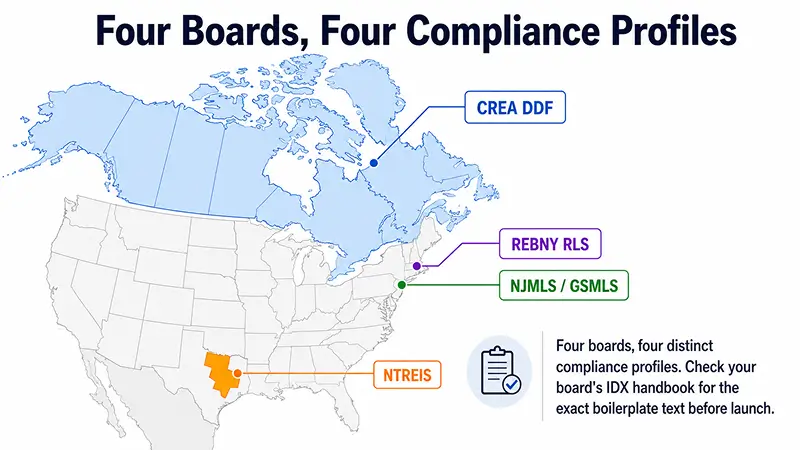
While all boards share the same baseline, four have rules strict or unusual enough to need their own configuration: NTREIS in North Texas, REBNY RLS in New York City, NJMLS/GSMLS in New Jersey, and CREA DDF in Canada. Misconfigure any one and you’ve found the most common source of compliance notices.
| Board | Min. refresh required | Off-market window | Attribution format | Logo requirements | Pre-launch review |
|---|---|---|---|---|---|
| NTREIS | Every 12-24h (general rule; confirm with NTREIS) | ~24h | “Courtesy of [Broker] © NTREIS” | MLS copyright line required | Register domain + vendor with NTREIS |
| REBNY RLS | Near-real-time (RLS policy; verify the current interval with REBNY) | Not specified | Exact boilerplate on ALL views, including cards and thumbnails | Per REBNY policy | Manual site review before production |
| NJMLS / GSMLS | Varies, confirm with your board | Not specified | “Source: NJMLS” (explicit source credit) | Official IDX/MLS logos required per listing | Manual site review required |
| CREA DDF | 24h max (MLSImport real-world: ~1 to 3h) | Not specified | MLS® + REALTOR® trademark lines + CREA copyright | MLS® and REALTOR® logos | Via REALTOR® Dashboard |
NTREIS (North Texas)
NTREIS centers on three things: credits, timing, and data scope. The required attribution pattern is “Courtesy of [Listing Broker] © NTREIS,” with an MLS copyright plus data-source line on every listing view. Off-market listings need to drop within roughly 24 hours, and you register your IDX domain and vendor with NTREIS before going live.
The good news for NTREIS-only sites: MLSImport’s default hourly sync clears the 24-hour threshold with room to spare, so no schedule change is needed. Treat this attribution pattern as your starting point, then pull the exact full boilerplate from your NTREIS member handbook before you publish.
REBNY RLS (New York City)
REBNY acts like an auditor from day one, and its RLS policy calls for near-real-time data, far tighter than the usual daily refresh. Pull the current refresh interval straight from REBNY’s own RLS rules before you build, because it can be a matter of minutes rather than hours, and that number drives everything downstream. If your board’s window is that tight, MLSImport’s default hourly cron is not enough, and WordPress’s built-in cron only fires on page visits, so you need a real server-level cron job to hit a short window reliably. That server cron is the most common REBNY miss.
REBNY also wants its exact boilerplate on every view, including small cards, thumbnails, and search snippets. There’s no detail-page-only shortcut here. Manual site review happens before you get production access, so submit a staging URL with every compliance element already in place before you point your live domain at it. MLSImport support can advise on cron configuration for those tighter intervals.
📌 Pro Tip: Submit your REBNY staging URL before you point your live domain at it. Manual review happens before production access, so if a compliance element is missing, you wait through another full review cycle.
Get started today: If you’re on REBNY, look up the refresh interval in your current RLS rulebook, then check your MLSImport sync settings. If your board’s window is tighter than hourly, set up a server-level cron at the required interval before you submit for review.
North New Jersey, NJMLS and GSMLS
North Jersey boards lean hard on logos and source credit. Official IDX/MLS logos have to appear per listing, and an explicit source credit like “Source: NJMLS” belongs on every listing view. Manual site review is required before production access is granted.
One trap to avoid: NJMLS and GSMLS are distinct boards with some rule differences, so don’t assume the NJMLS IDX addendum covers GSMLS; confirm each separately. The sources don’t pin down a single NJ refresh interval, so don’t guess, confirm it directly with your board.
Canada, CREA DDF
Any page showing Canadian listings needs MLS® and REALTOR® trademark lines, a CREA copyright statement, a standard “deemed reliable but not guaranteed” disclaimer, and a last-updated timestamp. On the data side, verify that Canadian RESO fields display correctly: Municipality, Province, PostalCode, and a standardized MLS Number, all of which MLSImport maps through the RESO Data Dictionary.
Now the messy part nobody warns you about. Listing remarks stay in whatever language the submitting agent used (English or French), while WPML or Polylang only translate your interface labels. So you can end up with French remarks under an English menu, which is allowed but not pretty. Flag this to Canadian clients upfront.
CREA and board approval is still required through the REALTOR® Dashboard, so don’t go live without written sign-off. On timing, MLSImport’s real-world sync of roughly 1 to 3 hours easily beats CREA’s 24-hour expectation.
How to Get MLS Approval, and What It Costs
Before your first listing goes live, you need written approval from your MLS board covering both your IDX domain and your chosen vendor, and you should budget two separate cost lines: the board’s own IDX or RESO API access fee, plus the MLSImport subscription.
- Confirm your broker is a signed MLS participant. The broker has to countersign your IDX/RESO API application; a solo agent can’t apply without a participating broker.
- Apply for IDX or RESO API access through your MLS board’s member portal. You’ll list your site domain and your technology vendor (MLSImport) at this step.
- For boards that require manual review (REBNY, NJMLS/GSMLS), prepare a staging URL with every compliance element already in place before you submit.
- Once approved, keep all IDX data on the single approved domain. Exporting IDX data to additional sites or apps without separate written permission violates most IDX agreements.
On cost, plan for two lines. First, your MLS/board IDX or API fee, which runs roughly $5 to $30 per month depending on the board. Confirm the exact number directly with your board, because they control it, not the plugin.
Second, the MLSImport subscription: $49/month or $504/year (about $42/month on the annual plan, roughly two months free). See the full breakdown on the MLSImport plans and pricing page. There’s a 30-day free trial, no setup fee, and you can cancel anytime, so you can start your 30-day free trial and test the plugin side at zero cost while your board application processes.
MLSImport’s import pipeline is tested against WPResidence, WPEstate, Houzez, and Real Homes, the themes most commonly used for IDX sites, so your theme choice probably isn’t a blocker.
Get started today: Start your free trial and submit your board application at the same time, since neither one blocks the other and both take time to process.
Verification and Ongoing Compliance After Launch
A compliant launch is not a permanent guarantee. Sync schedules drift, theme updates can overwrite your template parts, and boards occasionally revise their boilerplate. A monthly spot-check plus a quick response to any board notice keeps you ahead of violations.
- Pull roughly 10 random listings, not just your own, and verify each: broker attribution on the search card and the detail page, disclaimer text verbatim from your board, a current last-updated timestamp, and no off-market listings still visible.
- Check the sync log in the MLSImport dashboard. Confirm the last successful run timestamp and that no import errors are sitting in the queue.
- Check that any recent WordPress theme update didn’t overwrite your listing-legal.php template part or your compliance hooks.
- Review your MLS board’s member communications for disclaimer text updates. Boards occasionally revise boilerplate, and last year’s text will fail next year’s audit.
📌 Pro Tip: During your monthly review, check your board’s IDX handbook for its “last revised” date. Boards rarely announce boilerplate changes loudly, and stale disclaimer text is what trips most audits.
If you do get a board notice, don’t panic. Boards typically open with an email (to you and usually your broker) naming the page and the rule violated, with a deadline of about 3 to 10 days. Fix the template or setting, recheck the pages, and reply with the corrected URLs.
Ignoring notices is what escalates to feed suspension or fines, not the first notice itself. Here’s the reassuring part: you’ll probably get at least one notice someday, and that’s normal. What a board wants is a quick, clean fix, not a flawless record.
One last thing: if you switch themes, re-verify every compliance element from scratch, since disclaimer template parts do not auto-migrate.
Key Takeaways
- Every MLS listing page, including search-result cards, must show broker attribution and the board’s verbatim disclaimer text, not a reworded version.
- MLSImport automates the data layer (hourly sync, RESO field mapping, off-market removal), but you place disclaimer text and required logos in your WordPress theme.
- Strict boards like REBNY require near-real-time data, so confirm your board’s refresh interval and use a server-level cron when the default hourly sync isn’t tight enough.
- MLSImport costs $49/month or $504/year (about $42/month) after a 30-day free trial; your MLS board charges a separate IDX/API fee of roughly $5 to $30/month.
- Spot-checking about 10 random listings per month against your MLS board’s handbook is the simplest way to catch compliance drift before a notice arrives.
Frequently Asked Questions
Does any plugin automatically make my IDX WordPress site fully MLS-compliant?
No plugin can guarantee full compliance, because compliance includes display elements (disclaimer text, logo placement, brokerage branding) that live in your theme, not in the import layer. MLSImport automates the data side: RESO field import, hourly sync, off-market removal, and the compliance fields. You still verify the wording with your board and place the elements in your theme.
Do I need MLS disclaimers on both search results pages and property detail pages?
Yes. Most MLS boards require disclaimer text on every view where IDX listings appear: search grids, map cards, and detail pages. Detail pages typically need the full verbatim disclaimer, while search cards can carry a condensed version, but broker attribution must still appear on the cards. With MLSImport, a shared template part covers both views. Check your board’s handbook for the exact scope.
What if my MLS doesn’t include a logo or disclaimer text in its data feed?
Not all boards expose a disclaimer field in their RESO feed. If yours doesn’t, copy the approved disclaimer text verbatim from your board’s portal or IDX handbook and hardcode it into your listing template part. Do the same for any required logo: download the official graphic and embed it directly, since MLSImport can only import what the board actually puts in the feed.
Can I change the color or font size of disclaimer text without violating board rules?
Yes, within limits. Most MLS boards require disclaimer text to be “legible,” not a specific font size or color. You can make it smaller, gray, or styled to match your design, as long as it stays readable. What you cannot do is paraphrase the wording or push it off the visible page. MLSImport delivers the field; how you style it is your call.
Do leads on another broker’s listing go to the listing agent or to me?
To you. Because MLSImport imports listings as native WordPress posts in your theme, the contact forms (inquiry forms, call-back requests, mortgage calculators) are your own forms, routing to your inbox or CRM. The listing broker receives the required attribution credit, but the lead relationship starts with you, not the listing agent.
Can I mix my own non-MLS properties and MLS listings in one search?
Not in an undifferentiated way. IDX rules prohibit blending MLS listings and off-MLS or pocket deals into one search where visitors can’t tell which source a listing comes from. You can keep separate, clearly labeled sections, like “MLS Search” and “Our Exclusive Listings.” MLSImport supports this by importing into distinct pages or sections.
Do I pay my MLS separately for IDX or RESO API access on top of the plugin?
Yes. Your MLS board controls its own IDX or RESO API access fee, typically $5 to $30 per month, separate from the subscription cost. Confirm the board fee directly with your MLS, then add the plugin. MLSImport runs $49/month or $504/year, and its 30-day free trial covers the plugin side at no cost while you sort out board access.
What happens if my MLS sends a notice saying my site isn’t compliant?
The board emails you, and usually your broker, naming the page and the rule violated, with a deadline of about 3 to 10 days. Fix the template or setting, recheck the pages, and reply with the corrected URLs. Boards expect prompt correction, not perfection, so a first notice is routine. If you run MLSImport, most data-side fixes are a settings change, not a rebuild. Ignoring notices is what escalates to suspension or fines.
How often does MLSImport refresh listing data, and is that fast enough for my board?
MLSImport syncs hourly by default, which clears the typical 12-to-24-hour board requirement with room to spare, and its real-world CREA sync of roughly 1 to 3 hours easily beats CREA’s 24-hour expectation. The exception is near-real-time boards like REBNY RLS: there, WordPress’s built-in cron (which only fires on page visits) isn’t reliable enough, so you set up a server-level cron job at the board’s required interval. Always confirm the exact cadence with your own board, since it’s set by board policy, not by the plugin.
How quickly are sold or expired listings removed from my WordPress site?
MLSImport reads the status field automatically and removes off-market listings (Sold, Expired, Withdrawn, Closed, Deleted, and Pending) on its sync cycle. Most boards require off-market listings to come down within roughly 24 hours, and the default hourly sync handles that without any configuration on your part. Confirm your board’s exact window, since a few set tighter deadlines.
Will MLS photo watermarks stay intact on my WordPress site?
Yes. MLSImport serves photos straight from the MLS or its CDN rather than copying them into your WordPress media library, so any watermarks, “virtually staged” labels, and overlays the MLS applies stay exactly as delivered. That matters because boards check for photo alterations during compliance reviews, and re-watermarking, cropping out, or rebranding MLS photos is a violation. As a bonus, not copying images also cuts your hosting load.
Can I build white-label IDX sites for clients without a “Powered by” badge?
Yes. There’s no front-end “Powered by MLSImport” badge; white-label is the default, so the client sees only their agency’s branding. For a clean handoff, give clients the WordPress Editor role while the agency keeps Admin and plugin access, so they can edit pages without breaking the import pipeline. Note that each client site needs its own MLSImport license and its own MLS board approval, which folds neatly into a monthly agency retainer.
Does MLSImport work with my real estate theme?
Probably, yes. MLSImport’s import pipeline is tested against WPResidence, WPEstate, Houzez, and Real Homes, the themes most commonly used for IDX sites, so your theme choice usually isn’t a blocker. Because listings import as native WordPress posts, your theme owns the display layer, which is also why you place disclaimers, logos, and attribution in the theme rather than relying on the plugin to inject them.
Can I add my own neighborhood guides and market commentary around MLS listings?
Yes, within one rule. Neighborhood guides, YouTube tours, market charts, and investor commentary are all allowed, as long as the MLS fields stay unedited and your content is visually separated from the data. What’s off-limits is editing the MLS remarks or implying the MLS endorses your take, so you can’t drop “great flip potential” inside the remarks field, but you can add it as a separate block attributed to you. If you’re adding non-standard market commentary, have your broker review the plan first.
Bringing It All Together
Here’s the whole thing in one breath: compliant, fully branded IDX comes down to two layers. MLSImport runs the data layer (clean RESO fields, hourly sync, off-market removal, watermarked photos), and your WordPress theme runs the display layer (every disclaimer, logo, and attribution line). Get that division of labor right and you keep your brand front and center while satisfying even an auditor-style board like REBNY.
I won’t pretend the first setup is nothing. It’s a real one-time configuration: mapping fields, building your listing-legal.php part, registering with your board. But you do it once, and it protects your license and your brand for years. If you’re ready to handle the data side, you can start your free 30-day trial and wire up your IDX compliance on WordPress before you spend a dollar.
What do you think? Drop your board, your theme, and your trickiest compliance question in the comments, or reach out to MLSImport support for help mapping a credit field to the right template hook.