
Last updated: August 19, 2026
You already run a WordPress site and you want real MLS listings on it. This is how to integrate MLS into WordPress, start to finish, before the detail:
- Confirm you are allowed to display MLS listings.
- Obtain an authorized RESO or IDX feed from your MLS.
- Choose the WordPress architecture: an embedded IDX service or a native import.
- Install the plugin.
- Connect the feed and map the fields.
- Publish and synchronize the listing and search pages.
Step three decides most of what follows. An embedded IDX service drops a widget or an iframe onto your page while the listings stay on a vendor’s host. A native WordPress import writes every listing into your own database as property content on your own domain, which is what our plugin, MLS Import, does. It is our product, so weigh that accordingly.
You don’t need this because you hold a licence. You need it once you want listing pages that sit on your domain, carry your branding, and get crawled like any other page you own. If you arrived asking how to add MLS listings to your website, this is the WordPress answer.
Confirm you are allowed to display MLS listings
Any IDX integration starts with eligibility: two separate permissions have to exist before a plugin matters. The first is standing in a multiple listing service, the broker-run listing database for your market. The second is IDX permission, the right to publish other participants’ listings publicly.
Who holds that second permission changes from MLS to MLS, and the spread is wider than most guides admit.
ARMLS provides data feeds to Participants (broker-owners or brokerage principals), subscribers and approved vendors, and says IDX feeds can run on brokerage websites or “Agent websites (with broker approval)” (armls.com/data-feeds-vendor-info). Metro MLS in Wisconsin is stricter: non-Participant subscribers “are not eligible for a direct data feed except in the case of Virtual Office Websites,” and otherwise get only a framed view of the Participant’s office website, WiHomes.com or the Realtor.com listing search (metromls.com/participant-data-feed-information/). Stellar MLS in Florida offers “two API options for IDX”, MLS Grid and Bridge API, so integrators go through a gateway (stellarmls.com/api-options).
RESO counted 489 MLS systems in the U.S. as of July 2026. So read yours first. It costs an afternoon; buying software you can’t connect costs more.
Check the five prerequisites before you pay for anything
Five things have to be true before MLS integration on WordPress works at all. Miss one and you own a licence you can’t use. A licence alone is not enough; you also need the MLS participation standing and IDX authorization required by that MLS.
- Participating broker authorization, where the MLS requires it. ARMLS lets an agent site run on the broker’s IDX feed with the broker’s approval. Metro MLS reserves direct feeds for the Participant. Get the signature before you file.
- A supported provider. Your MLS, or the gateway it routes through, has to expose a RESO Web API feed the plugin can read.
- Credentials. An API token plus a base endpoint URL, issued once the MLS approves the request. No token, no data.
- A compatible theme, or Standalone mode. MLS Import runs Standalone on any WordPress theme, so it’s rarely the blocker people expect.
- Adequate hosting. WordPress ships a modest 40MB front-end memory default, and its own Advanced Administration Handbook warns that PHP timeouts “are often configured per server and you won’t be able to modify them if you’re on a shared hosting account” (developer.wordpress.org/advanced-administration/performance/php/).
The same gates sit in checklist form on our requirements before you buy page.
Choose between an embedded IDX service and a native WordPress import
Two architectures produce two different websites. An embedded IDX service renders listings from the vendor’s host inside your layout. A native import pulls the feed into your WordPress database, where each listing becomes a property post you template, filter and link. Our import versus live IDX breakdown goes deeper.
| Question | Embedded IDX service | Native WordPress import |
|---|---|---|
| Where the data lives | The vendor’s host | Your own WordPress database |
| Who owns the SEO | The vendor’s indexed pages | Your own indexable listing URLs |
| How it updates | On the vendor’s schedule | Your own sync cadence, hourly with MLS Import |
| Setup effort | Lower, vendor hosted | Higher, one-time field mapping |
| Best fit for | A fast listing widget | A site that wants its own listing pages |
IDX Broker, Showcase IDX, iHomefinder and Diverse Solutions all sell hosted IDX plugins, and for a site that needs a search box by Friday that’s the shorter path. MLS Import is the native-import side of that table and our own plugin, so read that as a disclosed preference. We compare nine tools on the best MLS plugin for WordPress; IDX has its own guide.

That is the native route: your design, your domain, no vendor frame.
Request an authorized RESO Web API feed from your MLS
Ask your MLS for a RESO Web API credential, by that name. RETS, the transport it replaced, “has been phased out in favor of RESO Web API” according to NAR’s own standards page. This is settled ground: WAV Group was telling MLSs “2022 is YOUR year to move 100% to the RESO Web API” in December 2021 (wavgroup.com/2021/12/13/2022-is-your-year-to-move-100-to-the-reso-web-api/). RESO’s knowledge base lists Web API Core 2.0.0 as the current transport spec.
Who signs depends on your MLS: ARMLS accepts an agent site on the broker’s feed with broker approval, Metro MLS issues direct feeds only to the Participant, Stellar MLS routes through a gateway.
Single-board pages cover one market at a time, for example Bright MLS, which covers the Mid-Atlantic under one feed.
On timing, one hard number exists. NAR Policy Statement 7.58 says requests for IDX feeds “must be acted on by the MLS within five (5) business days.” Acted on means approved, denied, or given an estimated date, not credentials landing on day five. Mathew Kallumadil, VP of Technology and Innovation at Stellar MLS, said of RESO’s transition guide: “We wish we had this guide [at the time]. It would have been really useful.” Our RESO Web API connection details page lists what to send.
Install and activate the MLS Import plugin
The install is the least interesting step here. Upload the plugin package, activate it, then paste in the account details and the API token your MLS issued. MLS Import runs in Standalone mode on any WordPress theme, so whatever you’re already using is fine. Houzez, Real Homes, WpResidence and WpEstate get deeper native property templating, which is an option, not a gate.
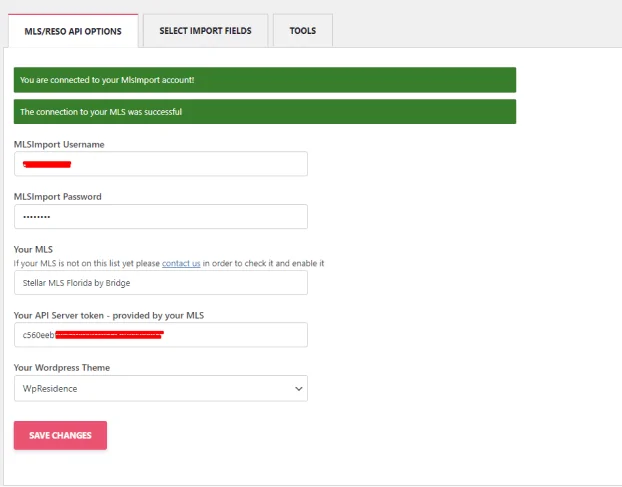
Two green banners is what a finished connection looks like: one for the account, one for the MLS itself. Anything less and either the token or the MLS selection is wrong, and the fix is on that screen. Our install walkthrough covers it field by field.
Connect the feed and map the MLS fields to your theme
Mapping is where an integration is won or lost. The shared vocabulary between your MLS and the plugin is the RESO Data Dictionary. Its own version table lists Data Dictionary 2.0, approved October 23, 2023, as active, DD 1.7 as legacy, and DD 2.1 as a draft.
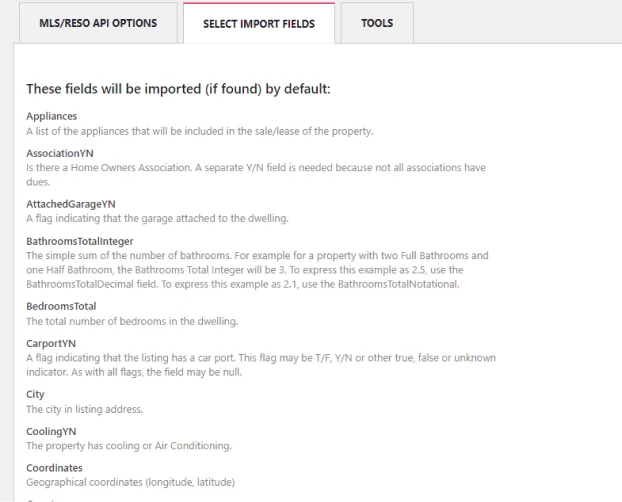
You pick which field names flow into which display fields in your theme. Import wide rather than narrow. Michael Wurzer, CEO of FBS, the company behind Flexmls, and Vice-Chair of RESO, made the case for full data richness in a 2019 RESO post: “You really need to supply it all, because the recipients are expecting that.” He meant MLSs feeding vendors; it holds in reverse too.
Two things to know while you map. The MLS or its CDN serves listing photos directly; your media library never gets them, which keeps disk and backups small. Some fields in a feed are internal, not public: leave those unmapped or mark them private. Our field selection guide walks the tab.
Run a test import and verify the mapped listing fields
Run the first import against a small batch and check it on a staging URL before anything goes public. A wrong mapping doesn’t throw an error. It just publishes confidently wrong data.
The bathroom fields are the classic example, and the plugin’s field list spells out why. BathroomsTotalInteger, BathroomsTotalDecimal and BathroomsTotalNotational are three different RESO fields describing the same house. Two full baths plus a half bath is 3 as an integer, 2.5 as a decimal, and 2.1 in notational form.
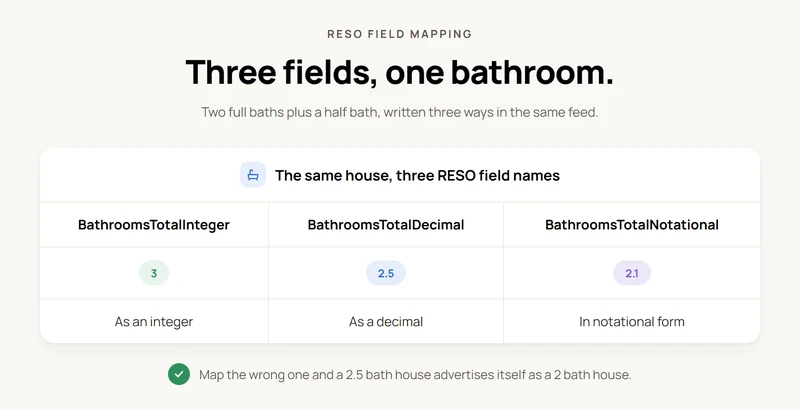
Three separate field names, one actual number of bathrooms. Map the wrong one into your theme’s bathroom field and a 2.5-bath house advertises itself as a 2-bath house until somebody notices.
Status is the second trap. If the feed’s status values don’t line up with your theme’s own status taxonomy, a closed or withdrawn listing can render as active, the error that generates phone calls. Pull ten listings you know, open them beside the MLS portal, and compare beds, baths, price and status before publishing. Title, status and owner formatting sits in our formatting guide.
Publish the listing and search pages, then turn on hourly synchronization
Publishing turns the import into a website. Each property gets its own permalink on your domain, and your theme’s archive and search templates become the browse experience. That is the payoff of the native route: indexable listing URLs you control, not vendor-hosted pages you rent. The templates are yours to change too, which is what customizing listing templates covers.
Then set the sync schedule. MLS Import checks the feed every hour by default and updates price, status, description and photos on existing property posts rather than duplicating them, which is the mechanism behind hourly synchronization.
Worth stating precisely, because vendor copy blurs it: NAR sets a floor, not a target. Policy Statement 7.58 requires participants to “refresh all MLS downloads and displays automatically fed by those downloads not less frequently than every 12 hours.” Hourly clears that floor comfortably. But it isn’t something NAR asks for, and a vendor advertising it isn’t advertising compliance.
Apply the display rules your MLS attaches to the feed
An IDX feed arrives with display conditions, and they’re enforceable. NAR’s national floor requires the display to “clearly identify the name of the brokerage firm under which they operate in a readily visible color and typeface,” and to show the listing firm’s email or phone “not smaller than the median used in the display of listing data.”
Past that floor the rules are local, and NAR’s text is permissive. MLSs “may” prohibit showing instructions, seller and occupant contact details, or the type of listing agreement: a menu each MLS picks from, not a universal ban list. No standard disclaimer sentence exists at NAR level, so take the wording from your own MLS’s rules.
On compensation the line is narrow. NAR’s settlement FAQ Q53 lets a broker publish compensation “for only listings of their own brokerage” on their own IDX or VOW site. Q54 prohibits using MLS data to run a multi-broker compensation platform. Our guide to sites that respect local MLS rules covers the rest.
What does the integration cost, and what will it not do?
MLS Import, our own plugin, is $49 per month or $504 per year, after a 30-day free trial, with no setup fee. If you would rather hand the build over, a paid setup service runs $599. Your MLS’s own data-feed and participation fees are separate, paid to the MLS, never to us.
One MLS connection per site or plugin setup. If your business needs two different MLS feeds, that’s two WordPress installs.
What the plugin won’t do matters as much. It doesn’t grant MLS approval; that decision is your MLS’s.
It doesn’t import listing photos into your media library, since images come from the MLS or its CDN. Maps run on OpenStreetMap, so polygon search works and drive-time search does not. And there’s no named CRM integration, so lead routing is yours to wire up.
Fix the four failures that stop a first integration
Four failures come up again and again in a first IDX integration.
- Approved, but the credentials have not arrived. The MLS said yes and the token hasn’t been issued. The connection test fails cleanly rather than half-working. Nothing to configure, just wait.
- Fields mapped to the wrong theme field. Bathroom counts off by half, statuses showing active when they’re closed. Check the mapping first whenever a sync looks wrong but the connection is green.
- Cron not firing, so stale listings survive. The schedule is configured and nothing runs, because wp-cron fires on visits, as WordPress.org’s handbook describes, not on a clock. Confirm the task actually ran, not just that it exists. Outdated listings are usually this.
- Hosting undersized for the query load. WordPress stores custom fields as key-value rows, which the ACF guide says entails “complex joins and table scans for queries that involve multiple meta keys or values,” and the meta_value column is longtext, “preventing effective indexing” (advancedcustomfields.com/blog/wordpress-post-meta-query/). Memory often isn’t the wall: SiteGround allows 768MB on shared plans (siteground.com/kb/php-memory-limit). The documented limits are the timeouts WordPress.org says shared hosts won’t change, and the cost of filtering on postmeta.
Frequently Asked Questions
Do I need MLS approval to display listings on my WordPress site?
Yes, and it’s never automatic. You need MLS standing plus IDX display permission, and the rule differs by market: ARMLS allows agent sites with broker approval, Metro MLS restricts feeds to Participants. MLS Import moves approved data, never approval.
How long does MLS approval take?
NAR Policy 7.58 requires the MLS to act on an IDX request within five business days: approve, deny, or estimate a date. That’s a response deadline, not a promise of credentials; nothing imports through MLS Import until the token arrives.
Will an IDX plugin work with any WordPress theme?
It depends on the plugin. MLS Import runs in Standalone mode on any WordPress theme, so your design isn’t a blocker. Houzez, Real Homes, WpResidence and WpEstate add deeper property templating, as an option, not a requirement.
Can I connect multiple MLS feeds to one WordPress site?
Not on a single setup. MLS Import supports one MLS connection per site or plugin setup. If you need two different MLS feeds, that’s two separate WordPress installs, one connection each. Multiple import tasks from one connection are fine.
How does MLS Import differ from a typical IDX feed?
An embedded IDX service renders listings from the vendor’s host inside your page. MLS Import writes the feed into your own WordPress database, so each listing becomes a property post on your domain: its own permalink, your SEO control. It’s how you integrate MLS into WordPress and own the page.
