
How to Customize MLS Listing Templates in WordPress
By Benjamin Levy, MLS Integration Specialist at MLSImport
Last updated: June 14, 2026
You know the frustration: an IDX iframe you can’t restyle, a template locked behind a vendor’s design, and your SEO landing on someone else’s subdomain. It doesn’t have to work that way. MLSImport stores every imported listing as a native WordPress custom post type. The plugin owns only the data layer, syncing RESO Web API fields into post meta and taxonomies, so your theme and page builder own 100% of the HTML, CSS, and template markup.
That split is why you can customize MLS listing templates in WordPress down to the pixel, within the few content rules your MLS keeps fixed (photo order and the agent’s remarks, for example, stay as the feed delivers them). You decide which fields appear on cards and detail pages. You decide whether each field is public or back-office only, what each label reads, and how galleries behave. And you decide whether to build with Elementor, Divi, Gutenberg, or a PHP child theme. No iframes. Every MLS listing template WordPress renders is a live page you can restyle, query, and hand to any builder, just like any other post type.
Here’s the road map for the rest of this guide:
- How MLS listings are stored in WordPress
- Choosing, renaming, hiding, and marking fields private
- How card and single-property detail layouts work
- Image galleries without photo caps
- Overriding MLS listing templates with child themes, hooks, and filters
- Which page builders and themes work with MLSImport
- Mapping MLS fields to custom fields and taxonomies
- How URL and permalink control works
- Making the lead form yours, and routing each lead
- Localizing and translating listing labels
- Reusing template setups across client sites
- Hard limits on listings, photos, or fields
- Developer vs. no-code: what needs custom PHP
How MLS Listings Are Stored in WordPress, and Why It Unlocks Full Customization
Here’s what separates a native WordPress integration from an iframe IDX, and why it matters every time you try to restyle a listing. Each imported property is a single row in your posts table, filed under a public, queryable custom post type, with field values in post meta. Location terms (City, Neighborhood, Subdivision) become taxonomies. On WP Residence the post type is named estate_property or wpresidence_property; on Houzez it’s houzez_property.
The plugin ships no rigid front-end template and no skin to override; it just pipes RESO data in and out while your theme owns layout, markup, and CSS. On the data side, MLSImport connects through the RESO Web API, which already supports over 800 RESO-certified MLSs across the US and Canada.
Because the data lives in standard tables, post IDs and permalinks are preserved on every sync, and an Active-to-Sold flip updates the same post rather than deleting it, so your URLs and backlinks survive. The data also survives plugin deactivation, a host migration, and a theme switch: you keep every row and only remap fields, with MLSImport support helping on that remap.
With a native custom post type, your theme controls every pixel and Google crawls every listing on your own domain, instead of an iframe parking your SEO on a vendor’s page. A single site can even run more than one RESO feed, though many agencies prefer a separate site per board for compliance clarity.
Choosing, Renaming, Hiding, and Marking Fields Private
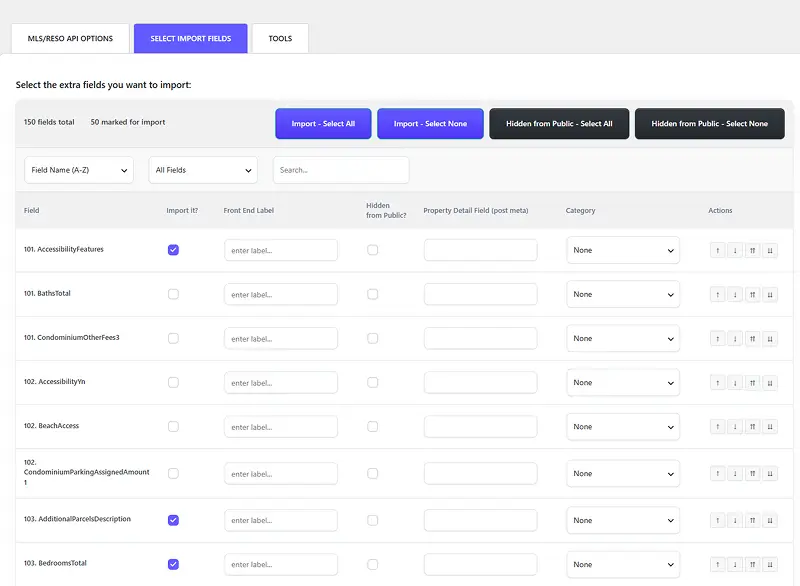
“Can I control what actually shows on the page?” Yes, and no developer required. The admin mapping screen lists the fields from your MLS board, often more than 100 per feed.
For each field, you get four independent controls: turn the import on or off, map it to a meta key or custom field slug, rename the display label, and mark it private (back-office only). Those switches control what a buyer sees.
Renaming is where brands get their voice back. Map AssociationFee to “HOA Dues,” BathroomsFull to “Full Bathrooms,” GarageSpaces to “Parking Type,” or ListPrice to “Asking Price.” None of that breaks the sync: the RESO key stays put, only the display string changes.
The private switch is just as useful. Fields like Agent Remarks, showing instructions, Days on Market, and office IDs stay in your database for admin use while never rendering publicly. You can also import a field purely for backend logic, a contract date or status flag, and never display it.
For a sense of the raw material, a typical feed exposes fields like ListPrice, BedroomsTotal, BathroomsFull, LivingArea, YearBuilt, PropertyType, ArchitecturalStyle, WaterfrontYN, GarageSpaces, AssociationFee, and VirtualTourURLUnbranded. Each can appear on cards, detail pages, search filters, or nowhere at all, independently.
📌 Pro Tip: Map the fields you might want later even if you’re hiding them now. A private import costs nothing, and you can surface it next quarter without re-doing setup.
Get started today: open your MLSImport field mapping screen, switch off every field you won’t show on the front end, then rename three labels to match how your market talks.
How do listing card and single-property detail layouts work?
For listing cards, WP Residence ships the Listing Card Composer: drag-and-drop reorder the image, price badge, address, and beds/baths/sqft, set the image ratio, and pick a hover style. Prefer a builder? Cards also build cleanly in Elementor Pro‘s Loop Grid, the Gutenberg Query Loop block, Divi’s loop module, or WPBakery grid widgets.
For single-property detail pages, WP Residence’s Studio builder lets you drag sections, field groups, gallery blocks, and agent-info blocks into any order. Elementor Pro’s Theme Builder, Divi’s Theme Builder, and the Gutenberg Site Editor all work the same way.
You can also run multiple single-property layouts: build a “Luxury Detail” for listings above a price threshold and a “Standard Detail” for the rest, assigned by an Elementor display condition, theme template rule, or taxonomy term. That’s how you get a genuine $10M editorial look, an oversized hero gallery, big typography, a map above the fold, an agent-bio block, all in the theme with no plugin-side change.
On timing: RESO-to-theme mapping runs about 30 to 60 minutes, a branded card-and-detail look roughly 1 to 3 hours, and a full no-code build about 1 to 2 days.
Get started today: open your card builder, drag the price badge above the address, set the image ratio to match your homepage grid, and save it as your default card layout.
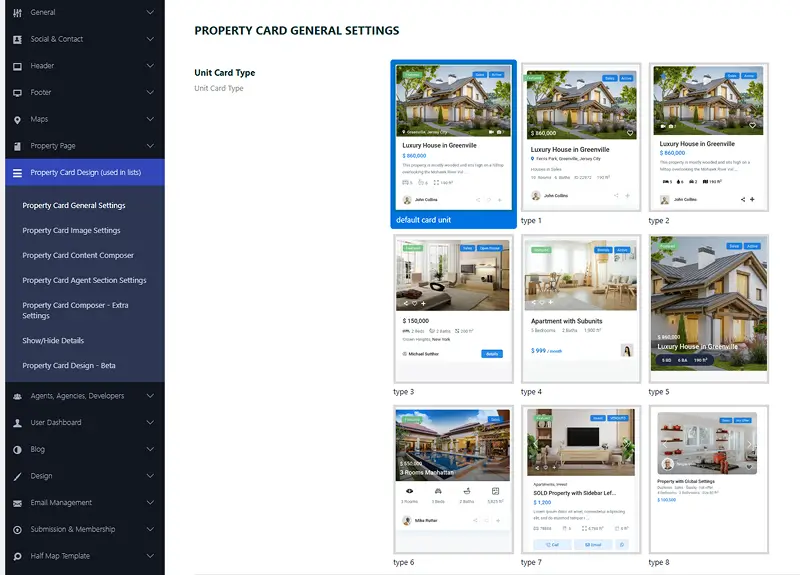
Image Galleries: Sliders, Carousels, and Lightboxes Without Photo Caps
Older IDX tools often capped you at the first 20 or 30 photos. MLSImport doesn’t cap photos at all; it reads whatever the RESO feed exposes, whether that’s 10, 50, or more on a luxury listing, well past where legacy tools used to cut you off.
The mechanism matters because it changes how you plan hosting. Photos are served from the MLS or its CDN by URL, not copied into your media library. WordPress stores only the URL string, which keeps backups small and spares you the storage and bandwidth cost of thousands of full-resolution images, while the photo still renders as a standard image tag that search engines crawl and index.
Presentation is entirely your theme’s call (and yes, your luxury hero gallery can finally look like one). A full-width 1920 by 1080 hero slider, a thumbnail carousel, a masonry grid, a lightbox, all of it uses standard theme or page-builder components, with no plugin gallery skin in the way.
One honest compliance note: photo order and captions are honored exactly as the MLS feed delivers them, and reordering is a compliance risk on most boards, so leave them as received. You can still use featured-listing flags to surface an agent’s own listings first inside any grid or carousel.
Get started today: drop your theme’s gallery widget onto the single-property template, set the hero slider to full width, and preview a listing that has 40-plus photos to see the whole feed render.
Overriding MLS Listing Templates with Child Themes, Hooks, and Filters
Maybe theme options and a page builder get you 90% of the way there, but you need that last 10% the GUI can’t do. Good news: because nothing is locked in an iframe, you have three override layers.
The first layer is the standard WordPress template hierarchy. Copy single-wpresidence_property.php (or archive-houzez_property.php on Houzez) into a child theme and you’ve overridden the default markup entirely, no special API needed.
The second layer is the import cycle. The plugin fires WordPress action and filter hooks around its import steps: post creation, meta updates, taxonomy assignments. Hook in to sync a listing to a CRM, compute an investment score into a custom meta key, or trigger a webhook at import time, before the listing is ever public.
The third layer is the query. Use the pre_get_posts hook to modify archive and search queries without touching core files, and WP_Query with a meta query for compound filters like price under 1,000,000 AND waterfront equals yes. Because there are no iframes or hard-coded HTML wrappers, your overrides aren’t fought: the plugin ships no rigid front-end skin of its own, so your theme keeps full control of layout, markup, and CSS. Your JSON-LD, heading hierarchy, and microdata all live at the template layer, like any other post type.
Hooking into the import cycle for sync-time logic
Here’s a concrete use case. On the post-created hook, write a function that reads the newly imported LivingArea and ListPrice values, computes a price-per-square-foot figure, and saves it to a custom meta key. That value is instantly searchable in a WP_Query filter and displayable in a template, with no wait for the next sync. That’s the point: hooks turn the import into an extensible pipeline, not a black box you work around.
📌 Pro Tip: Write any computed value to your own custom meta key, never back to a mapped RESO field. The next sync will happily stomp a RESO field, but it leaves your custom keys alone.
Which page builders and real estate themes work with MLSImport?
The “will my builder work?” answer is universal. Listings are standard custom post types with values in standard post meta, so any builder that can target a CPT and read dynamic meta values works without a special add-on or paid extension.
Here’s how each builder connects:
- Elementor Pro: Theme Builder targets the property post type, dynamic tags pull any post meta field, the Loop Grid and Posts widgets handle archives and search, and Popup Builder powers forced-registration overlays.
- Divi: Theme Builder with a loop module targeting the post type; the Post Content element outputs the theme’s default detail template, and a custom layout replaces it.
- Gutenberg / Site Editor: the Query Loop and Post Template blocks handle archives; a single-post template in the Site Editor handles the detail page.
- WPBakery: property grid, carousel, and slider shortcodes on supported real estate themes read the same post type.
- Beaver Builder, Oxygen, and Bricks: all work through the standard post-type mechanism; Bricks’ query loop connects straight to post meta, no bridge plugin.
On the theme side, four real estate themes are plug-and-play. WP Residence is the deepest: Listing Card Composer, the Studio builder, a Search Form Builder, native Elementor property widgets, a CRM add-on, HubSpot integration, and ACF auto-detect (5.2 up). Houzez, Real Homes, and WP Estate are plug-and-play too.
What about a generic theme like Astra? It works, but you’ll map fields and build the card and detail layouts from scratch, with no theme-side helpers, so budget more developer time. For most projects, starting on one of the four real estate themes saves hours.
Mapping MLS Fields to Custom WordPress Fields and Taxonomies
If you’ve ever wanted to layer your own data on top of the MLS feed (an investment score, a neighborhood tag, a luxury tier) without the next sync wiping it out, this section is for you. Every imported RESO field becomes ordinary WordPress post meta, which opens up the full WordPress toolkit: read any value with the standard get_post_meta function, through any ACF field group, or any builder’s dynamic tag. No special MLSImport API call required.
So consider location fields. City, Subdivision, and Neighborhood map into your theme’s taxonomies at import, and WordPress auto-creates archive pages at slugs like /city/miami/ or /neighborhood/downtown/. Those become SEO landing pages that refresh themselves as new listings sync in.
ACF integration is tidy on WP Residence 5.2 and up, which auto-detects ACF field groups on the property post type, so imported RESO values drop straight into your ACF layouts and repeaters with no custom PHP. And here’s the rule that protects your own work: add non-MLS custom fields (Luxury Tier, Cap Rate, ARV, Walkability Score) and the sync never overwrites them, because it writes only to the fields you explicitly mapped.
And you can go further with custom taxonomies for niche landing pages. Build a “Waterfront Homes” or “School District” taxonomy, assign terms via a mapping rule, and let the /waterfront-homes/ archive stay current. When the feed provides latitude and longitude, those import too, powering map and radius search with no geocoding step.
Building neighborhood and niche SEO landing pages
Here’s the workflow that builds organic traffic. Map the RESO SubdivisionName field to a custom “Neighborhood” taxonomy at import, and every new listing auto-populates the matching archive (say /neighborhood/brickell/) with zero manual updates. Pair that grid with a hand-written intro paragraph and you’ve got the neighborhood-hub model: fresh inventory underneath, edited depth on top.
Get started today: pick your three highest-value neighborhoods, map the SubdivisionName field to a Neighborhood taxonomy, and write one short intro paragraph for each archive before your next import.
How does URL and permalink control work for MLS listings?
The URL defaults are clean. Out of the box you get address-derived slugs like /property/123-main-st/, following your Permalinks setting. The base slug is yours to change, so /property/ becomes /homes/ or /listings/, and WP Residence can even fold taxonomies into the path, like /toronto/downtown/123-main-st/.
Stability is the quiet win. Slugs don’t change when status, price, or MLS ID updates, so an Active-to-Sold flip preserves the URL and any backlinks, and you can hand-edit a slug without breaking the sync. For expired and sold listings, 301-redirect to a relevant area or search page so the link equity isn’t wasted. So pick one global permalink pattern, even on a multi-market site, and stick with it.
Making the Lead Form Yours, and Routing Each Lead Where It Belongs
You worked hard to build a brand, so the last thing you want is a vendor’s generic inquiry box stamped on your best listing. The plugin dictates nothing about your forms. Drop a theme inquiry form, an Elementor form, a Gravity Forms shortcode, a WPForms block, or Contact Form 7 onto the template, and it inherits your global theme styling. No vendor badge anywhere.
To make each lead useful, pass property context through hidden fields pre-filled with Property ID, Address, Listing URL, and MLS ID. In Gravity Forms that uses the field-value parameter hook, roughly a 10 to 15 line addition to your functions file, with basic setup under two hours. And drop your broker attribution, the “Listing courtesy of” credit, in the same region so it travels with every listing.
WP Residence gives you a head start: a built-in inquiry form, a light CRM inbox, and native HubSpot integration. Paste your HubSpot API key into theme options, and agent-level keys route leads to personal pipelines.
Want forced or soft registration after a few views? A cookie or localStorage view-counter (commonly 3 or 5 views) fires a popup through Elementor Pro Popups or Popup Maker, paired with the theme’s login modal. That logic lives in WordPress, not the plugin.
One honest caveat: routing to Follow Up Boss, Chime, or LionDesk goes through lead-inbox email parsing, webhooks, or Zapier. There is no native CRM connector inside MLSImport itself, so plan for one of those routes.
Can you localize or translate all listing labels?
Yes, and this is where market-specific terminology shines. Interface labels and search filter terms are fully localizable through WPML, Polylang, Weglot, or Loco Translate, and WP Residence supports right-to-left languages. You can rename any front-end label without touching the database or the sync, because the RESO key in post meta stays unchanged and only the display string moves. Change County to District, or HOA Dues to Maintenance Fees.
The local-market angle is the fun part. In New York City, relabel fields as Co-op, Brownstone, Sponsor Unit, or HDFC Co-op; in San Francisco, use TIC (Tenancy-in-Common) or Condo Conversion. These changes are instant and need no re-import.
One boundary to respect: MLS-provided descriptions and agent remarks stay in the language the MLS delivered them, because compliance on most boards prohibits altering them. But the interface around the description is fully editable. For a bilingual English/Spanish site, one RESO feed powers both versions, and WPML or Polylang creates separate, indexable URL sets per locale (like /es/propiedad/123-calle-main/).
Reusing Template Setups Across Client Sites
If you run an agency or freelance for multiple clients, this section pays your rent. Build one master MLS-ready site with every customization finished, then clone it per client with Duplicator, All-in-One WP Migration, or host-level cloning.
The per-client swap is genuinely small: logo, brand colors, homepage, menus, API key, MLS board, and geographic filters, often fewer than 10 plugin fields. Everything else carries forward untouched: card design, single-property layout, saved search form, featured-listings blocks, SEO title patterns, and permalink rules.
The payoff is real: MLSImport reports that agencies cloning from a master setup typically cut new-client delivery from 3 to 4 weeks down to 3 to 4 days. Because RESO field naming is standardized, the same mapping template works across boards and regions, so a Florida and a Canadian setup share field-name conventions. Licensing is per active live domain, with a single license covering dev and staging, so verify current terms before cloning.
📌 Pro Tip: Keep one pristine master site you never connect to a live MLS. Clone from that copy every time, so a half-finished client tweak never sneaks into your next build.
Get started today: finish one client site you’re proud of, export it with Duplicator, and save that package as your master template for the next onboarding.
Are there any hard limits on listings, photos, or fields?
Let’s be straight, because most plugins dodge this. There are no hard plugin caps on listings, photos, or RESO fields, and neither the plugin nor the subscription tier enforces a ceiling. The real limits come from your hosting, your theme’s rendering performance, and your MLS board’s display rules.
For context, around 8,000 properties have imported on standard cloud hosting in a few hours, and typical focused imports land in the 2,000 to 8,000 range. Here’s how to size the host:
| Listing volume | Recommended hosting |
|---|---|
| Up to ~1,000 | Shared hosting or a small VPS |
| 1,000 to 5,000 | VPS with SSD plus an object cache |
| 5,000 to 10,000 | Mid-tier VPS or managed WordPress with DB indexing |
| 10,000 to 20,000 | High-spec VPS with Redis |
| 20,000+ | Custom-tuned infrastructure |
On custom fields, keep to roughly 20 to 40 you actually use; push past about 100 mapped per listing and admin queries start to drag. Run PHP 8, and move to a VPS past about 7,000 listings. None of that is a plugin limit, it’s just physics.
Developer vs. No-Code: What Actually Needs Custom PHP
“Do I need a developer?” deserves a straight answer (and no, the answer is not “always,” despite what some vendors would love you to believe). Here’s the honest split.
Handle these with the admin, theme options, and a page builder, no code:
- Colors, fonts, and logo
- Field display order on cards versus detail pages
- Card layout and single-property sections
- Search filter configuration and featured-listing order
- Label renaming, basic lead-form placement, and the permalink base slug
You’ll want a developer for these:
- Per-property-type template logic (different markup for condos versus land)
- Import hooks for CRM sync or score computation
- Gravity Forms hidden-field pre-population through the field-value hook
- Complex multi-board field normalization
- Conditional compliance blocks for strict boards like REBNY or NJMLS
On labor: an experienced webmaster finishes a standard no-code setup in about 2 to 4 hours, while a full custom build (custom templates, CRM hooks, multi-board normalization) typically needs 10 to 30 hours. And if you’d rather not touch the connection at all, MLSImport’s team handles the first install and MLS API connection, working directly with your designer or agency, not just the site owner.
📌 Pro Tip: Do the entire no-code build first and live with it for a week. You’ll often find the “must-have” custom template you were about to pay for is a feature the page builder already handles.
Get started today: write two lists, one for what theme options and the page builder can do, one for what genuinely needs PHP, then book a developer only for the second.
Key Takeaways
- MLSImport stores every imported listing as a native WordPress custom post type, giving the theme and page builder complete control over layout and markup.
- Field-level controls in the mapping screen let you import, rename, hide, or mark private any of 100+ RESO fields per board without breaking sync.
- Listings work with Elementor, Divi, Gutenberg, WPBakery, Beaver Builder, Oxygen, and Bricks with no special add-on, because they are standard custom post types.
- MLS photos are served from the MLS CDN as standard image tags, so there’s no WordPress media library storage and no plugin-imposed photo cap.
- An experienced webmaster completes a standard no-code MLSImport setup in 2 to 4 hours; a full custom developer build typically runs 10 to 30 hours.
Frequently Asked Questions
Will hiding fields or renaming labels break MLS compliance data inside my site?
No. Renaming a display label, say GarageSpaces to “Parking Type,” changes only the front-end string; the underlying RESO key stays in post meta, and MLSImport keeps writing to it on every sync. Hiding a field doesn’t delete it either, so the raw data stays available for admin use and queries, preserved exactly as the board delivered it.
Do MLS images get stored in my WordPress media library?
No. Photos are served directly from the MLS or its CDN as URL references, and MLSImport stores only the URL string, not the image file. That keeps backups small and avoids storage costs. The photo still renders as a standard image tag, so search engines crawl and index it alongside your listing page.
Do I need a special Elementor or Divi add-on to design around MLSImport data?
No add-on required. Because the listings are native custom post types with values in standard post meta, any builder that targets a custom post type and reads dynamic meta tags works out of the box. Elementor Pro’s Theme Builder, Divi’s Theme Builder, and Gutenberg’s Query Loop block all connect directly through MLSImport’s storage model, no intermediary extension.
Will manual edits to MLS-synced fields be overwritten on the next import?
For RESO-mapped fields, yes, the sync overwrites them on the next cycle. For your own custom fields (ACF field groups, non-RESO meta keys, custom taxonomy terms), the sync never touches them, because MLSImport writes only to the fields you explicitly mapped. So keep any manual override in a custom meta key or taxonomy, not a mapped MLS field, and it survives indefinitely.
Can I run a bilingual English and Spanish site and still get SEO value from MLS pages?
Yes. One RESO feed powers both language versions, and plugins like WPML or Polylang create separate, indexable URL sets per locale, such as /es/propiedad/123-calle-main/. Interface labels, search filter terms, and taxonomy names translate per locale, so MLSImport supports a genuinely bilingual front end. MLS-provided descriptions stay in their original language, since altering them risks compliance, but every surrounding element is fully translatable.
What happens to my listings if I cancel MLSImport?
Your imported posts remain in the WordPress database. They stop syncing and gradually show stale data, but nothing is deleted automatically. That’s the opposite of a hosted or iframe IDX, where listings vanish the moment the subscription lapses. Because you own the rows, MLSImport leaves them in place; you’d remove off-market or stale posts manually once MLS access ends.
Can I connect more than one MLS board to a single WordPress site?
No. A single site runs one RESO feed, meaning one MLS connection. You can create multiple import tasks from that one feed to drive separate market or niche pages, but covering a second board means a separate WordPress install. That’s the clean separation most agencies prefer anyway, and because RESO field naming is standardized, the same mapping template carries across both setups.
Is there a limit on how many photos a listing can show?
No. MLSImport doesn’t cap photos; it renders whatever the RESO feed exposes, whether that’s 10, 50, or more on a luxury listing, well past the 20-to-30 ceiling older IDX tools imposed. Presentation is your theme’s call, so a full-width hero slider, thumbnail carousel, masonry grid, or lightbox all use standard theme components. One compliance note: photo order and captions are honored exactly as the feed delivers them, since reordering is a compliance risk on most boards.
How many listings can MLSImport handle before I need a bigger server?
There’s no plugin cap on listings; the real limit is your hosting. Around 8,000 properties have imported on standard cloud hosting in a few hours, and typical focused imports land in the 2,000 to 8,000 range. Shared hosting or a small VPS handles up to roughly 1,000 listings, a VPS with SSD and object cache covers 1,000 to 5,000, and past about 7,000 listings you’ll want a VPS, ideally with Redis. Run PHP 8 throughout.
Can I show a different layout for luxury listings versus standard ones?
Yes. You can run multiple single-property layouts, for example a “Luxury Detail” template for listings above a price threshold and a “Standard Detail” for the rest. The assignment is driven by an Elementor display condition, a theme template rule, or a taxonomy term, all at the theme layer with no plugin-side change. That’s how you get an oversized hero gallery, big typography, and an agent-bio block on high-end listings while keeping a leaner layout everywhere else.
Does MLSImport connect directly to CRMs like Follow Up Boss or Chime?
Not natively. There is no built-in CRM connector inside MLSImport itself, so routing leads to Follow Up Boss, Chime, or LionDesk goes through lead-inbox email parsing, webhooks, or Zapier. If you’re on WP Residence, you do get a built-in inquiry form, a light CRM inbox, and native HubSpot integration, where pasting an API key into theme options routes leads, and agent-level keys send them to personal pipelines.
How much faster is launching client sites if I clone a master setup?
MLSImport reports that agencies cloning from a finished master site typically cut new-client delivery from 3 to 4 weeks down to 3 to 4 days. You build one master MLS-ready site with every customization done, then clone it with Duplicator, All-in-One WP Migration, or host-level cloning. The per-client swap is small, often fewer than 10 fields: logo, brand colors, homepage, menus, API key, MLS board, and geographic filters. Licensing is per active live domain, with one license covering dev and staging.
It comes back to one idea: the plugin is the data pipe, and your theme and page builder are the design layer. That separation is what makes MLS listing templates in WordPress genuinely flexible instead of locked into an IDX vendor’s skin. You can have listings live in your own theme, on your own domain, before a 30-day free trial runs out, all for $49 per month (or $504 a year) with unlimited listings.
So pick one listing page, restyle it until it matches the rest of your site, and let that prove you never have to settle for a vendor’s layout again.
What do you think? Tell us in the comments how you styled yours.