
IDX (Internet Data Exchange) is the National Association of REALTORS® policy and MLS program that lets participants show other brokers’ listings on their own websites, not just their own, plus the data feed that delivers those listings. How the listings get from the MLS onto a website is in the five steps below.
Why does it matter? 97% of home buyers use the internet to look for homes, says a study by the National Association of REALTORS® (NAR). If they can search the whole MLS on your site, they don’t have to leave for Zillow. The answer for each case, and for each kind of website, is in the next sections.
What Is IDX Exchange?
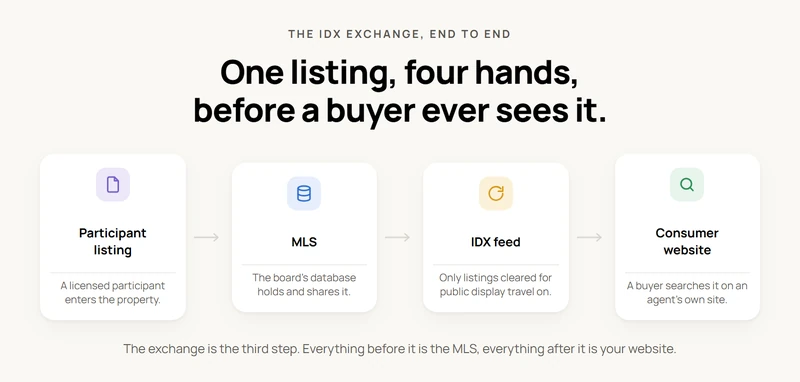
IDX, created by the National Association of REALTORS®, is a policy under which brokers exchange permission to share and show each other’s listings online. It’s also called Broker Reciprocity, showing how brokers work together.
Even though IDX is a policy, it’s often used to discuss the list of properties from an MLS System. It also refers to the rules about how the property information is shown, which can differ for each MLS® System.
Do I need IDX to show homes for sale on the website I built?
Yes, if you want other brokers’ homes on your site. No, if you only show your own listings, which you can type in by hand. If your site only has your bio, a contact form, or links to other sites, you are not running an IDX search. Building the site yourself does not grant feed access: the IDX feed goes to a licensed broker in the MLS, and the board sets the rules, fees and credentials. Not licensed? See who can use MLSImport.
| What you want on your site | Do you need IDX? | What to do |
|---|---|---|
| Homes from every office in your area, with search and a map | Yes | Your broker signs your MLS’s IDX agreement. Then a plugin or IDX vendor pulls the feed onto your site |
| Only your own or your office’s listings, typed in | No | Add each home by hand, with photos and price |
| Only your own listings, filled in and updated on their own | Yes, you need a feed from your MLS | Get the feed, then filter it to your agent or office ID. Ask your broker what listing rights and site rules apply to that narrower display |
| Homes you own or sell yourself (for sale by owner, builder, landlord) | You can’t get IDX | Add them by hand, or work with a licensed agent |
What your site runs on decides how the homes show up:
- WordPress: install an IDX plugin. MLS Import pulls each home in as a real page on your own domain, on four supported real estate themes or, with Standalone mode, on any WordPress theme.
- Wix or Squarespace: paste an IDX vendor’s embed code or app, if your plan allows custom code. The homes stay on the vendor’s servers. MLS Import is a WordPress plugin, so it does not install there.
- Code from an AI tool like Lovable, Bolt or v0: paste an IDX vendor’s embed script, or hire a developer to build on your MLS feed. Or move the site to WordPress and add MLS Import.
Steps by platform are in I built my real estate website with an AI tool. How do I add homes for sale?
What is the difference between an IDX feed, a VOW feed and broker reciprocity for a brokerage website?
IDX supports public listing display; VOW supports online brokerage services for registered consumers; broker reciprocity commonly means the IDX arrangement. For a US brokerage website, the choice affects who can access listings, which information may appear and what obligations the brokerage must meet. Your MLS sets the requirements. See IDX, VOW and a feed on one agent website for which part is permission and which part moves the data, and IDX feed vs VOW feed vs broker reciprocity for the full comparison.
| Term | Purpose on a brokerage website | Consumer access | What the brokerage must confirm |
|---|---|---|---|
| IDX feed | Supplies listings authorized for public display under the MLS’s IDX program | Public browsing, with optional account features subject to local rules | IDX approval, permitted listings and fields, attribution and refresh requirements |
| VOW feed | Supplies authorized MLS information for online brokerage services | Registered consumers after the required broker-consumer relationship and access requirements are satisfied | VOW approval, registration, terms, access controls and permitted data |
| Broker reciprocity | Common name for the arrangement allowing participating brokers to display one another’s listings through IDX | Generally the IDX browsing experience | The local MLS’s definition and participation rules |
Canopy MLS explains IDX and VOW in terms of public display versus brokerage services and a broker-consumer relationship. REBNY’s RLS FAQ also separates public IDX access from VOW access. These are local examples, not rules for every US MLS.
Does adding registration to IDX turn a brokerage website into a VOW?
No. A registration form alone does not make an IDX website a VOW. The brokerage must meet its MLS’s VOW requirements and the broker-consumer relationship requirements before providing VOW access. Confirm the approved feed, permitted fields and access controls with your MLS before publishing restricted information.
Does sold information always require a VOW feed?
No. Sold-data availability depends on the MLS’s feed and display rules. ARMLS’s IDX/VOW comparison documents sold listings within its IDX program. Ask your own MLS which sold records and fields may appear publicly and which require VOW access. MLS Import handles the WordPress import of your public IDX feed; a VOW feed, its access controls and its build are confirmed separately with your MLS and developer.
The History of IDX
Now that you know what IDX is, you need to know that before it’s appearance, only Realtors with access to the MLS could provide property information to consumers. This situation made the search process slow and inefficient.
With the growth of the internet, IDX was created to enable direct access to property listings, empowering consumers to search independently.
In the early 2000s, NAR formed a work group to improve real estate applications on the internet for better client service while preventing misuse.
As a result, NAR first adopted the IDX policy in May 2000, and it has been revised many times since. The rules keep changing, so the version your board uses today is the one that counts. For the latest NAR change and what it means for who can show listings, read What are IDX, MLS, RETS and RESO API. Then ask your MLS for its current IDX rules in writing.
How Does IDX Work with MLS?
When a real estate agent adds a property to the MLS, it becomes available through a data feed for other MLS agents to use on their websites.
Initially, each MLS board had its own data feed, but they are now consolidating to create larger feeds, combining all area listings without merging the associations.

Most MLS boards have adopted the IDX system, making buying and selling property easier for consumers.
Integrating an IDX/Data feed into your realtor website is essential nowadays. The chosen option should ensure automatic listing updates and provide various ways to showcase your listings and others.
To fully utilize the potential of IDX for your real estate business, explore how MLSImport can assist in creating a robust real estate website.
Working in Canada? IDX works a little differently there. Some boards run their own IDX program, and CREA runs a national feed called DDF. Only Canadian REALTORS® can get DDF, and it carries Canadian listings only. See DDF vs IDX for a Canadian realtor website to learn which one your site needs, and how to use CREA DDF on WordPress.
What is IDX, and how does it get MLS listings onto an agent’s or brokerage website?
IDX gets MLS listings onto an agent’s or brokerage website in five steps: the broker qualifies as an MLS participant, signs the MLS’s IDX agreement, gets a data feed through a vendor or its own software, displays the listings under the MLS’s rules, and keeps them refreshed. The paperwork comes first and usually takes a few days to a few weeks; here is how long MLS approval takes before your IDX listings go live. The software comes last.
- Qualify as a participant. NAR defines participants as REALTORS® who are a principal, partner, corporate officer or branch office manager holding a broker’s license. The MLS gives IDX rights to the participant. That is usually the broker, not each agent.
- Sign the IDX agreement. Your local MLS sets the agreement, the fees and the display rules. Local rules can be stricter than NAR’s minimums but never looser. Some boards also charge a feed fee.
- Request the feed. Under NAR policy the MLS must act on an IDX feed request within five business days. The feed is the stream of listing data (price, photos, status and remarks), delivered over the RESO Web API, the current standard.
- Choose how listings appear. A hosted or framed IDX vendor keeps the search and listing pages on its own system. A native import writes the listings into your own website database as pages on your own domain. Most boards make the vendor apply too, or put your broker’s signature on the vendor’s request.
- Refresh and comply. Keep the listings refreshed and follow the display rules; both are listed under the industry rules below.
A WordPress IDX plugin does not grant IDX rights. It displays data you are already licensed to show. For the full sequence, see how to connect your website to your MLS.
MLS Import is our own plugin, so keep that in mind. It takes the native import route on WordPress. It costs $49 a month or $504 a year for one MLS, or $99 and $199 a month for up to three or seven boards, with a 30-day free trial. It checks for listing changes every hour, and a daily check you can turn on removes homes that have left the MLS. It brings the records in as property posts that your theme or MLS Import’s Standalone mode shows to buyers. It cannot get MLS approval for you: your broker does that step with the board and supplies the feed credentials. Who signs is explained in Who needs to hold the credentials. See how MLS Import works, or how to show all the homes for sale in your area on your own website.
How does IDX get MLS listings onto our team website?
A team usually works under one broker, so the broker, not the team, holds the IDX rights. Ask your broker whether your office already has an approved IDX feed and whether the team site can use it. Some boards let an agent apply with the broker’s written OK; some deal only with the broker. Then choose which listings to pull: the whole market, only your team’s listings, or both. With MLS Import you filter by agent or office MLS ID when you set up the import.
| Team need | How MLS Import handles it |
|---|---|
| A page for each agent | Each agent gets a profile page that lists their own homes |
| Leads to the right person | A question about a home goes to the agent tied to that listing |
| Only our team’s listings on one page | Filter the import by agent or office MLS ID |
Email your board before you buy anything: “Is an IDX feed approved for our team website, and who has to sign?” The reply tells you who applies. See who needs to hold the MLS credentials and MLS Import for teams.
How does IDX affect what Google sees on my real estate website?
IDX decides whose website Google credits for your listings. IDX itself is only the permission your MLS gives your broker to show listings. The setup your vendor or plugin uses is what Google sees, and there are four common ones:
| Setup | Where the listing page lives | Who Google credits | What you keep if you cancel |
|---|---|---|---|
| Framed (iframe) | The vendor’s server, shown in a window on your page | The vendor | Nothing |
| Vendor subdomain | Something like search.yoursite.com, run by the vendor | The subdomain, kept apart from your main site | Nothing |
| Vendor pages on your domain | Your address, built from the vendor’s data | Your domain | The pages stop |
| Imported into WordPress | Your own database, like yoursite.com/property/123-main-street | Your domain | The pages stay. Updates stop. |
Does indexable IDX get my listings on page one?
No. Indexable means Google can read the page. It does not mean Google will show it. Zillow, Realtor.com and every other agent in your MLS have the same listing text and photos. Copied listing text is not a penalty; it just rarely wins on its own. Your listing pages help most as support for what only you have: neighborhood and subdivision pages with your own local notes, saved searches for the areas you farm, market updates, sold homes your board lets you show, and your agent pages. See SEO for imported listings and are IDX listings indexable on WordPress.
How do I check what Google sees on my site?
- Open a listing on your site. Right-click, pick View Page Source, and search for the street address. If you only find an iframe tag pointing to another site, the listing belongs to the vendor.
- Look at the address bar. Is the listing on your domain, a subdomain, or the vendor’s domain?
- Google
site:yourdomain.complus a street name from one of your listings. - In Google Search Console, run URL Inspection on a listing page and look at the page Google sees.
Some sites add the listing details after the page loads, so if step 1 comes up empty, still do step 4. One MLS Import setting changes the answer: in Live Mode it reads listings straight from your MLS and stores nothing, so you give up listing pages Google can index. See Live Mode limitations and how MLS websites work: import vs live IDX.
Which are the terms commonly used in relation to IDX?
IDX agreement / IDX Real Estate License
An IDX (Internet Data Exchange) agreement is a contractual agreement between a real estate agent or broker and a Multiple Listing Service (MLS) outlining the terms and conditions for the agent or broker to display MLS listing data on their website.
This agreement typically specifies the rules and guidelines for how the agent can use the IDX data, including displaying property listings and using MLS information for marketing purposes.
The IDX agreement often includes provisions related to data usage, data sharing, property display rules, and compliance with MLS regulations.
It also outlines the responsibilities of the agent or broker in maintaining the accuracy and integrity of the MLS data displayed on their website.
Additionally, the agreement may cover aspects such as the duration of the contract, any fees associated with IDX usage, and the obligations of the agent or broker to adhere to specific IDX policies set by the MLS.
IDX compliance standards
IDX compliance standards are regulations real estate agents, and brokers must follow when showing MLS data on their websites.
These rules guarantee that the data is used correctly and meets industry and legal standards. They cover data accuracy, usage, property display, and consumer privacy protection.
Adhering to these standards maintains data integrity, builds client trust, and promotes ethical practices in the real estate industry.
IDX feed / IDX data feed
An IDX feed, or IDX data feed, is a stream of real estate listing data from an MLS given to agents for their websites.
It allows agents to display current property listings in a standardized format. Using an IDX feed ensures website information stays updated and matches the MLS database, giving visitors accurate property details.
IDX information
IDX information includes real estate listings from an MLS, provided to agents for display on their websites.
It contains property details like prices, descriptions, and images, helping agents offer comprehensive and current listings to their website visitors and making property searches easier for potential buyers.
IDX listings
IDX listings are properties from real estate agents or brokers displayed on their websites using the Internet Data Exchange (IDX) system. These listings are part of the agreement and data feed provided by IDX.
They come from a Multiple Listing Service (MLS) and provide detailed information like pricing, property descriptions, and images to help potential buyers search for their new home.
These listings enable agents to offer a comprehensive view of available properties, making it easier for buyers to find and explore potential homes.
IDX website
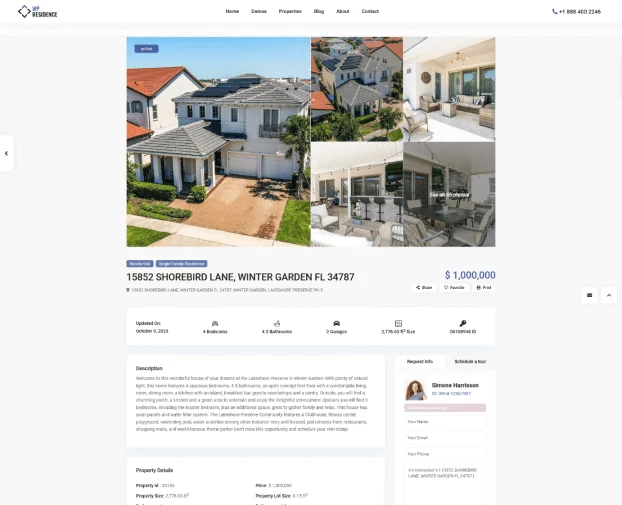
An IDX website is a real estate agent or broker’s site that uses IDX technology to show property listings from an MLS.
It helps agents offer visitors an up-to-date view of available properties on their site.
These sites often have advanced search options, making it more straightforward for users to find properties based on location, price, and features.
They aim to enhance the user experience and help potential buyers find properties that suit their needs.
IDX technology
IDX technology allows agents to display MLS property listings on their websites, making it convenient for potential buyers to explore available properties without leaving the agent’s site.
This integration enhances agents’ online presence and streamlines the property search process for their website visitors.
IDX plugin
IDX Plugin is a software component that integrates Internet Data Exchange (IDX) functionality into a real estate website. Since WordPress is the most used system for real estate websites – the IDX plugin often refers to a WordPress IDX plugin. MLS Import is an IDX plugin built on the RESO Web API. It pulls each listing into your WordPress site as a real page on your own domain, not a frame. Setting it up for a realtor client? See what IDX means for the sites a web agency builds.
Plugins differ a lot in how they get the data and what they cost, so it is worth comparing the main IDX plugin alternatives before committing to one.
IDX vendor
IDX vendor is a company that accesses the Multiple Listing Service (MLS) on behalf of a real estate agent, facilitating the integration of MLS listings onto the agent’s website. Vendors enable agents to display property listings while managing compliance with IDX standards and regulations.
What are the differences between MLS and IDX?
MLS stands for Multiple Listing Service
It is a particular database made and managed by real estate experts to assist their clients in searching, buying, and selling property. We have a complete guide: The Ultimate Guide: What is Multiple Listing Service ( MLS ) in Real Estate and How Does It Work?
IDX listings usually come from MLS Systems, which can serve one or multiple associations or boards. REALTORS associations or brokers might own these systems or operate independently.
A single board system shows how that works in one market, for example the San Diego Multiple Listing Service (SDMLS).
They can cover anything from a single city or county to large regions. For additional information about MLS® Systems, you can visit the National Association of REALTORS® website.
IDX (Internet Data Exchange)
Is the policy that enables real estate agents to display MLS (Multiple Listing Service) data on their websites, making it easily accessible to potential buyers who visit their sites.
Integrating IDX with each MLS helps agents expand their reach to a broader audience and offer valuable information to individuals interested in buying or selling real estate.
What are the technologies used for Internet Data Exchange (IDX) Technologies
Four main technologies are used to deliver IDX listings: RESO Web API, IDX Framing, FTP, and RETS. Each technique employs distinct approaches to accessing Multiple Listing Service (MLS) data and incorporating listings, bringing their advantages and limitations.
RESO Web API
The RESO Web API represents the latest advancement in IDX technology. It employs an Application Programming Interface (API) to retrieve listings directly from an MLS and display or replicate them on a real estate agent’s website.
iFrame
A frame (iframe) shows the vendor’s listing pages inside a window on your page. It is the fastest setup: you paste a code. But you can’t restyle the listings, and Google credits them to the vendor; see how IDX affects what Google sees.
FTP (File Transfer Protocol)
FTP stores listings directly on your website server; however, the data transfer process of FTP can be cumbersome and inefficient. Complete file downloads are necessary for each synchronization, limiting the frequency of updates and potentially resulting in outdated information on your site.
RETS (Real Estate Transaction Standard)
RETS is an old standardized IDX technology that facilitates the exchange of real estate, but it is challenging to maintain. Newer technologies such as RESO Web API have replaced RETS nowadays for most MLS.
What are the Benefits of IDX for your business?
Despite the strict rules, IDX is very useful for real estate agents, and it’s a win-win for agents and people searching for homes.
- Agents and brokers can show the best houses on their websites to attract buyers.
- Buyers can see the newest homes on the market and trust that the information is correct.
Those who don’t use IDX might miss out on capturing leads or struggle to compete in the market.
Here are a few other advantages of using IDX:
- Let agents show more houses on their websites: Showing MLS listings helps agents attract clients searching for properties online, leading to more potential leads and sales.
- MLS listings make the website seem more trustworthy: It shows potential clients that agents are reliable and have access to up-to-date property information.
- Streamlined workflow: IDX’s newest technologies, like RESO WEB API, automate the process of updating websites with new listings, freeing up agents’ time to focus on other important tasks like marketing and client service.
Homebuyers frequently ask their agents to explain what IDX is and why it’s important for their property search. We have a more detailed article about What Are the Benefits and Advantages of Using Multiple Listings Service(MLS)
IDX Listing Display Options for Brokers and Agents
You don’t have to do anything when your MLS starts using the IDX program. The system assumes you agree to display your listings.
If you prefer not to show your listings to others, you can inform the MLS that you’re withholding your consent.
Some MLSs require you to actively choose to participate, while others assume you’re in by default. Whether it’s “opt-in” or “opt-out” depends on your local MLS’s decision.
For brokers in the program, the following options are available for displaying IDX data on their website:
- Download data from the MLS to create and manage a broker-owned website with compliant display pages.
- Employ an external consultant or an approved third-party vendor to integrate IDX listings through an IDX Plugin.
Among these options, the most cost-effective is the first one, with MLS Import as a helpful plugin for downloading and syncing MLS data. Supported themes ensure the necessary real estate functionality and smooth operation.
What are the Industry Rules for Using the IDX System?
The IDX platform has specific rules governed by the National Association of Realtors (NAR). Here, you can read the detailed guide on NAR’s IDX regulations.
While it can boost business, violating IDX rules can have serious consequences. Some activities that may lead to legal problems include:
- IDX listings should only be used for IDX display.
- If sellers don’t want property addresses online, agents should respect their wishes and not display them on IDX.
- IDX displays can be based on location, price, property type, etc.
- The MLS data should be updated every 12 hours.
- NAR emphasizes that IDX displays cannot distribute MLS data to anyone else except as outlined in the policy.
- Participants must identify their brokerage while showing IDX content with distinct colors and typeface.
- Participants should be open to feedback about listing accuracy and correct any false information provided by the listing broker/agent, except for opinions or professional judgment.
- Participants cannot share IDX listings with external parties outside the IDX exchange.
- Participants cannot modify information to make listings more attractive.
Agents and realtors must follow these rules to uphold their professional integrity and reputation.
What happens if someone abuses IDX?
If someone misuses IDX, the MLS association will take appropriate action. Offenders will be notified and asked to correct the problem. Failure to comply can lead to disciplinary measures per MLS Rules and Regulations.
What does IDX mean for the websites a web agency or developer builds for clients?
IDX means your client brings the listings and you build the site that shows them. The MLS gives the feed to your client, not to you. Your client (the broker, or an agent with the broker’s okay) applies to their MLS and gets the feed key (a token, or a client ID and secret) in their own name. You plug that feed into the site and make every page follow the board’s rules. You do not need your own MLS membership.
| Step | Who does it |
|---|---|
| Join the MLS and sign the IDX agreement | Your client and their broker |
| Get the feed key | Your client |
| Install the plugin, map fields, build search pages | You |
| Pay the plugin | Either of you |
What that changes for a web agency:
- Each client applies in their own name. An agency can’t hold a feed on its own account and share it across clients, or reuse one client’s feed on another client’s site. Ask your client to put the real domain on the application, not a staging address. See who needs to hold the credentials.
- Every MLS is its own job. A client in a new market means a new board, new forms and maybe new display rules. Don’t promise a launch date before the approval comes.
- The board’s rules become your design rules. If the site breaks them, your client pays the fine, so build them into your templates from the first mockup. The checklist is in IDX compliance.
- Price IDX as a monthly line item. Count the IDX tool, any board fee, and hosting that can carry a big listing database, because with an import every listing is a page.
With MLS Import ($49 a month or $504 a year per site, after a 30-day free trial), one login holds the billing and license keys for all your client sites, but each site is set up on its own; there is no master panel that pushes a change to every site. Developers get templates you can override from the theme, action and filter hooks, and the same field names on every MLS: see MLS Import for developers and real estate agency website MLS: teams, roles and scale.
Ask your client to forward the MLS approval email itself, not a summary. It names the feed type, the platform and the approved domain. Those three things decide whether the site will connect. More in who can use MLS Import.
How to Get an Affordable IDX Real Estate Website?
Many real estate professionals are often curious about what IDX is and how it can enhance their online property listings.
Creating a real estate website on a budget can be challenging, especially for startups watching every penny. Professional site design can be costly, and ongoing maintenance increases over time.
The good news is that you can have a functional and attractive real estate website without a hefty budget. Choose MLSImport for your IDX website needs.
We have two advanced guides: Building a Successful MLS Real Estate Website: A Comprehensive Guide to MLS Integration and How We Created a WordPress MLS Website with 8,000 Listings.
Utilizing WordPress, pre-built friendly themes with real estate functionality, and cost-effective IDX solutions like MLSImport can help you create a professional online presence without breaking the bank. Prioritize features that matter most to your business, and consider DIY options where feasible to save costs and ensure flexibility.
Disclaimer:
The views in this article are the author’s information provided is for general information only and should not be considered professional advice in real estate, legal, or accounting matters. Please consult your MLS providers for advice on certification, professional guidance, or legal procedures.
FAQ
Can my brokerage show other brokers’ listings on our website with IDX?
Yes. IDX lets a brokerage show other brokers’ MLS listings on its own website, not just its own. The brokers in your MLS agree to share their listings this way. A seller or listing broker can still opt out, either for all their listings or one at a time. Those listings will not show up in your feed.
Your broker has to sign the board’s IDX agreement first. After that, every page has to follow the board’s rules:
- Show the listing brokerage’s name on every listing, including search results.
- Show the MLS disclaimer and copyright line, word for word.
- Never change the listing details or photos.
- Take listings down when the board says they can no longer be shown.
The full checklist is in MLS/IDX compliance rules for WordPress sites.
Am I allowed to show other agents’ listings on my personal real estate website?
Yes, in most US markets, as long as the listings come through your MLS’s IDX program and your broker says yes. Without IDX you can’t just copy another agent’s listing onto your site: NAR’s Code of Ethics guidance says copying another broker’s listing counts as advertising and needs the listing broker’s permission. Linking to their page does not. A public page, such as a portal, is not a reuse license, so don’t copy photos or remarks from a portal.
What has to be true before other agents’ homes can show up on your own site:
- You hold a license, and your broker takes part in your MLS. The feed is issued to the MLS participant (the brokerage principal or an authorized manager), not to an agent alone.
- Your broker agrees. Agents show IDX listings “subject to the Participant’s consent and control.” Many boards also want your brokerage name and logo on the site.
- Your broker signs the board’s IDX agreement, and your office shares its own listings too: a broker who holds back their listings from IDX can’t show anyone else’s.
- You follow the same display rules as a brokerage site (see the question above).
Your agent MLS login is for your own work, not for a public site. See why your MLS login alone can’t put listings on your own website and who must approve the MLS feed for your personal website. Rules differ by board, so ask your MLS in writing: “Can an agent run an IDX feed on a personal website, and what does my broker have to sign?” With MLS Import, turn on the internet display flag on each import task to leave out homes the seller kept off the internet.
Does the brokerage showing a home also represent the seller?
No. A brokerage website can show a home listed by another brokerage. Look for the listing brokerage name near the home details. A contact form may send your message to the firm running the website. Ask who will receive it and who represents the seller.
Does the website show every home and every change right away?
No. Coverage depends on the MLS feed, display rules, and the site’s setup. Updates take time to reach a website. Ask an agent to check the current status before you plan a showing.