
Yes, MLSImport gives you a one-hour live onboarding call with our team to get your MLS connected and importing. You book it from your MLSImport account on mlsimport.com, the same place you open support tickets. Both are in the menu on the left once you log in. It works the same whether the site is your own or a client’s site you are building. For guided checks in ChatGPT or Claude, see how to connect an AI assistant to MLS Import.
Log in at mlsimport.com/my-account with the email and password you set when you signed up. If you did not save the password, reset it here. The same email and password log you in to MLSImport inside the plugin settings on your website.
Book a live onboarding call
- On your account Dashboard, find Book your onboarding call and click Pick a time. You can also open Onboarding Call from the menu on the left.
- Pick a highlighted day in the calendar. The free times for that day show on the right.
- Choose the time that suits you.

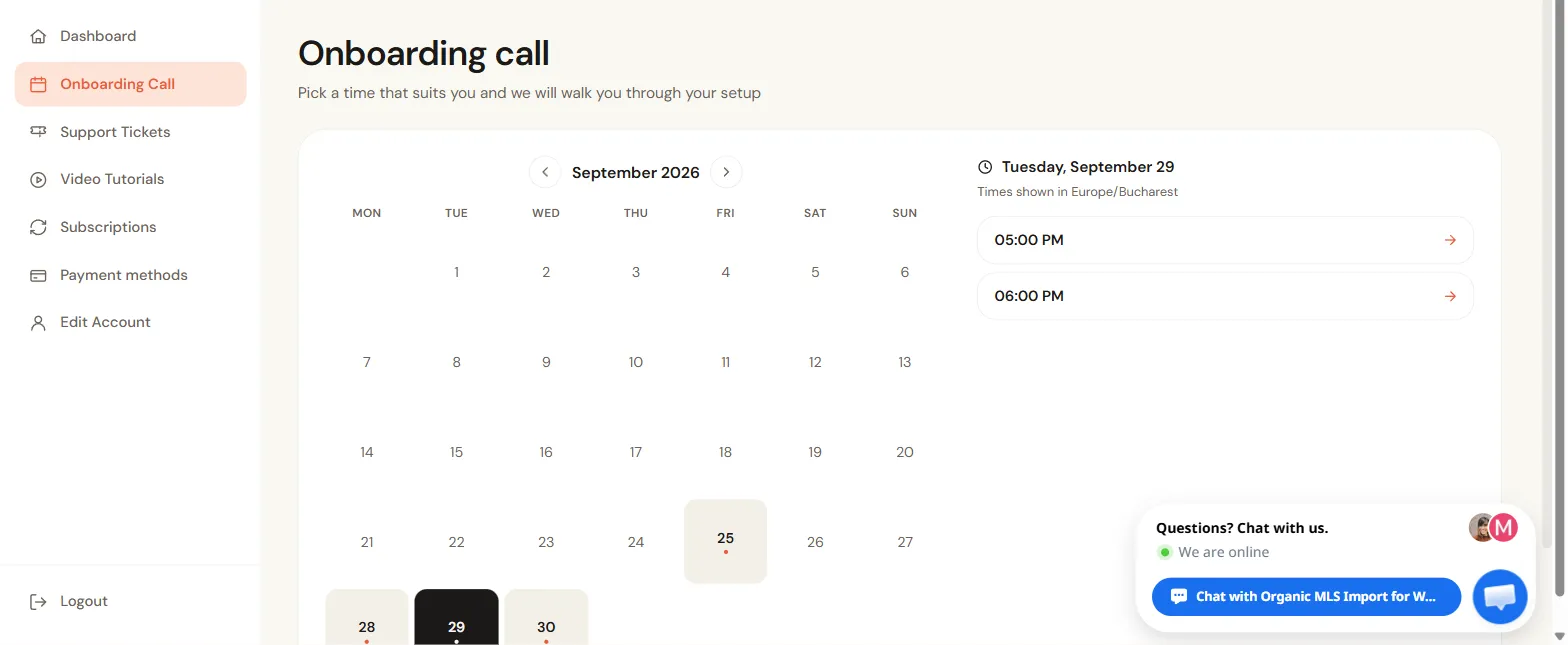
The time zone of the times is written above the list.
What setup help do I get, and what can’t you do for me?
We help you from install to your first import, and setup help is part of your plan. There is no setup fee: the onboarding call and installation tickets come with the subscription, which is $49 a month for one MLS after the 30-day free trial. Your MLS board fees and hosting are separate. On the call we connect your MLS, pick fields and filters, and run the five-listing test import with you. If you would rather we work inside your site, open a Support with Installation ticket; the tip under Open a support ticket says what to include. The one thing we can’t do is the MLS paperwork. Your MLS gives the feed to you or your broker (for an agency, to your client), so you apply and sign. See who needs to hold the credentials.
| Step | Who does it |
|---|---|
| Ask your MLS for a website feed and sign the forms | You or your broker (your client, if you are an agency) |
| Tell you which login values to ask your MLS for, and check that they connect before you pay | Our team |
| Turn on an MLS that needs manual activation | Our team, from a ticket |
| Install the plugin, run the Setup Wizard, pick fields, run the first test import | You, with our team on the call or by ticket |
| Find out why a test import brought in zero listings, or why listings stopped | Our team, from a ticket |
| A WordPress site and hosting | You (any theme works with Standalone mode) |
| New page designs, neighborhood pages, a hosting move, a change to where leads go | Quoted separately, from $70 an hour (Hire Us); ask for the scope and price before work begins |
Bring your MLS name, theme, approval email, credentials, site address and one MLS number to test. Stuck before the call? Open a ticket under Support with Installation and say which wizard step stopped you and what the screen says, or under Manual MLS activation if your MLS needs switching on. If the connection test is red, run the three checks in the connection to your MLS fails first; most causes take minutes to fix, so the call can go straight to your first test import. A REALTOR.ca DDF feed works the same way: the call connects your approved feed, and you type your Client ID and Client Secret yourself; see who can set up DDF listings for me. Want someone to do the whole site, area pages too? See who can set up MLS Import and your neighborhood pages for you, and if you have no website yet, the free real estate website install offer.
Can an agency book the onboarding call for a client’s site?
Yes. Book it from the MLSImport account that holds the client site’s subscription, which can be yours or your client’s. Your client applies to their board, naming the real website address, and forwards you the approval email. Ask them for the email itself, not a summary: it names the feed type, the platform and the approved domain. The one thing we can’t speed up is MLS approval, which can take days or weeks, so don’t promise a launch date before you have it. Until it arrives, build the pages and search on the Test MLS of sample homes the plugin connects the first time you sign in, and put in the real login the day the board sends it. Once it works, the first listings often show up the same day; the first full import runs for a few hours on your server. Book the call early in the week rather than the day before launch, since replies come on business days. If the free trial is running out while you wait, ask us to extend it before the end date; see the free trial and what limits actually exist. Building more than one client site? See running MLS sites for teams and agencies.
How do I keep my live site safe while MLS Import is set up?
- Make a test copy. Many hosts call it a staging site. Setup is a handful of screens, so it is quick to redo on the live site.
- Start with five listings. The test import brings in five, which shows the connection, the fields and your theme work together before thousands of listings arrive.
- Know what you can undo. The Restart Setup button clears the wizard’s answers. It does not delete your MLS login or the listings you already imported.
Worried about updates later? Read Will an MLSImport update break my site?
Open a support ticket
Tickets are opened from your account, not from the chat or by email. A ticket is private and linked to your subscription, so we can see your MLS and your plan without asking for them.
- Go to Support Tickets and click Add ticket, or click New support ticket on the Dashboard.
- Title: one short line about the problem.
- Category: Manual MLS activation, Report an issue, or Support with Installation.
- Message: what you expected, what happened, and any error message.
- Click Create ticket.
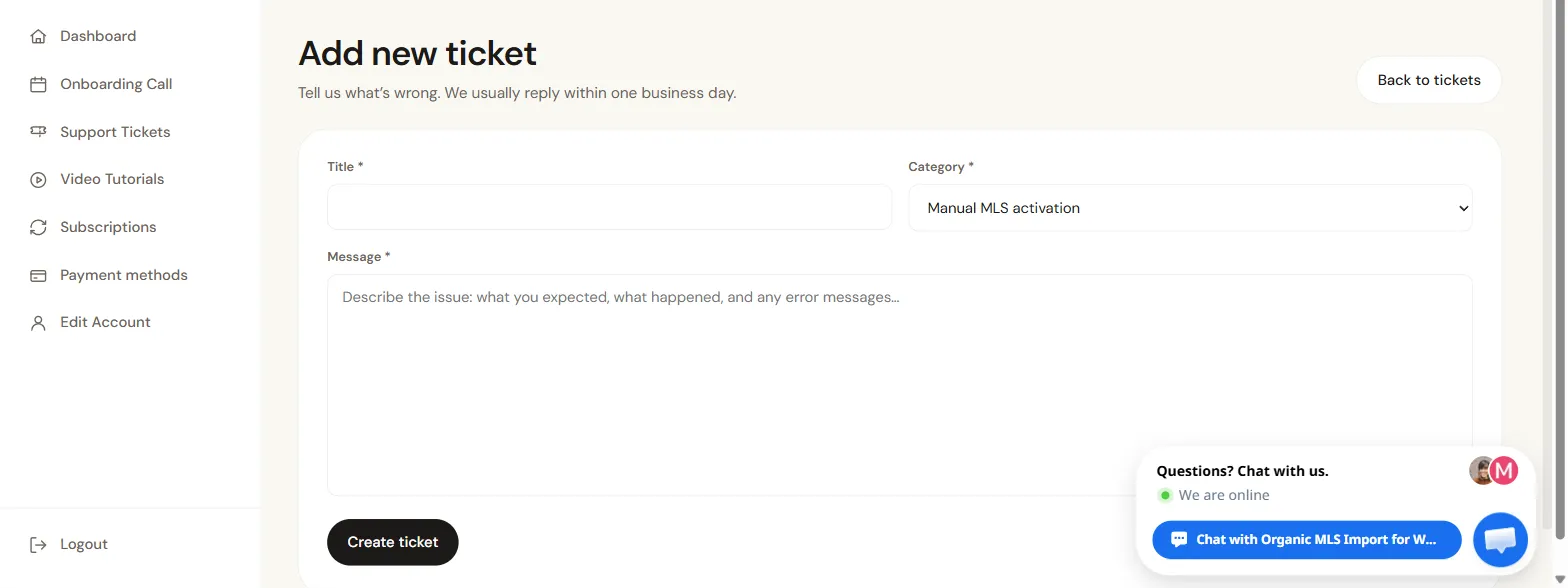
We usually reply within one business day. For what to put in the message so the first reply is a fix, see How to report an issue so we can fix it fast.
If we need to look inside your website, put the site URL, a WordPress admin username and a temporary admin password in the same ticket. Send login details only through a ticket, never through the chat, and delete that admin user when the work is done.
Frequently asked questions
Can I open a ticket on a weekend?
Yes. You can open a ticket any day. Our team is online Monday to Friday, 9am to 6pm Eastern, so a weekend ticket gets its reply on the next business day. If listings stopped updating, run the ten-minute checks in who to call when listings stop updating on a weekend while you wait, and put your site address, one affected MLS number, what is wrong and when you last saw a correct update in the ticket. For a live site, agree a named weekend contact with your website team before launch; the broken-feed support checklist lists what to agree.
Related
- How to report an issue so we can fix it fast
- Standalone mode: run MLSImport on any theme
- All MLSImport documentation
Book your onboarding call from your account and we will get your MLS connected and importing with you.
