
What Handles IDX Lead Capture and CRM Delivery on WordPress?
Last updated: August 19, 2026
By Benjamin Levy
MLS Import supplies native WordPress listing posts. The active real estate theme supplies property forms and, where supported, forced registration. The CRM, form add-on, Zapier, Make, or webhook handles the final lead delivery and automation.
IDX lead capture on WordPress is a stack question, not a single-product question. That split describes the four real estate themes. On any other theme MLS Import runs in standalone mode and renders its own enquiry forms, and it still never gates a listing, stores a lead, or connects to a CRM. WPResidence, our own theme, bends the split the other way: it ships WpEstate CRM and a two-way HubSpot sync, so the theme and CRM layers can be one purchase. Either way, getting a lead into a CRM is a separate purchase from the plugin, and every section below names the layer that owns each step.
In Canada? Lead emails also fall under CASL. See what a Canadian REALTOR® website needs to bring in buyer leads.
In this article
- Best IDX website builder with forced registration
- What MLS Import does
- What your theme supplies
- How the lead reaches your CRM
- Forced registration trade-offs
- Who owns the lead
- What this costs
- FAQ
What is the best IDX website builder with forced registration and lead capture?
There isn’t one. On WordPress the capability splits across three purchases, and the table names which gets you which piece.
| Capability | Which layer supplies it | What you have to buy or connect | Which mode |
|---|---|---|---|
| MLS listing data | MLS Import, the plugin | A subscription, $49/month or $504/year, one MLS feed per site | Both modes |
| Listing pages and templates | MLS Import’s own templates in standalone mode; your theme on the four real estate themes | Nothing extra in standalone mode; otherwise the theme’s listing layouts | Both, owner changes |
| Property enquiry form | MLS Import in standalone mode; your theme or a form plugin otherwise | Nothing extra in standalone mode; otherwise the theme’s form or a form plugin | Both, owner changes |
| Tour or showing request | MLS Import’s booking sidebar in standalone mode; your theme otherwise | Nothing extra; otherwise your theme’s showing form | Both, owner changes |
| Forced registration wall | Your theme, where it supports the feature | A theme with a built-in wall, such as WPResidence; MLS Import never gates one | Theme-side, either mode |
| Search and saved searches | MLS Import in standalone mode (saved searches since version 7.2.2); your theme on the real estate themes | Nothing extra in standalone mode; otherwise the theme’s saved searches | Both, owner changes |
| New listing emails to buyers | MLS Import in standalone mode; your theme where supported | Nothing extra in standalone mode; otherwise the theme’s buyer alerts | Both, owner changes |
| A daily email telling you which buyer to call | MLS Import Alerts, since version 7.2.3 | Nothing extra | Both modes |
| Favorites (the heart) | MLS Import in standalone mode, no account needed | Nothing extra | Standalone |
| Lead storage on the site | Nobody in standalone mode, where leads are emailed; a theme CRM where the theme ships one | A mailbox in standalone mode; a theme with a built-in CRM, such as WPResidence or Houzez | Both, owner changes |
| Delivery to an external CRM | A form add-on, a theme sync, an automation service, or the plugin’s lead hook | WPForms’ or Gravity Forms’ HubSpot add-on, WPResidence’s HubSpot sync, a Zapier or Make scenario, or code on the hook | Both modes, hook standalone only |
| Automation on the lead | The connected CRM or the automation service | HubSpot workflows, or a Zapier or Make step after delivery | Both modes |
The table assigns every capability, from the MLS data to the CRM automation on the far end, to one of three layers: MLS Import, your active theme, or the CRM and automation layer you connect.
Want the fewest separate purchases? WPResidence is the one theme where the theme and CRM layers are the same purchase, and it is ours. WPResidence’s own CRM page lists 27 ready-made automation rules and a two-way HubSpot sync of contacts, deals and tickets, and its Built-in Forced Registration page documents a limit on how many properties a visitor can open. On any other theme, those are three line items.
One bound: a three-purchase stack and a one-purchase hosted subscription are different shapes.
What MLS Import does, and what it does not do
MLS Import supplies MLS listings as native WordPress posts and, in standalone mode, the enquiry form beside them; it never gates a listing, stores a lead, or connects to a CRM. The plugin connects through the RESO Web API, writes each listing into your database as a property post, and keeps it current on a schedule. What an import task does is on its own page.
Outside WPResidence, Houzez, Real Homes and WpEstate, the plugin supplies the form itself: a booking sidebar with a Schedule a Tour tab and an Ask a Question tab, each collecting name, email, phone and a consent checkbox. Our own documentation on where property leads are sent says what happens next: the lead is emailed to the agent on the listing, then the company address, then the administration email, and nothing is stored. There is still no wall and no CRM, so it counts nobody’s listing views and pushes nothing to HubSpot, Follow Up Boss, Salesforce, or Zoho.
MLS Import runs with any WordPress theme. The real estate themes integrate more deeply, but they aren’t a requirement and you don’t need to buy WPResidence. If you are still shortlisting, see our guide to the best MLS plugin for WordPress.
One more limit, flat: one MLS connection per site. Two different MLS feeds means two WordPress installs, not a settings toggle.
Does an IDX import plugin come with lead capture, saved searches and listing alerts, or do I need a separate CRM?
Yes for three of the four, if you run MLS Import in standalone mode. It gives you lead forms, saved searches and listing alerts on your own site. It does not give you a CRM. Your leads arrive by email. If you want them stored, tagged and followed up, you still need a CRM, or a theme that has one built in.
When do you need a separate CRM?
You need one as soon as your inbox stops being enough. One agent with a few buyers can work from the lead emails and the daily Alerts email. A team that needs lead routing, drip emails, texting, reporting, a shared contact record, notes, call tasks or deal tracking needs a CRM. The ways to get each lead into one are under How the lead reaches your CRM, below.
What about the real estate themes?
On WPResidence, Houzez and Real Homes, the theme runs the forms and saved searches. The daily Alerts email still works and reads the theme’s saved searches, so you still see which buyer to call when a price drops. WpEstate is not on that Alerts list.
Do buyers need an account to save a search?
No. In standalone mode, a buyer gives a name and email, then clicks a link to confirm the search. The site sends no listing emails before that click. After confirmation, it sends at most one email a day when new or updated listings match. No matching change means no email.
Read how saved searches work before you test the buyer’s full path.
Are buyer listing emails and agent alerts the same thing?
No. Buyer emails show homes that match one buyer’s saved search. Agent alerts show the listing changes you choose to follow, such as price drops and back on market. The agent email can also list, at the top, buyers whose saved searches match a new or changed home. Both run daily, so neither promises to beat a portal to each change.
See the daily listing changes email for setup and limits.
How do I check that the setup works?
Test one enquiry and one saved search before you send buyers to the site. Check that the enquiry reaches your inbox. Confirm the saved search from a buyer email address, then check the next daily run for a matching new or updated listing. Setup time depends on your MLS approval, website and any CRM code work.
What your theme supplies
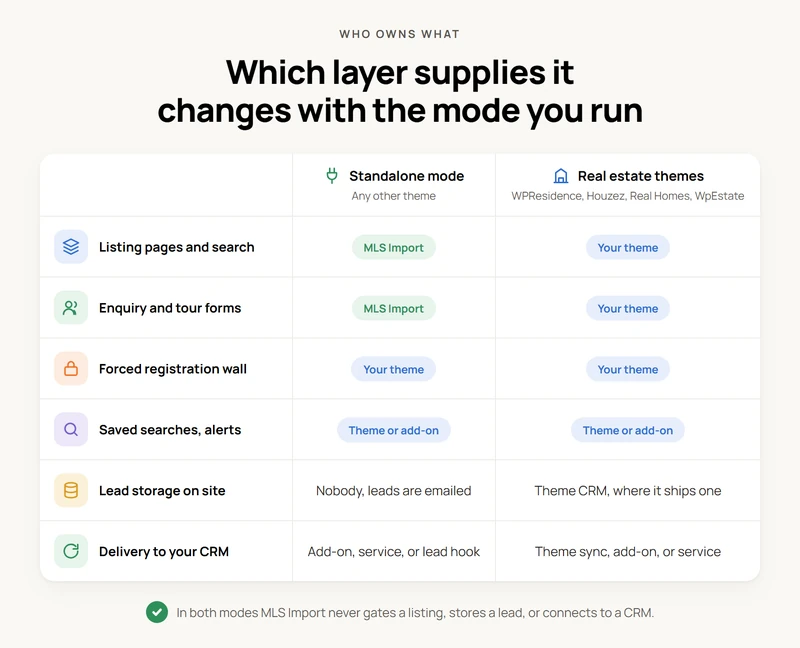
On WPResidence, Houzez, Real Homes and WpEstate the theme, not MLS Import, supplies the enquiry form and, where the theme builds it, the registration wall. Read “where supported” as load-bearing. In standalone mode the plugin ships its own property templates, search and archives, so listings do not depend on the theme.
WPResidence, ours, is the clearest first-party example. Its Lead Generation Form page documents the enquiry form, and its Built-in Forced Registration page (the feature arrived in WPResidence 5.6.0) states the mechanic in the vendor’s own words: “You can set how many properties a visitor can open before registration is required.” A gallery-image limit and a reset period sit alongside it. No number is defaulted or recommended anywhere on that page.
This is not a WPResidence-only pattern. Houzez publishes its own lead generation form feature and a separate built-in CRM for leads, inquiries and deals inside WordPress. Two theme vendors, one pattern: forms and gating are theme territory.
This matters at checkout. Put MLS Import on a generic blog theme and you are in standalone mode: listings, templates, search and the enquiry form all come from the plugin. In standalone mode, MLS Import also has its own saved searches and a daily Alerts email. Map and neighborhood pages are built from the imported coordinates, and we cover those in MLS map search and neighborhood pages.
How the lead reaches your CRM
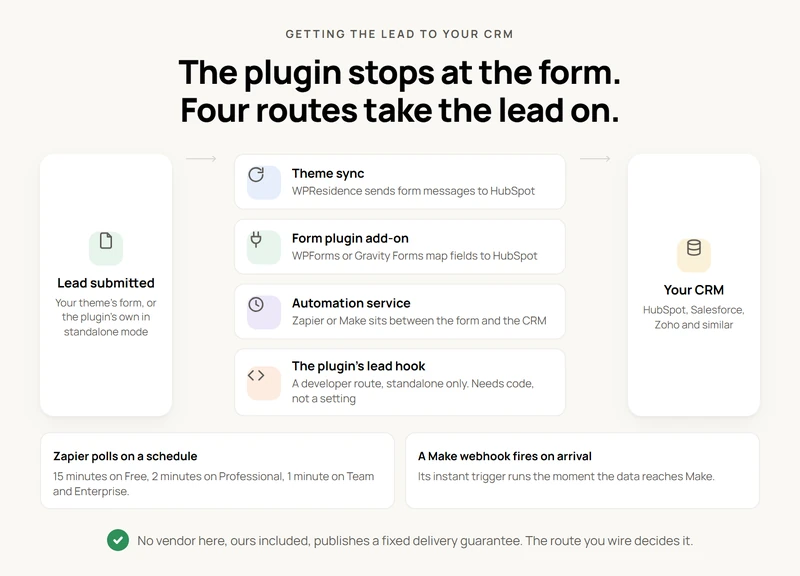
Delivery is never MLS Import’s job. The plugin emails a standalone lead and stops, so reaching a CRM takes the theme’s sync, a form add-on, an automation service, or code on the plugin’s lead hook.
- Theme-native sync. The theme’s form writes to the theme’s CRM, which pushes to an external one. On WPResidence, ours, the HubSpot integration sends contact form messages into HubSpot; the CRM page above documents contacts, deals and tickets moving both ways.
- Form-plugin add-on. WPForms’ HubSpot addon downloads your HubSpot properties, custom ones included, and maps form fields to them. Gravity Forms does the same through a HubSpot feed. Contact Form 7 is different: its docs index lists Brevo, Cloudflare Turnstile, reCAPTCHA and Stripe under external API integrations, with no first-party CRM add-on.
- Automation service. Zapier or Make sits between the form and the CRM.
- The plugin’s own lead hook. In standalone mode every valid lead fires the mlsimport_property_lead_submitted action with the data, and our guide to sending property leads to a CRM calls that the supported way to push leads anywhere; it also has the Follow Up Boss steps, including the code that sends each listing lead in as a Property Inquiry. This is a developer route: it needs code, not a setting.
Route three decides delivery speed. Zapier’s own documentation says “the majority of triggers are polling triggers” and publishes the interval by plan: 15 minutes on Free, 2 minutes on Professional, 1 minute on Team and Enterprise, adjustable on Enterprise.
Make’s developer docs describe the other model: “The instant trigger is executed immediately when the data arrives to Make,” and its webhooks help page contrasts that against scheduled checks. None of the vendors here, ours included, publishes a fixed under-a-minute guarantee. The route you wire decides it.
Here is how a two-agent team would wire this. WPResidence supplies the enquiry form, WpEstate CRM catches the submission and assigns it by rule, and the HubSpot sync carries the contact across.
Here is how a solo agent on a generic theme would wire this. MLS Import imports the listings and renders the enquiry form, which emails the lead. To get it into HubSpot, a developer hooks the plugin’s lead action, or the agent adds a form plugin routed through Zapier or Make: a polling check on a free plan, instant as a Make webhook.
Forced registration: what you gain and what you lose
A registration wall is a decision, not a setting with a known outcome. Turning it on means a visitor meets a form they did not ask for. But what that does to your lead count and lead quality is what nobody in this space can cite.
What you won’t get from us is a recommended view count, because no researched one exists. So we looked for a study, a dataset, or a named researcher behind the thresholds that circulate here, and found vendor blogs restating each other.
The two vendors best positioned to know (both run hosted platforms with account-level data) land in opposite places. IDX Broker’s own “Request or Force Registration” support article reviewed aggregate lead capture settings across all accounts, and says of it: “While this is not a true scientific analysis,” before suggesting a request prompt after the 1st or 2nd details page view and a forced one after the 7th or 8th. Showcase IDX’s own registration settings documentation takes the opposite position, saying “we don’t typically recommend putting a restriction on listings,” and ships no figure at all.
WPResidence, ours, sits between them: the setting counts how many properties a visitor can open, with a gallery-image limit and a reset period, and no number is recommended on that page.
Two vendors with real usage data reaching opposite recommendations is itself the finding. There is no universal number, so the threshold is a test you run on your own traffic: set a limit and compare registered leads against a stretch with the wall off. The active theme controls this wall, where it has one; the number you set is a decision the theme puts in your hands, not a threshold MLS Import, or anyone else, can hand you.
Who owns the lead
On a self-hosted WordPress stack, the CRM you connected owns the lead outright; MLS Import emails a standalone lead and stores nothing, so it never held a copy to export. The submission goes from the form to your CRM, or your inbox in standalone mode, so there is nothing to migrate the day you swap themes, change form plugins, or cancel a subscription. Your listings would stop updating. Your contact records would not move.
A hosted IDX platform works the other way, and both models are defensible: the platform’s own dashboard is where the lead lands first. IDX Broker’s own support documentation explains how to export leads as a .csv file from the Leads menu (which exists because the leads sit on their side). Showcase IDX’s own plans and pricing documentation frames routing to a third-party CRM as a step you connect, not the default.
Neither is cheating: one trades control for convenience, the other the reverse. Either way, your MLS sets what may be displayed, which we cover in MLS display rules, attribution, and internet flags.
What this costs
MLS Import is ours, so here is the price plainly. MLS Import itself costs $49 a month or $504 a year, with a 30-day free trial, and connects one MLS feed to one WordPress site; a second feed needs a second installation, not a setting.
That figure covers the data pipeline and nothing else. Your theme is a separate purchase, a form plugin another where you need one, and your CRM or automation service bills on its own schedule. So budget all four lines, plus your MLS board fees and website hosting. Check current plans before you buy.
Before you buy, read the requirements before you buy: you still need approved MLS credentials, and hosting sized for the listings you intend to sync.
The thing to price is the stack, not the plugin. Work out which layer owes you the form, which owes you the wall, and which owes you the CRM record, and the invoice stops surprising you.
Frequently Asked Questions
Does MLS Import capture leads or send them to a CRM?
Partly. In standalone mode MLS Import renders its own enquiry form and emails the lead; on the four real estate themes the theme’s form takes over. It stores nothing and connects to no CRM, so delivery needs a sync or an automation service.
How many listing views should trigger a registration wall?
No researched number exists. IDX Broker’s own docs give example settings and call the review non-scientific; Showcase IDX says it does not typically recommend restricting listings. MLS Import never gates a listing, so test the threshold on your traffic.
Do I need WPResidence to use MLS Import?
No. MLS Import runs with any WordPress theme; the real estate themes integrate more deeply but aren’t requirements. A generic theme puts you in standalone mode, where the plugin’s own form runs but no registration wall or CRM does.
Is a lead delivered to my CRM instantly?
It depends on the route. A Zapier polling trigger checks for new data every 1 to 15 minutes by plan. A webhook route, such as Make’s instant trigger, fires on arrival. MLS Import is not in that path.
What happens to my leads if I cancel MLS Import or switch themes?
Leads already sent to your CRM stay there. MLS Import never held a separate copy to export. IDX Broker, for example, differs: it stores leads in its own dashboard and offers a .csv export before you leave.
How much does MLS Import cost, and does it cover more than one MLS?
MLS Import costs $49 a month or $504 a year. One subscription connects one MLS feed to one WordPress site. A second feed needs a second WordPress installation, not an extra setting on the first.
Which CRMs can a WordPress IDX site connect to?
HubSpot, Follow Up Boss, Salesforce, Zoho and similar CRMs are all reachable, but never directly from MLS Import. The connection runs through your theme’s sync, a form plugin’s CRM add-on, or a service like Zapier or Make.