
Last updated: August 19, 2026
How do I get my real estate website to show up when people search for homes in my neighborhood?
You need three things working together: a full Google Business Profile, one real page for each neighborhood you know, and listings Google can read on your own domain. Then add your own local notes to each page and give it a few months. No plugin or vendor can promise you page one, us included.
Here is the order to do it in:
- Finish your Google Business Profile. Pick “Real Estate Agent” as the main category, list the areas you serve, and ask every client for a review. Google says it ranks local results by relevance, distance and prominence, and you can’t pay to move up.
- Make one page for each neighborhood. Put the neighborhood name in the page title and the web address, like yoursite.com/city/maple-heights/.
- Show live listings on that page from your own domain. If your IDX sits in an iframe or on a vendor subdomain, Google gives the credit to the vendor, not you.
- Write what only you know: price ranges, HOA notes, drive times, parks, a dated market update and your own photos.
- Link your pages together: the area guide, its listings, nearby areas and your blog posts.
- Get links from local sites: your chamber of commerce, a school event you sponsor, lenders and builders you work with.
- Check Google Search Console after about three months. See which area pages get clicks, then count the calls.
| Step | Who does it |
|---|---|
| Google Business Profile and reviews | You |
| A page for each city, ZIP or subdivision | MLS Import, from the names in your MLS feed |
| Listings on that page that update every hour | MLS Import |
| Your local notes, photos and market update | You |
| School notes | You, from a source you are allowed to use |
| Local links | You |
Every agent on your MLS has the same listings. As one agent asked, “If there’s 10 agents using these sites, how exactly do you think you will outrank the next guy using the same service?” The answer is your own local words, sitting next to the listings.
Start with the 3 to 5 areas where you close the most deals. A few deep pages beat fifty pages that only swap the town name. Not sure if Google can read your listings today? Read Are IDX listings indexable on WordPress? If your Google profile got suspended, start with how to get your Google Business Profile back.
MLS Import can create auto-updating WordPress neighborhood pages from imported MLS location fields; school-zone or school-quality data must come from the MLS when licensed or from a separate permitted data provider. Three parties split that work, and mixing them up is where most of these projects go sideways. MLS Import generates the pages: it imports listings as WordPress content and turns location values like City and SubdivisionName into taxonomy terms, and every term gets its own archive page. The WordPress theme renders what you see, and on WpResidence, WpEstate, Houzez and Real Homes the theme also owns the property search and the map key. Anything past the feed (school ratings, attendance boundaries, walkability scores) comes from a provider you license yourself. Below: the mechanism, one live customer page you can open now, and the licensing line on school data pages.
How do neighborhood pages help a small brokerage get found by local buyers and sellers?
Neighborhood pages help you show up for the small, local searches the portals cover poorly. Zillow wins “homes for sale in [city].” It is much weaker on “[subdivision] homes under $400k” or “condos near [park].” A page for each area you know well, with live listings and your own notes, gives Google a page from you to show for those searches.
Here is why that works:
- Buyers start online. In NAR’s 2025 Profile of Home Buyers and Sellers, 46% of buyers started by looking at homes online.
- You know things the portals don’t. As one agent put it: “Zillow and others have not yet gotten into the specifics of our local area, that’s where each agent has the advantage.”
- Sellers search too. A homeowner who looks up their own area finds your page, sees recent homes and your name, and has a reason to call you about a valuation.
- The lead comes to you. On a portal, the question goes to whoever paid for the area. On your own page, it goes to your office.
Buyers need home types, price ranges, parks, travel options, and current listings. Sellers need recent sales, a dated market update, and advice on selling in that area. Both need a clear way to reach an agent who knows the place.
🚨 Fair housing: describe homes, streets and places. Don’t describe who lives there or who “should” live there.
Build one useful community page first
Start with one area you know well, and check that people can read your local guide above or beside the listings. MLS Import handles the listing updates. Your team checks the facts, writes the guide, and gives buyers and sellers a clear next step.
- Pick a farm area where your team knows the homes and streets.
- Check that your MLS sends the city or subdivision names you need.
- Add a short buyer guide and a dated seller market update. Use only sales data your board lets you show.
- Check the public page on a phone. Make sure the text, listings, and contact link show up.
- Track visits and buyer or seller inquiries for that page.
Which real estate website platform auto-generates neighborhood and school data pages?
MLS Import auto-generates them on any WordPress theme through its standalone mode, building each page out of imported MLS location fields. On WpResidence, WpEstate, Houzez and Real Homes, the theme renders the property template, search and map around that same data. Nothing generates school ratings or boundaries out of a RESO Web API feed, because the standard defines neither.
Straight disclosure, because the verdict here favors our side: MLS Import is our own plugin. We build it, we sell it at $49 per month or $504 per year, and the honest version of that answer has to include the parts we don’t do.
You don’t need one of those four themes. Standalone mode ships its own property search, listing cards, half map search, single property pages and archives, so the plugin runs on whatever theme you already own.
Here is the split.
| What MLS Import generates | What the WordPress theme renders | What requires an external provider |
|---|---|---|
| Listings imported as native WordPress content | The property template and single listing layout on WpResidence, WpEstate, Houzez and Real Homes | Map tiles beyond the free default (Google Maps, Mapbox) |
| Location taxonomy terms from imported fields (City, CountyOrParish, PostalCode, SubdivisionName, MLSAreaMajor, MLSAreaMinor) | The search UI that reads those taxonomy terms | School ratings |
| The term archive pages those terms produce, which are the auto-generated neighborhood pages | The map, including the map API key, on those four themes | School attendance boundaries |
| A taxonomy widget that displays terms as image tiles, each with a per-term featured image and HTML description | n/a | Walkability and transit scores (Walk Score) |
| In standalone mode: its own search, archives, property pages and map, on OpenStreetMap tiles by default | n/a | Crime data |
That middle column is where builds go wrong. A site owner asks why the city page shows no map, finds nothing broken in the plugin settings, and never looks in the theme options, where the Houzez map key actually lives.
The generating part is simpler than it sounds. An imported location value becomes a taxonomy term, WordPress gives every term an archive URL, and that archive is the neighborhood page. Nobody builds it by hand, and nobody updates it by hand.
How does an imported MLS field become a neighborhood page?
An imported MLS field takes one of three routes inside MLS Import, and only one produces a page. The plugin writes the value into a theme meta key, turns it into a term in a taxonomy, or leaves it unmapped, in which case the theme decides where it lands: Additional Features on Houzez, the theme’s own custom fields on WpResidence and WpEstate, the additional details list on Real Homes. Our own field mapping documentation states what the taxonomy route does: “The value becomes a term, the term gains an archive page, and the theme’s search controls that read that taxonomy can offer it.”
That is the whole trick. Fort Lauderdale becomes a term. The term gets a URL. The URL is a neighborhood page.
The route also decides what a buyer can search. The same documentation is blunt about it: “Houzez search dropdowns are built from taxonomy terms, not from meta values. A field left in Additional Features can be read on the page and cannot be searched on.” Pick the taxonomy and you get a searchable filter plus a page, out of one decision.
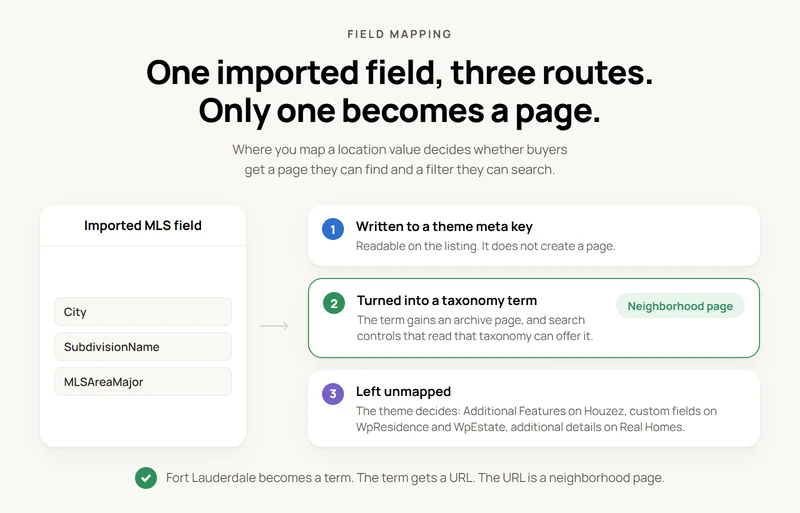
Which fields feed that route? The RESO Data Dictionary 2.0 names them, and the spellings matter because that’s how your MLS sends them: City, CountyOrParish, PostalCode, SubdivisionName, MLSAreaMajor and MLSAreaMinor. RESO defines SubdivisionName as “A neighborhood, community, complex or builder tract,” and MLSAreaMajor as “The major marketing area name, as defined by the MLS or other nongovernmental organization.” Those two produce the pages buyers search for by name.
The plugin also ships a widget for those taxonomies. Its changelog, published through the WordPress.org plugins API (https://api.wordpress.org/plugins/info/1.0/mlsimport.json), describes a widget that will “display any listing taxonomy (city, type, status, …) as image tiles, using a new per-term featured image and per-term HTML description.” Tiles on a page, one per term. That entry is from version 7.0.4; the current release is 7.0.7, updated July 25, 2026.
Worth naming the closest thing on the market. Realtyna’s own step by step guide has the agent create each neighborhood page by hand first, then bulk-assign listings to it with Organic MLS Integration. Real automation, but generating the page itself from a taxonomy value is a different thing.
The field by field procedure: field mapping for Houzez, and field mapping for the other supported themes.
A live example of an auto-generated neighborhood page
Open https://wyserhomes.com/city/fort-lauderdale/ and you’re looking at one. Checked again on August 19, 2026: HTTP 200, an H1 that reads “Fort Lauderdale”, nine distinct property links on the page, the MLS Import plugin loading from wp-content/plugins/mlsimport, and the Houzez theme underneath. The URL pattern is /city/ plus the city name, one page per imported city value.
Provenance first. Wyser Homes is a site on our customer sites page, not an independent audit we stumbled onto. That page describes it as displaying “various MLS real estate listings in Miami, imported from Miami Realtors MLS with the MLS Import plugin.”
One honest limit: the site’s Houzez configuration carries an empty Mapbox key, so don’t take that page as proof of a working map. What it does prove is narrower: a city taxonomy archive whose H1 is the city name and whose listing set came out of the feed.
The same site has a page that makes the opposite point. https://wyserhomes.com/cooper-city-school-zone-homes/ is titled “What to Check in Cooper City School Zone Homes” and carries zero property links. A person wrote that one, start to finish. The Fort Lauderdale page, the feed wrote.
MLS city archive pages like that one keep changing after publication. With hourly synchronization switched on for the import task, each run asks the MLS for listings that match that task’s filters and were modified in the last two hours. Existing properties are updated in place, newly matching listings are added, and nothing is backfilled if cron went down. The two hour window is a deliberate overlap, so a listing changed near a run boundary is caught by the next run.
Are school ratings and boundaries included in your MLS feed?
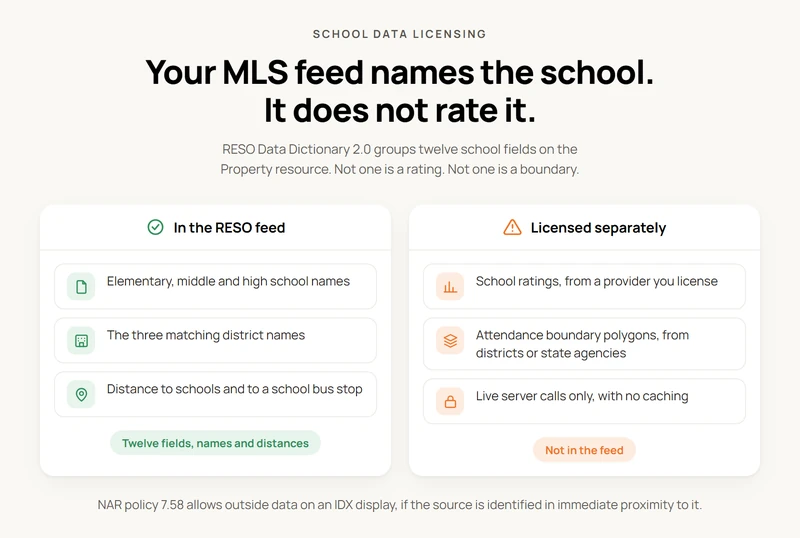
School ratings and attendance boundaries are a different licensing question from the rest of your feed, and the RESO Data Dictionary shows why.
DD 2.0, the current version for certification, groups twelve school related fields under Location on the Property resource. Six are names: ElementarySchool, MiddleOrJuniorSchool, HighSchool, ElementarySchoolDistrict, MiddleOrJuniorSchoolDistrict and HighSchoolDistrict. The other six measure distance to a school or a school bus stop.
Not one of the twelve is a rating. Not one is a boundary.
RESO defines ElementarySchool as “The name of the primary school having a catchment area that includes the associated property.” A name is what the standard gives you.
So, the line for your own site. A school name may arrive as a text field if your MLS populates it and your license permits displaying it. A rating or an attendance boundary almost certainly will not, and needs a separately licensed source. That’s a condition of your own feed and license, not a complaint about anybody’s MLS.
Planning school district pages on a WordPress IDX site? Settle the data source before the design.
Three primary sources point the same way. NAR’s own Realtors Property Resource says it “works with a variety of third-party providers to source data that enhances the property-specific public records and listing data,” including “neighborhood boundary information, flood maps, school information and ratings” (https://blog.narrpr.com/support/for-mlss-and-associations-data-feeds-sharing-tab/). If NAR’s own national product buys ratings from third parties, it’s a fair bet your IDX feed isn’t quietly carrying them either.
NAR’s IDX policy statement 7.58 then sets the display rule: participants “may augment their IDX displays of MLS data with applicable property information from other sources… The source(s) of the information must be clearly identified in the immediate proximity to such data.” Outside data is allowed on the page. It has to be labeled.
The licenses behave nothing like a data field. GreatSchools’ API terms state that “Your license to GS Data Content and Service is limited to making direct server calls to access and distribute the GS Data Content to Your users immediately upon receipt by Your server(s),” and that the content is “confidential and proprietary” (https://www.greatschools.org/gk/about/api-terms-of-service/). Live server calls, no caching. Nothing like City.
Boundary polygons come from school districts, state education departments or federal collections, not from your feed. When you write a school section by hand, our notes on verifying school facts for a listing are worth reading first.
Who draws the map: the plugin, the theme, or an outside provider
Maps on an MLS Import site have two possible owners, depending on the mode you run.
In standalone mode the plugin draws the pins and clusters itself, and the tiles arrive from the free OpenStreetMap servers with nothing configured. Our own map documentation on mlsimport.com puts it plainly: “Maps work with none of them set. The tiles come from the free OpenStreetMap servers, which are slower than a paid tile service but cost nothing and need no account.” Paste a Mapbox public token into Design Settings and you swap the tile images, nothing more: “Clearing the field returns every map to OpenStreetMap. Nothing else about the maps changes, since only the tile images come from MapBox.”
On WpResidence, WpEstate, Houzez and Real Homes, the map belongs to the theme and the key goes in the theme’s own options. WpResidence can draw with either Google Maps or Mapbox and asks for that key in its theme settings. If your MLS map search on WordPress misbehaves on one of those four themes, the theme options are where to look first. The configuration detail sits in our map settings guide.
Walkability sits outside both parties. Walk Score’s own terms of use require that “All queries sent to Walk Score requesting data must reference your valid WSID or WSAPIKEY” (https://www.walkscore.com/tile-terms-of-use.shtml). Key gated and licensed, and its professional terms carry a fee clause (https://www.walkscore.com/professional/terms-of-use.php). Same category as school ratings.
What an auto-updating neighborhood site costs, and what has to be true first
An MLS Import subscription is $49 per month or $504 per year, with a 30 day free trial and no setup fee. Your board’s own fee is separate. Those are the only two plan terms: no Pro tier, no brokerage tier. The monthly price and the trial are published on our own requirements page, and the annual price is what our own store charges.
One subscription covers one WordPress install connected to one MLS account. Our documentation answers it directly: “A second site, or a second MLS feed, needs its own subscription.” Two MLSs means two setups, each at $49 per month or $504 per year. Settle that before you promise a broker two boards on one domain.
Three things have to be true first. You need an MLS or board that offers RESO Web API access, because the plugin “does not work with the older RETS protocol, and it does not scrape public websites.” You need a license that permits IDX display. And you need the location fields you plan to build pages from actually populated in your feed, because a taxonomy can’t make a term out of a value the MLS never sends. MLS Import connects to any RESO certified MLS, and RESO’s own certification page counts 489 functioning MLS systems in the United States and more than 30 in Canada.
The full checklist lives on our requirements before you buy page.
Frequently Asked Questions
Do neighborhood pages update themselves?
Yes, when auto update is switched on for the import task. Each hourly run asks the MLS for listings matching that task’s filters that were modified in the last two hours, updates existing properties in place, and adds newly matching ones. MLS Import doesn’t backfill missed hours, so re-run the import manually after any cron outage.
Where do I write my own words about the neighborhood?
Write them on a page you control, then put that area’s listings on it. In standalone mode, every city and area term has an HTML description box. The bundled archive template does not print it, so on a stock install that text stays hidden from visitors and from Google. You have three ways to get your words on the page:
- Make a normal WordPress page for the area. Write your intro, then add the Property List or Search Results block filtered to that area.
- Use a WpResidence, WpEstate, Houzez or Real Homes area page, where the theme controls the layout.
- Have a developer print the term description with a template override.
Check the live page before you count the text as published. See category images and descriptions and template overrides in standalone mode.
Are school ratings included in an IDX feed?
Not ordinarily. The RESO Data Dictionary defines school name and district name fields, and no rating or boundary polygon at all. Ratings come from a separately licensed provider such as GreatSchools. A school name may reach your site if your MLS populates that field and your license permits it, so MLS Import can map the field but can’t produce a score.
Do I need a Google Maps or Mapbox key?
Not in standalone mode. MLS Import draws the pins and clusters itself and pulls tiles from OpenStreetMap with nothing configured, and a Mapbox public token only swaps the tile images. On WpResidence, WpEstate, Houzez and Real Homes the map belongs to the theme, so the Google Maps or Mapbox key goes into the theme’s own options instead.
Can one site connect to two MLSs?
No. One subscription covers one WordPress install connected to one MLS account, so a second feed needs its own setup and its own subscription at $49 per month or $504 per year. Multiple import tasks on that one connection are fine: MLS Import’s auto-synchronization documentation describes the sync collecting every task with auto update switched on and working through them one at a time.
Can my neighborhood page show up in Google if every agent has the same listings?
Yes, but the listings are not what gets it there. Google sees the same listing text on Zillow, Realtor.com and every agent site on your MLS. So it picks one copy to show, often the portal’s. What makes your area page different is what you add: local notes only you can write, like HOA quirks, drive times, the street that floods, and a dated market update.
- Keep the listings on the page. They show buyers you have current homes.
- Put your own words above or beside the listings, not at the very bottom.
- Update the market notes every month or two, and put the date on them.
How long before neighborhood pages bring in leads?
Plan on a few months, not a few weeks. Google has to find the pages, and your own words have to give it a reason to show them. Keep the prices and notes on each page current. A page with old numbers loses trust fast. Watch Search Console for clicks on each area page, and count the calls and forms that come from them. Do not count a listing update as a new lead.
Three parties, one page. The plugin generates it from the feed, the theme renders it, and everything past the feed comes from a provider you license yourself. Get that split straight and the auto-generated neighborhood pages real estate brokers keep asking for turn out to be simple: taxonomy archives, with your own copy on top and an hourly update behind them.
Because imported listings live as native WordPress content rather than inside an iframe, those pages are crawlable on your own domain. The detail is in our guide to indexable listings and SEO.
Building city or subdivision pages this way? Tell us which fields you mapped in the comments.