
MLS Import Plugin is a unique property import tool that connects to your MLS through your API Credentials and lets you manage what properties and what property fields to import into your Real Estate WordPress-based website.
The MLS/RESO API Options settings area is the interface where you insert your credentials from MLS and your MLS Import account.
Select a Theme / Plugin
The “Select Theme / Plugin” dropdown lists all the possible Real Estate WordPress themes you can use with MLS Import.
If you want to see the possible Real Estate themes demos at work, please follow the below links:
- WpResidence MLS Import Demo ($59, one-time fee – get it here)
- WpEstate MLS Import Demo ($49, one-time fee – get it here)
- Houzez MLS Import Demo ($59, one-time fee – get it here)
- Real Homes MLS Import Demo ($59, one-time fee – get it here).
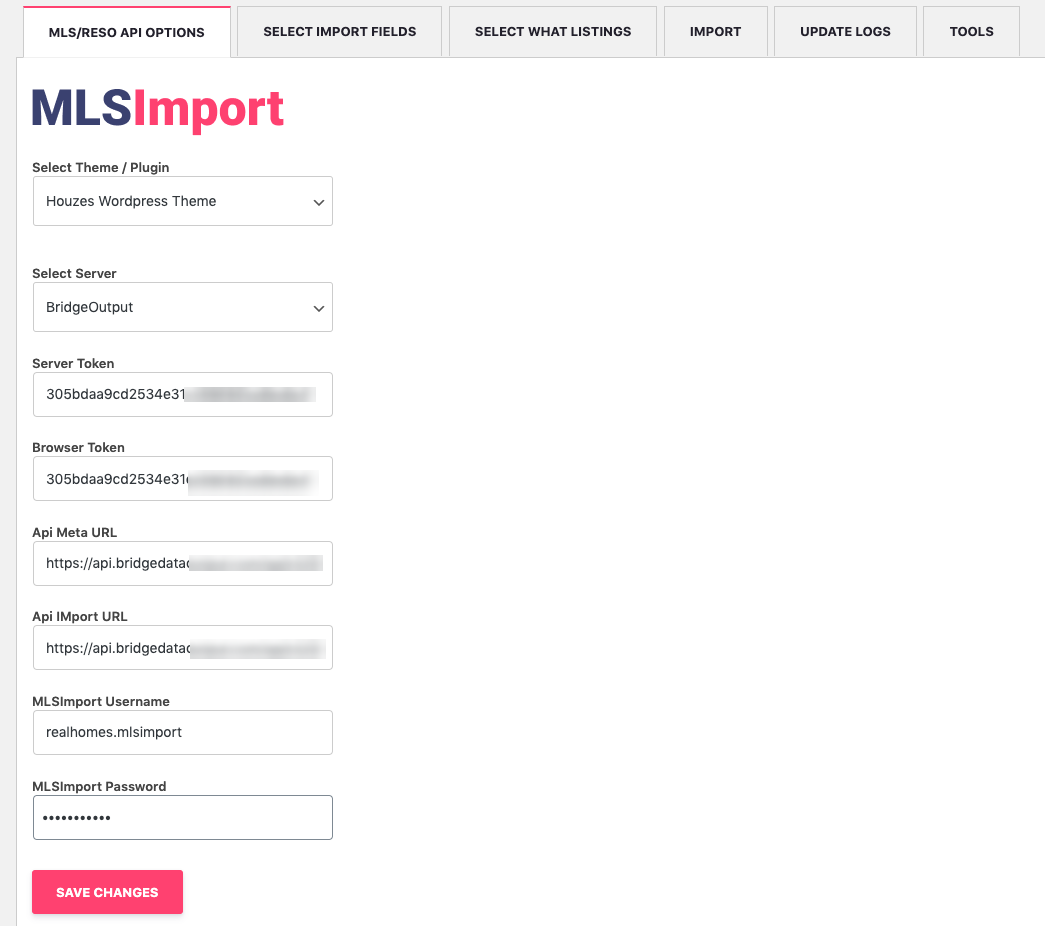
MLS credentials
The MLS credentials from the below list come from your MLS, and all you have to do is contact them directly to get access:
- Select Server
- Server Token
- Browser Token
- API Meta URL
- API Import URL
Some MLSs may require you to pay a fee for this kind of service, which can be confirmed directly with your MLS contact.
If you’re unsure your MLS can work with MLS Import, check this list https://mlsimport.com/list-of-mls-in-usa-reso-certified-multiple-listing-services/.
If you do not find your MLS, Contact Us to check if your MLS may work with RESO, but their name is not on this list yet.
MLSImport Credentials
When you buy MLS Import, we send the username and password to your email address as soon as the payment is confirmed. These will be copied into the “MLSImport Username” and “MLSImport Password” fields.
FAQ
What is the MLS Import Plugin and what does it do?
MLS Import Plugin is a property import tool for Real Estate WordPress websites that connects to your MLS using your API credentials. It lets you control which properties are imported and which property fields are brought into your site.
Where do I enter my MLS and MLS Import credentials?
You enter both sets of credentials in the MLS/RESO API Options settings area. This is the interface specifically intended for adding the credentials provided by your MLS and the credentials from your MLS Import account.
What does the “Select Theme / Plugin” dropdown do, and does it include WPResidence?
The “Select Theme / Plugin” dropdown lists the Real Estate WordPress themes you can use with MLS Import. The article also points to a WPResidence MLS Import demo link, along with other theme demo links, so you can see supported themes in action.
Which MLS credentials do I need to request from my MLS for RESO API access?
The MLS credentials you need come from your MLS, and you obtain them by contacting the MLS directly. The fields listed are Select Server, Server Token, Browser Token, API Meta URL, and API Import URL.
How can I check whether my MLS works with MLS Import, and what if it is not listed?
If you are unsure whether your MLS can work with MLS Import, check the list of MLSs at https://mlsimport.com/list-of-mls-in-usa-reso-certified-multiple-listing-services/. If you do not find your MLS there, you should contact MLS Import to ask whether your MLS may still work with RESO even if it is not on the list yet.