
Last updated: September 17, 2026
How to handle listings from different MLS regions comes down to one setup: since version 7.2, our MLS Import plugin connects one WordPress install to several approved MLS boards over the RESO Web API. Each board is its own connection, and each connection runs as many import tasks as you need.
Each task filters on property type, status, city, county, ZIP, price range, agent ID, agency ID, or office ID, so one board’s inventory splits across as many task sets as the site plan calls for.
Each board keeps its own credentials, its own field mapping and its own import tasks, so adding a second board never changes the first. How many boards you can connect depends on your plan: 1, 3 or 7.
Before version 7.2, a second board meant a second WordPress install and a second subscription. That is no longer needed. Both boards import into the same site.
For the setup screen by screen, see how to connect two MLS boards to one WordPress site.
Which leaves the question this article spends most of its length on: once two boards feed one site, what does the public see, and what does NAR’s policy let you combine?
How to handle listings from different MLS regions: one install, one connection per board
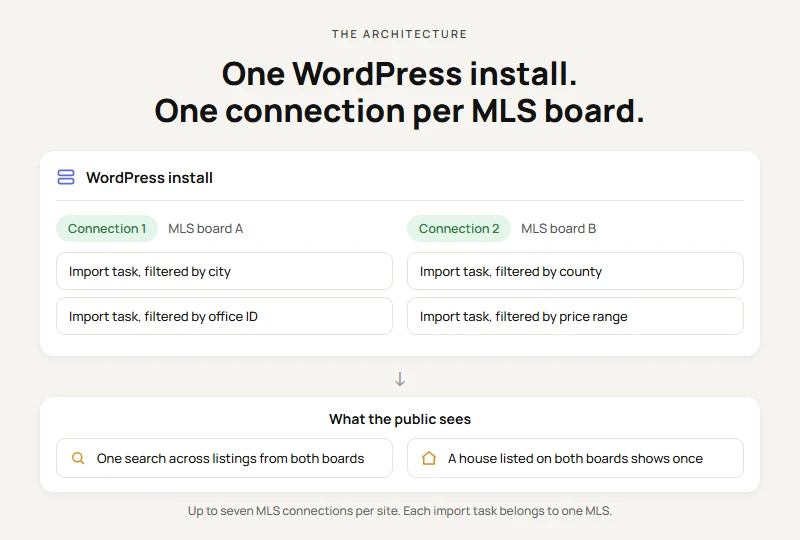
Start with the setup: everything else in a two-board build sits on top of it. MLS Import holds one connection per MLS board, and all of them live on the same WordPress install. You add them on the Connections tab in MLS Import Settings, which lists each MLS with its status and the time of its last test. Inside each connection, you create as many import tasks as the site needs.
Know the limits before you plan. A site holds up to seven MLS connections. Each import task pulls from one MLS. And multi-MLS works when listings are imported into WordPress, in standalone mode and with the supported themes (WpResidence, WpEstate, Houzez and Real Homes). It does not work in the live “store nothing” mode.
Multi-board brokerages aren’t an edge case. RESO’s own MLS FAQ, pulled 2026-08-19, counts 489 MLS systems in the United States as of July 2026, plus more than 30 in Canada.
Two boards on one site means one dashboard, one hourly sync and one site to update. Each board still has its own credentials.
If you’re still weighing a direct feed against an IDX vendor, settle that first. Everything below assumes the access route is decided.
How does a brokerage show two boards to the public?
Both boards import into the same site, so your buyers see one site. Two things happen on the public side:
- One search covers the listings from both boards, on your domain, with your contact forms.
- A house listed on both boards shows once. MLS Import matches the two listings by street address, unit and city, and shows the copy from the connection that is higher in your priority order. The other copy is hidden, not deleted, and comes back if the shown copy leaves the market.
How the search looks is a template decision. MLS Import’s job stops at the pipeline: connect, filter, import, update, remove.
The legal ground is explicit. NAR’s Policy Statement 7.58 states that an MLS participant “may co-mingle the listings of other brokers received in an IDX feed with listings available from other MLS IDX feeds, provided all such displays are consistent with the IDX rules, and the MLS participant… holds participatory rights in those MLSs” (adopted 11/14, pulled 2026-08-19).
NAR describes who may combine listings, not how the software holds the feeds. Individual MLSs may require that listings from another MLS “display the source from which each such listing was obtained,” which Step 5 covers.
The implementation sequence
Step 1: Get credentials approved separately for each board
Each board approves its own credentials on its own timeline. Two boards, two credential sets. Each set becomes its own connection. Ask for RESO Web API access by name.
Check your board in RESO’s certification registry, whose own chart data (pulled 2026-08-19) counts 314 Certified Current, 77 Passed Current, 7 Certified Legacy, and 132 Uncertified. Passed Current is not “no Web API”: RESO defines it as a system that passed technical testing whose organization has not yet accepted those results for publication as certified. The RESO Web API connection details come from that approval.
Step 2: Add each board as a connection, then split it into import tasks
Add the first board in the setup wizard. Add the second on the Connections tab: click + Add MLS, pick the MLS, enter its credentials, then test and save. Nothing is saved until the test passes.
Inside each connection, each import task filters on property type, status, city, county, ZIP, price range, agent ID, agency ID, or office ID. A task pulls from one MLS, chosen when you create it, and can’t be moved to another MLS after you save it. So a region on the second board gets its own task, with that board’s own city, status and property type values.
Step 3: Normalize the fields to the RESO Data Dictionary
Map every import to the Data Dictionary’s field names, not to your first board’s labels. Each connection has its own field mapping: the Listing Details tab has an Editing fields for selector that switches between boards. DD 2.0 is the current version for RESO certification, approved October 23, 2023 (dd.reso.org, pulled 2026-08-19).
The targets are StandardStatus for listing state, PropertyType and PropertySubType for classification, and the Media resource for photos.
Step 4: Normalize the taxonomies before the first import
Field normalization gets the data in. Taxonomy normalization makes it searchable. Your theme keeps its own property-type categories, and both boards’ values must land in the same ones or your search filters split into near-duplicates.
RESO’s Data Dictionary wiki records 99% usage adoption for PropertyType and 95% for PropertySubType (pulled 2026-08-19). High, and still not the same as two boards populating them identically.
Step 5: Import and display each board’s required attribution
Two clauses of NAR’s Policy Statement 7.58 govern this. An IDX display “must clearly identify the name of the brokerage firm under which they operate in a readily visible color and typeface.” A clause amended 11/21 adds the listing firm plus its “email or phone number… not smaller than the median used in the display of listing data.”
On a blended page, label which board each listing came from; some boards require it. See our notes on MLS display rules, attribution, and internet flags.
Step 6: Set a refresh schedule each board’s rules allow
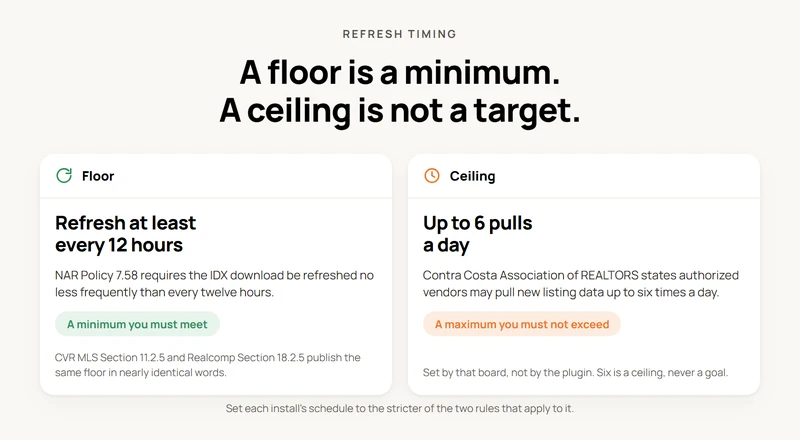
Each board sets its own refresh rules, so check both boards and meet the stricter one. NAR sets the floor: the IDX download “must be refreshed… no less frequently than every twelve (12) hours” (Policy Statement 7.58, amended 5/17).
Some boards cap the other end: Contra Costa Association of REALTORS states authorized vendors “may pull new listing data up to six times a day” (ccartoday.com, pulled 2026-08-19). Six is a ceiling, not a goal.
Step 7: Don’t run two large first imports at the same time
Both boards now run on the same host, so starting the first full import of each board in the same hour is the failure that costs a weekend. WordPress’s Plugin Handbook says WP-Cron “is only triggered on page load,” and PHP’s manual lists a default max_execution_time of 30 seconds.
So a big job can get cut mid-run, and the front end shows half-updated listings or a stalled queue. Let the first board’s import finish before you start the second, then define DISABLE_WP_CRON in wp-config.php and add a system cron entry. More on avoiding overlapping import tasks.
Check max_execution_time on your host first; no amount of spacing saves a job that dies at 30 seconds.
Step 8: Monitor each feed separately and alert per feed
Check each connection on its own. The Connections tab shows each MLS with its status. If one token expires, only that connection’s tasks pause, the other board keeps syncing, and the failing row shows an Update credentials action. The statuses MLS Import treats as off-market (Closed, Deleted, Expired, Withdrawn) can trigger removal, so a listing that should have dropped and did not is your first signal.
The daily cleanup runs per board. If one board’s API is offline, the plugin skips that board’s cleanup for the day and deletes nothing, so its last synced listings stay on the site. Related: fix outdated listings on a WordPress real estate site.
Worked example: the same three fields across two boards
“Different MLS regions use different field names” is a common misconception. But once both boards are RESO Data Dictionary certified, it’s wrong: standardizing those names is the point of certification. What varies is the values inside them, plus board rules outside the Dictionary. That reading is ours, from RESO’s field pages.
Table 1: status and property type. RESO field names are real and cited; “Board A” and “Board B” are illustrative, not real board values.
| RESO Data Dictionary field | “Board A” (illustrative) | “Board B” (illustrative) | What the site displays |
|---|---|---|---|
| StandardStatus | Active | Active | Active |
| MlsStatus (open enumeration) | “ACT” | “Active – Show” | mapped to StandardStatus = Active |
| PropertyType | Residential | Residential | Residential |
| PropertySubType | Single Family Residence | “SFR” | normalized to Single Family Residence |
RESO defines StandardStatus as “the status of the listing as it reflects the state of the contract between the listing agent and seller.” MlsStatus sits beside it by design, documented as “an open enumeration… Providers may use local values.” That is why normalization exists.
Table 2: photos. Three real boards, three different published rules, each cited to its own page.
| Board | Photo rule | Source |
|---|---|---|
| MLS Now (Ohio) | Maximum 50 photos per listing | support.mlsnow.com, updated March 13, 2026 |
| OneKey MLS (New York) | At least one exterior photo within 24 hours (most listings); photo deletion restricted once inactive | support.onekeymls.com, dated June 3, 2026 |
| Realcomp II Ltd (Michigan) | Pending and sold listings restricted to the primary photo only | realcomp.com IDX rules, Section 18.10 |
Three boards, three different rules on photo count and timing. Read each board’s own rulebook.
What changes from board to board
Opt-in and opt-out participation models
NAR’s model policy makes IDX inclusion the default. MLSs “may not exclude any listings… except those listings for which a seller has affirmatively directed that their listing or their property address not appear on the Internet.”
The listing broker’s side starts from a similar default: consent “may be presumed unless a listing broker affirmatively notifies the MLS that the listing broker refuses to permit display.”
The practical question usually isn’t whether a board “lets you in,” but whether a seller opted a listing out. Presumed consent is a common default, not a universal rule.
Which fields you actually receive
A standardized field name is not a promise that the field is populated. RESO’s Data Dictionary wiki records StandardStatus at 94% usage adoption across 344 organizations (pulled 2026-08-19).
Go a level deeper and the spread widens. RESO’s Data Dictionary wiki puts lookup-value adoption inside StandardStatus at 94% for Active and 23% for Coming Soon (pulled 2026-08-19). Before you build a filter or a badge on any single value, check what that board’s feed actually sends.
Photo and media limits
Photo rules are set per board. MLS Now (Ohio) caps a listing at 50 photos (support.mlsnow.com, March 13, 2026). OneKey MLS (New York) sets a minimum instead: most listings need one front exterior photograph within 24 hours of entry, and photos “may not be deleted” once a listing is no longer Active, with narrow status exceptions (support.onekeymls.com, June 3, 2026). Realcomp II Ltd (Michigan) allows only the primary photo on pending and sold listings (Section 18.10, realcomp.com IDX rules).
Build the gallery to degrade to one image; on a Realcomp feed that’s sometimes all you get.
Refresh timing
Three independently published rulebooks state the same floor in nearly identical words. NAR: refreshed “no less frequently than every twelve (12) hours.” CVR MLS, Section 11.2.5: “at least once every twelve (12) hours.” Realcomp, Section 18.2.5: “at least once every 12 hours. (Revised 2014).”
The ceiling is a separate, local number: CCAR’s six pulls a day. A floor is a minimum you must meet. A ceiling is a maximum you must not exceed, never a target.
Local display rules
NAR’s attribution baseline is the brokerage name plus the listing firm’s email or phone number. Boards add their own layer on top. Realcomp requires that, absent a link through to a detail view, “the Listing Office Name and Originating MLS must be displayed in the summary display for every listing” (Section 18.3.3, realcomp.com IDX rules).
On a two-board site, “Originating MLS” stops being boilerplate and starts being load-bearing.
What MLS access itself costs, board by board, is in understanding MLS access costs. Adding a board to MLS Import is a plan change; see MLS Import pricing.
Frequently Asked Questions
How many MLS connections can one WordPress site have?
Up to seven. Since version 7.2, MLS Import connects several approved MLS boards to one WordPress install, and your plan sets how many: 1, 3 or 7. Each connection has its own credentials, field mapping and import tasks.
How do I set up IDX search to cover multiple regions for a team or brokers?
Create one import task per region. For regions on one board, the tasks use that board’s connection. For regions on a second board, add that board on the Connections tab and create tasks with its own city and status values. All listings land on the same site, so one search covers both.
Several offices work the same way: create one import task per office, using the office code your feed supplies, and plan the rules so the same listing does not match several tasks. Your website team builds the office pages and sets which listings each page shows. Follow the guide to importing one office’s listings.
Do different MLS boards use different field names?
On our reading of RESO’s published field pages, no. StandardStatus, PropertyType, PropertySubType, and the Media resource are Data Dictionary names. What differs is the local values inside them, plus board rules such as photo caps; MLS Import maps every board to the same Data Dictionary targets.
What happens when the same house is on both MLS boards?
Your site shows it once. MLS Import matches the listings by street address, unit and city, and shows the copy from the connection that is higher in your priority order. The other copy is hidden, not deleted, and it comes back if the shown copy leaves the market.
What happens if an MLS listing changes status or goes off the market?
The statuses MLS Import treats as off-market (Closed, Deleted, Expired, Withdrawn) can trigger removal from the WordPress site during the normal sync cycle. If one board’s API is offline, only that board’s tasks pause, its daily cleanup is skipped with zero deletions, and the site keeps its last synced listings.
Check all your boards before you launch
Test listings from each board in one search before you send buyers to the site. A working feed is the first check. Your search must also show the right homes, use clear filters and meet each board’s display rules.
- Send support the names of your two or three boards and your WordPress theme. Ask them to confirm the setup and full cost.
- Get each board’s approval to show its listings on your site. Ask your broker who must sign.
- Pull a small set from each board. Check a known listing from each feed by address.
- Search by city, price, beds and home type. Check that homes from each board show up where you expect.
- If the same home appears in two feeds, check which copy shows. MLS Import checks the street address, unit and city. Missing address details can leave both copies visible.
- Check each board’s source labels, required notices and update rules. Ask support to confirm the setup meets those rules before launch.
Keep the test addresses, search links and results. They give your web person and support a clear record to check if a listing later stops showing up.
Should a brokerage with several offices use one website?
Start with one main website if your offices share a brand and serve buyers who search across those areas. Give each office its own page. Keep one home search across the areas you cover, so buyers can compare homes without moving between sites.
| Your office setup | A useful starting point |
|---|---|
| Several offices share one brand and one MLS | One site, with a page for each office |
| Several offices share one brand but use different MLS boards | One site, with approved access from each board |
| Offices have distinct brands and their own site teams | Separate sites may help each brand, with links between them |
The number of offices does not tell you how many MLS feeds you need. Ask each office which board holds its listings before you plan the site.
How long does it take to put each office’s listings on the site?
Your launch date depends on approval from each MLS board and the work your website needs. Board approval can take days or weeks. Ask each board for access first. Once you have working login details, add each board, set the listing filters and test the search. The time needed to pull the listings depends on your feed size and hosting. Then have your website team test a known listing from each office, check the office pages and confirm that auto update runs. Set your launch date after those checks.
Use the two-board setup guide for the connection steps. Before launch, test each contact form so a buyer’s question reaches the right person.
What should buyers check on a brokerage with several offices?
Buyers should check which areas the site covers, how current the listings are and who will answer a question about a home. A shared site helps when it makes those answers clear. Each office page should show its address, agents, local listings and a clear way to get in touch.
