
It’s Sunday night. You want a new page on your site before Monday. You want to call it “Homes in Tampa.” It has a search box at the top. Under it, you want Tampa condos, with the cheapest one first. You know how it should look. You just don’t know which WordPress screen makes it.
So the page waits. Maybe you’ll find a free hour next week. Maybe you’ll pay someone to make it. Either way, a buyer who looks for Tampa condos this week won’t find that page on your site.
Making that page by hand takes many steps. You add a new page. You pick a block for the search box. You pick another block for the listings. Then you set the city, the home type and the sort order. If you don’t do this often, it’s easy to get lost.
You may already use an AI chat app, like Claude or ChatGPT. In NAR’s REALTORS Technology Report, agents who use AI use it most to write listing descriptions. You type what you want, and the chat writes it.
If a chat can write your listing description, why can’t it build the page that shows your listings?
If your site runs MLS Import, it can. It works the same way in ChatGPT, too. This video shows it, start to finish.
Your site joins the chat
MLS Import lets you add your WordPress site to Claude or ChatGPT. It becomes a custom connector. That’s a link between the chat and your site. You log in to your site once and click Allow. After that, the chat can do what you do in wp-admin. It gets the same rights as the admin who said yes.
Page building works when the plugin runs in standalone mode. In that mode, the plugin shows the listings itself, with its own page blocks. It works with any WordPress theme. Then you can type something like this:
“Make a draft page called Homes in Tampa. Put a search form on top. Under it, show Tampa condos, cheapest first. Use Elementor.”
The chat builds the page from the plugin’s blocks. It can use Elementor or the block editor. Then it sends you a link to the draft, so you can open it and finish it.
You keep talking to change it. Say “Add a list of homes for sale in Tampa,” and it adds the list at the end of the page. Say “Show four homes per row, with green prices and round corners,” and the look changes. Say “Take the list off the page,” and it’s gone. You can still fix things by hand in the editor.
It spells things the way your MLS does
A page only works if the filter finds real homes. A city name, a status or a home type must match what your MLS uses. So the chat reads that list from your MLS first, and it uses the same spelling. The setup guide explains this. Some MLSs use codes instead of names. Centris is one of them. In that case, the chat sees the code and the name.
In standalone mode, you can also ask the chat to edit a listing’s text or photos. You can mark a home as featured. You can add an agent with a name, photo and bio.
Imports work on every MLS Import site, in any mode. You can type, “Make an import task for Tampa and Orlando, active listings only, and run it.” You can ask, “What came in over the last 24 hours?” You can ask, “Which prices changed last week?”
What you need, and four steps
First, check three things:
- WordPress 6.9 or newer
- A public site with HTTPS (the lock in the address bar)
- An admin login for your site
Claude and ChatGPT reach your site over the internet. So a copy of your site on your own computer can’t connect. A site behind a password can’t connect either.
- In wp-admin, open the “MLSImport” menu. Go to Settings, then Tools. Click “Turn on AI assistant access.” Copy the address it shows you.
- In Claude, open Connectors. Click Add, then “Add custom connector.” Type a name, paste the address and click Add.
- A window from your own site opens. Log in as the admin and click Allow.
- In each new chat, click the + button. Choose Connectors and turn your site on.
Custom connectors work on every Claude plan. The free plan lets you add one. ChatGPT needs a paid plan, with Developer mode turned on.
What it can’t do
The chat can delete things, so the plugin adds a safety step. Every delete takes two steps. First, the chat tells you what would be deleted, and nothing changes yet. It only deletes after you say yes. The Tools tab also keeps a list of every change the chat made.
There are a few limits. The chat can’t start the hourly sync. That runs on its own clock. It can only start one import by hand. There’s also no block for text about a neighborhood. If you want a paragraph about the area, it goes in as an Elementor heading and a text box. You’ll want to write those words yourself.
Make your first page this week
Pick one area you work in. Write one sentence. Say the page name, what goes at the top, which homes go under it and in what order. Ask for it as a draft. Then open the draft and read it like a buyer would.
The full setup guide has every step for Claude and ChatGPT.
What’s the first page you’d ask for? Hit reply and tell me.
Also this week
Six MLSs take Compass to court over hidden listings
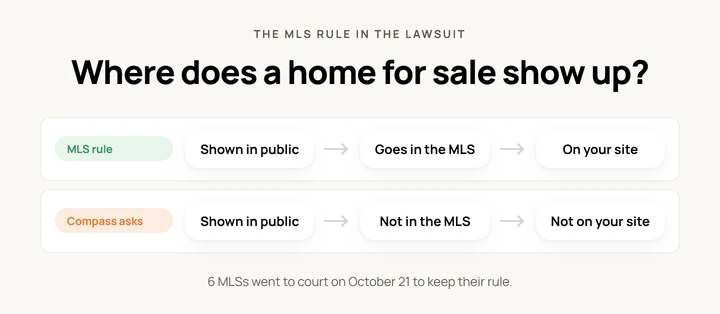
On October 21, six MLSs went to federal court in New York. They are ARMLS, BridgeMLS, Canopy MLS, REcolorado, Hive MLS and Doorify MLS. Each one got a letter from Compass that said Compass might sue them. The MLSs have a rule. If a home is shown to the public, it must go in the MLS. Sellers who want privacy still have choices, they say. They can skip public ads, or use Coming Soon. A day before, OneKey MLS said no to Compass too. It said Compass wants to show homes for sale “while hiding them from the shared MLS database.”
Read more: ARMLS v. Compass, the complaint (CourtListener) · OneKey MLS statement (Business Wire)
Buyers push back on AI-altered listing photos
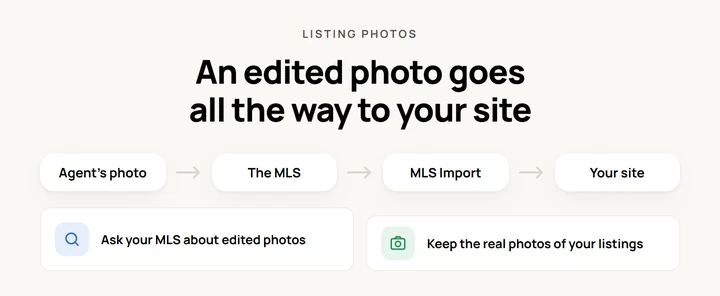
On October 20, a post on Reddit’s Boston forum said AI “staging” on listings is “straight up lying.” Many replies agreed. The photos did more than add fake furniture. “More like renovating,” one person wrote. Another said some photos “completely change dimensions.” A third said the AI made up a whole bedroom. MLS Import shows the photos the MLS sends. So if the listing agent uploaded an edited photo, your visitors see it too. Ask your MLS what its rules say about edited photos. Keep the real photos of your own listings.
Read more: r/boston, “The AI staging on real estate listings should be illegal” (Reddit)
SWMLS has IDX problems while it switches vendors
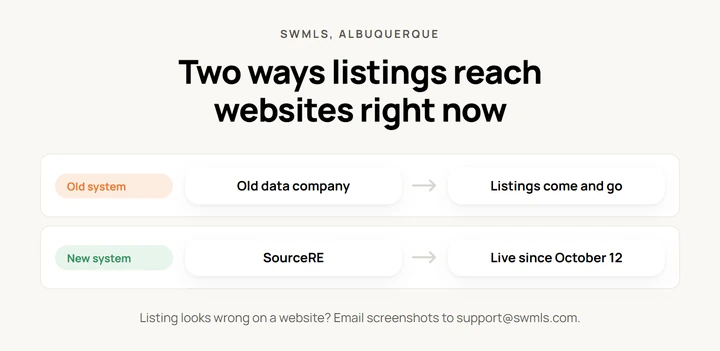
SWMLS is the MLS for the Albuquerque area. On October 21, it posted an update. The company that has sent out its listing data for years has problems. Listings come and go on some websites. SWMLS doesn’t name the company. These problems are one reason SWMLS moved to a new system called SourceRE. It went live on October 12. But some IDX companies still use the old system while they switch. So if a listing goes missing from your site, your site may be fine. If one of your listings looks wrong on a website, email screenshots to [email protected].
Read more: SWMLS, “Update on IDX and Listing Syndication Issues” · SWMLS, “SWMLS Launches SourceRE Data Marketplace”
