
Does Adding MLS Listings Slow Down Your WordPress Site?
By The MLSImport Team
Last updated: August 19, 2026
You’ve found the listings you want to import, but you’re worried thousands of properties will grind your WordPress site to a crawl. It’s a fair worry, and you’re smart to ask before you flip the switch. Here’s the honest answer: no, importing MLS listings does not have to slow your IDX plugin site speed or hurt your visitors’ experience.
The slowdown everyone fears comes from architecture, not listing count. There are two ways to put MLS data on a site: organic IDX, where each listing lives in your own WordPress database as a native post (cacheable, indexable, and yours), and iframe IDX, where a remote widget loads on every page and skips your cache entirely. Choose organic, and the levers that decide speed are yours: hosting tier, MySQL indexes on your busiest meta keys, full-page caching plus a CDN, and import filtering.
The rest of this guide shows you which settings decide that, and in which order to reach for them.
- Does the IDX architecture you choose matter more than listing count?
- Which IDX architecture holds up at peak demand?
- Which failures MLSImport can fix locally, and which belong to the MLS
- Database scale: what WordPress actually stores for 10,000 listings
- Hosting requirements at 5,000, 10,000, and 50,000 listings
- Caching, CDN, and object cache for large MLS sites
- Where do listing photos actually live?
- Sync strategy and slow-server timeouts
- Should you filter your MLS feed or import everything?
- Benchmarking IDX plugin site speed and hitting Core Web Vitals targets
- What 20,000 DFW listings look like in practice
- Frequently Asked Questions
Does the IDX architecture you choose matter more than listing count?
Yes, and it isn’t close. The plugin architecture you pick decides your site’s speed far more than how many listings you import. Most agents obsess over listing count and never ask what matters: where does the data live, and who serves the page?
An organic IDX plugin like MLSImport writes each listing into your own MySQL database as a native WordPress custom post type. Not an iframe, not a vendor widget, not a rented subdomain. The listing becomes content on your domain, so a caching plugin can flatten it into static HTML and your permalinks stay crawlable. Iframe IDX does the opposite: the search interface renders in a remote frame your cache can’t touch, re-fetched on every load.
That extra round-trip costs you, and the cost is structural rather than a figure we can quote. An organic cached page is a static file your own server hands over. An iframe page is that same file plus a second request to a machine you do not control, on every load, for every visitor, cache or no cache. Under load the difference compounds, because your cache absorbs your traffic while the vendor’s servers absorb everybody’s. We publish no latency or throughput numbers for either side of that comparison: there is no load test behind them that you could reproduce, and a number without its test conditions is decoration.
One honest note: MLSImport supports one MLS connection per site. Two separate MLS feeds means two separate WordPress installs, not one tangled database.
Organic IDX vs iframe IDX: the data-flow difference
With organic IDX, the browser requests a listing page and WordPress serves cached HTML from a full-page cache hit, photos loading from MLS CDN URLs already in that HTML. One round-trip, done. With iframe IDX, WordPress renders only the iframe shell, then the browser fires a second request to the remote vendor, waits for the search UI, and loads the listings. That second round-trip is the latency penalty you pay on every visit.
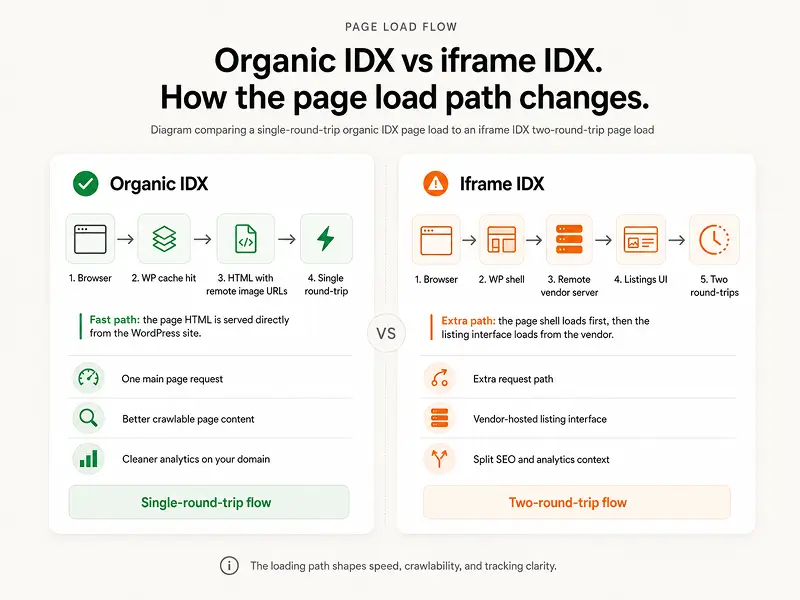
Comparison table: organic IDX vs iframe IDX
The table shows why architecture, not listing count, sets your speed.
| Feature | Organic IDX (MLSImport) | Iframe IDX |
|---|---|---|
| Where listings live | Your MySQL database (WP posts) | Vendor’s remote server |
| Full-page caching | Yes, pages cache to static HTML | No, search UI re-fetches each load |
| SEO on your domain | Yes, your URLs, crawlable | No, iframe content not indexed on your domain |
| Extra page latency | None when cached, the page is a static file | One extra network round-trip on every load |
| Throughput under load | Set by your cache, CDN and host | Set by the vendor’s servers |
| Listing photos on disk | Zero, remote MLS/CDN URLs only | Varies by vendor |
| Data ownership | Full, standard WP backup | Vendor-controlled |
| Hosting upgrade trigger | Listing volume (your DB) | Rarely, small local DB |
Get started today: right-click a listing on any IDX site you admire and check whether it’s a real URL on that domain or stuck in an iframe.
Which IDX architecture holds up at peak demand?
Native import holds up best at peak, because a cached listing page is static HTML your own server hands out and the MLS is not in the request at all. Hosted or on-domain rendering holds up exactly as well as the vendor’s platform does that day. Iframe or subdomain IDX is the most exposed of the three, because every visitor triggers a fresh request to a machine you do not control and your cache cannot stand in front of it.
Straight disclosure, because that ranking favours our side: MLSImport is our own plugin, and it is a native-import plugin. The reasoning below is about where the page comes from under load, so you can check it against any product in the category, ours included.
Native import (MLSImport and other organic IDX plugins). Listings live in your own database as WordPress posts. At peak, full-page caching hands the same static HTML to every visitor, so a traffic spike becomes a static-file problem: more cache, a CDN, more PHP workers. The MLS feed is only in the picture during a scheduled sync, which is a background job rather than a page request. If the MLS goes offline during your busiest hour, your listings keep serving from the last sync.
Hosted or on-domain rendering. The pages carry your hostname, but the vendor’s servers build them. At peak your capacity is the vendor’s capacity. You cannot cache around it and you cannot buy a bigger server to fix it, so the thing to ask for before you commit is a public status page and an uptime record.
Iframe or subdomain IDX. Every listing view fires a second request to the vendor after your own page has already loaded. Your cache cannot flatten that request, so your peak traffic becomes their peak traffic plus a round-trip on each load. When their servers slow down, your search slows down, and the visitor blames your site.
One honest limit across all three: nobody in this category, us included, publishes a load test you can reproduce. So do not buy on a latency claim, ours or anyone else’s. Ask which machine serves the page when everyone arrives at once, because that answer does not change with the weather.
Get started today: open a listing page on the platform you are considering, disable JavaScript, and reload. What still renders is what your cache can serve at peak.
Which failures MLSImport can fix locally, and which belong to the MLS
MLSImport can isolate anything that runs on your own server: the database, the cache, the PHP configuration, the cron tick, and the import job itself. It cannot isolate the MLS’s API or the MLS’s image CDN, because neither runs on your hardware and the plugin holds only credentials and URLs for them.
Local, and yours to fix. Slow filter searches from missing wp_postmeta indexes. Listing pages that keep missing the cache. Imports that die on max_execution_time or memory_limit. Syncs that never fire because WP-Cron is waiting for a visitor. Stale prices after a sync because the purge rule never ran. Every one of those sits on your side of the line, and every one of them is a setting.
Remote, and not the plugin’s to fix. A throttled or slow RESO API that stretches an import until it times out. A board that rate-limits your requests. An image CDN outage that turns galleries into broken-image placeholders. Fields the board does not publish in its feed. The plugin retries on the next run; it cannot make a remote server answer faster.
What native import does soften. Because listings were imported into your database, an MLS API outage does not take your site down: price, address, beds and baths keep rendering from your own tables while the feed is unreachable, and the next sync catches up. Photos are the visible exception, because they were never copied locally, which is what the optional hybrid mode that caches one featured image per listing exists for.
Telling the two apart takes one screen. The MLSImport sync log separates a host timeout from an MLS API rate-limit response, so read it before you call your host.
Get started today: open the MLSImport sync log after tonight’s run and check whether your last failure was a timeout on your side or a response from the board.
Database scale: what WordPress actually stores for 10,000 listings
Yes, your database grows when you import listings, but predictably, and two moves keep it from becoming a problem. This is simpler than it sounds, and you won’t need a database admin to pull it off.
Every listing becomes one row in wp_posts plus several rows in wp_postmeta, one per field. At 10,000 listings, that’s 200,000-plus rows across those two tables. For a big metro board like NTREIS, the database can climb into the hundreds of megabytes. WordPress handles millions of rows fine, as long as you index correctly.
Here’s where sites get into trouble. Without indexing, meta queries against wp_postmeta start getting heavy past 5,000 to 10,000 records. A filter-by-price search across 20,000 listings forces MySQL into a full-table scan, reading every row to find matches, and the page crawls.
The fix is cheap and permanent: add custom MySQL indexes on the four meta keys you query most, price, city, status, and MLS ID. With those in place, MySQL seeks the matching rows instead of reading the whole table, and an object cache keeps a repeated search off the database entirely. Two more things keep it lean. MLSImport deletes off-market and expired listings every sync, so the tables hold only active inventory and your sitemap never fills with dead URLs. And scoped imports (covered later) can cut your post count by 30 to 60 percent.
The four meta indexes that prevent query crawls
Index these four meta keys and you’ve solved most large-site slowness: price, city, status, and MLS ID. A table scan, in plain English, is MySQL reading every row to find your listings, like reading every page of a phone book to find one name. MLSImport also uses the MLS ID as its stable de-dupe key, so overlapping import filters never create duplicate posts. For very large markets, an optional Elasticsearch layer adds faceted search at scale; for most sites, the four indexes carry you.
Get started today: in phpMyAdmin, confirm whether price, city, status, and MLS ID each have an index on your wp_postmeta table. If not, add them before your next import.
Hosting requirements at 5,000, 10,000, and 50,000 listings
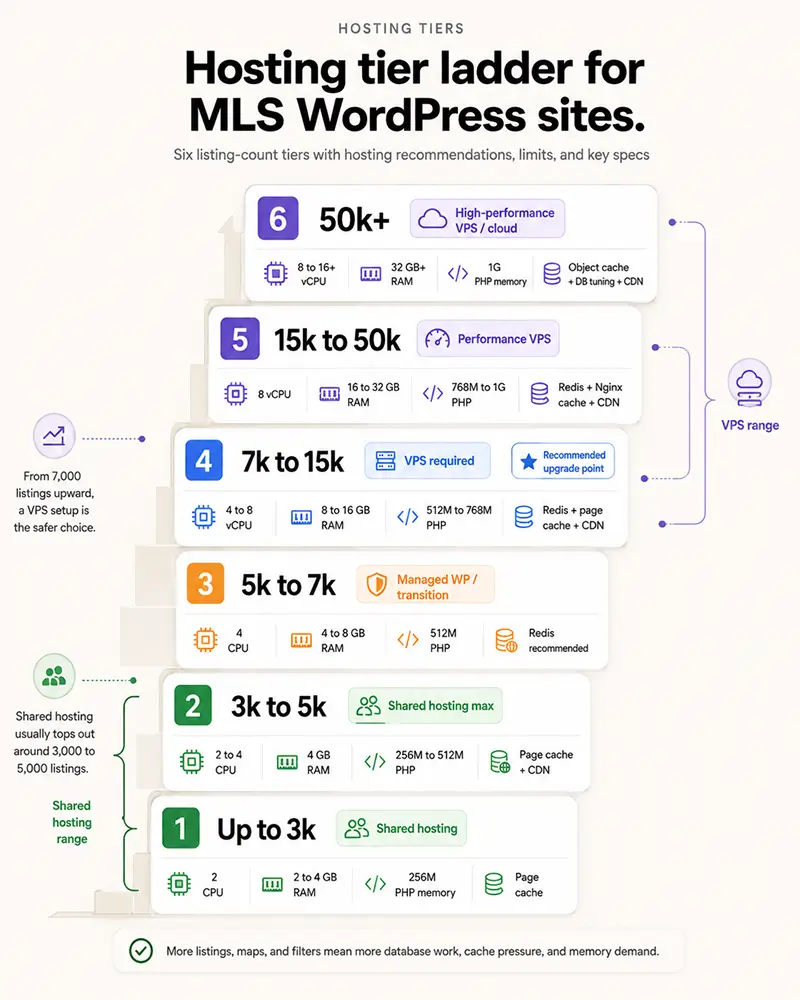
Your hosting tier is the biggest variable you control. Here’s what each scale needs, named hosts included, so you can match your count to a real spec.
The shared-hosting comfort zone sits around 3,000 to 5,000 active listings. GoDaddy and Bluehost standard plans handle roughly 3,000; a quality tier like SiteGround GrowBig stretches to about 5,000. SiteGround‘s caching sometimes needs simple exclusions for listing and search pages so results don’t serve stale.
The shared-to-VPS line lands at about 7,000 active listings, with a broader transition band of 5,000 to 15,000. Read those counts as planning guidance, not as measured breakpoints: we have no published load test behind them. A mid-range VPS with 2 to 4 cores and 4 to 8 GB of RAM handles 10,000 to 50,000 listings once object and page caching are in place. Past roughly 50,000 listings or 1,000 concurrent sessions, a separate database server makes sense.
One trap up front: managed hosts often cap max_execution_time at 60 to 120 seconds, which can break a first import of tens of thousands mid-run. Batch it into chunks and the cap stops mattering. And because MLSImport uses token-based RESO credentials, not IP whitelisting, changing hosts needs no new MLS approval as long as your domain stays the same.
PHP settings every MLSImport installation needs
Verify these before you start an import, not after a timeout:
- PHP memory: 256 MB baseline, 512 MB for large boards and heavy imports, 1 GB safer for very large feeds like NTREIS. (128 MB is the bare floor, don’t run a real import there.)
- max_execution_time: 120 to 300 seconds for heavy sync. Managed hosts frequently cap this at 60 to 120 seconds, so check it first if imports time out.
- max_input_vars: at least 5,000, so large field maps save without silently truncating.
- PHP version: run PHP 8.3 or newer. WordPress’s own minimum is 7.4, but 7.4 is end-of-life and no longer receives security patches, so don’t treat it as a target. Moving off PHP 7.x onto 8.x is one of the biggest free, zero-config speed wins available, and on a performance article that point deserves the top of the list, not a footnote.
- OPcache: enabled.
- Storage: SSD running MySQL or MariaDB.
Set up a real server cron to hit wp-cron.php every 5 to 15 minutes instead of visit-triggered WP-Cron, which misses sync windows on busy and quiet sites alike. Most managed hosts have a cron panel in their dashboard.
Hosting tier decision table
Not sure which tier you’re on, or when to move up? This table maps active listing count to specs so you can find your row and plan the next upgrade.
| Active Listings | Host Type | Min RAM | CPU Cores | PHP Memory | Notes |
|---|---|---|---|---|---|
| Up to 3,000 | Shared hosting | Shared pool | Shared | 256 MB | GoDaddy/Bluehost standard plans; keep caching on |
| 3,000 to 5,000 | Shared (quality tier) | Shared pool | Shared | 256 to 512 MB | SiteGround GrowBig range; add cache exclusions for listing pages |
| 5,000 to 7,000 | Shared (upper limit) | Shared pool | Shared | 512 MB | Approaching VPS territory; watch query response times |
| 7,000 to 15,000 | Entry VPS | 2 to 4 GB | 2 vCPUs | 512 MB | Upgrade trigger; Cloudways or a quality managed WordPress host |
| 15,000 to 50,000 | Mid-range VPS | 4 to 8 GB | 2 to 4 cores | 512 MB to 1 GB | Multi-agent/broker sites and full metro boards like NTREIS (20,000 to 30,000 active); Redis object cache required |
| 50,000+ | VPS / small dedicated | 8+ GB | 4+ cores | 1 GB | Statewide or multi-board feeds; PHP-FPM; consider separate DB server |
Get started today: check your host’s max_execution_time and memory_limit before you import anything. A 60-second cap found now beats one discovered halfway through your first import.
Caching, CDN, and object cache for large MLS sites
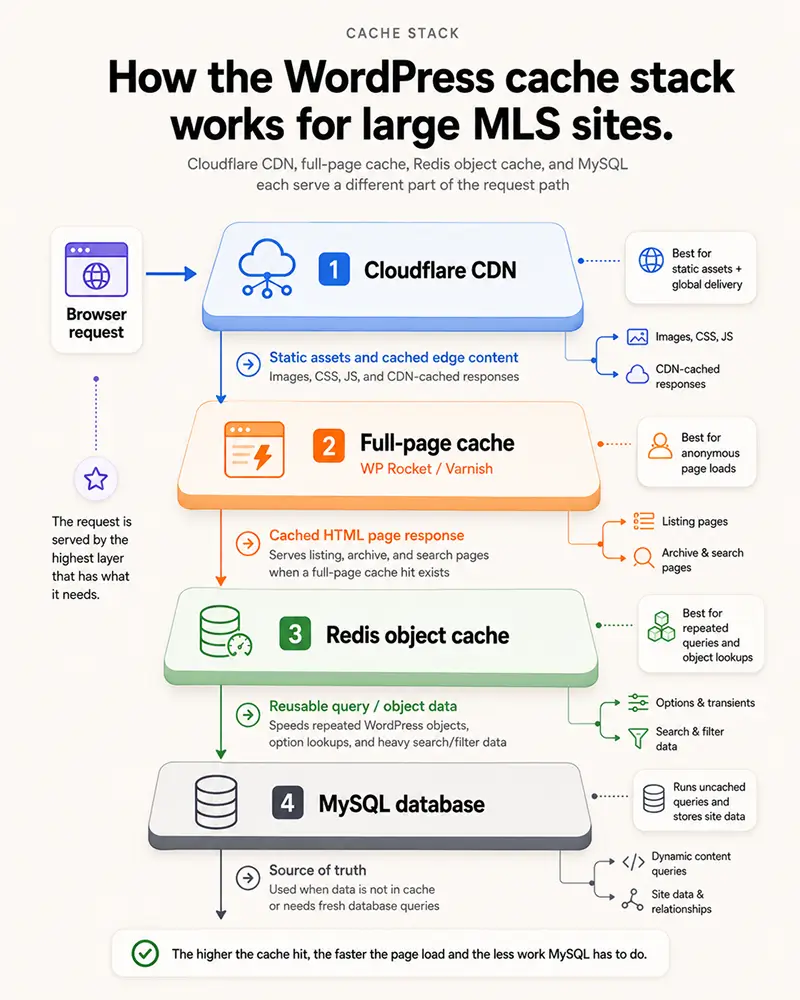
Caching turns a database-heavy MLS site into something that feels nearly instant. Without it, every listing page hits MySQL on every request.
Three layers work together on a large site. Full-page caching (WP Rocket, LiteSpeed Cache, Varnish, or Nginx FastCGI cache) turns listing pages into static HTML served from memory. Object caching (Redis or Memcached) stores query results in RAM, so a repeated search skips MySQL. A CDN like Cloudflare serves static assets from edge nodes near the visitor, and HTTP/2 and HTTP/3 cut latency by loading many assets at once.
Worth setting expectations honestly: MLSImport ships no cache engine of its own; it leans on your host and caching plugins. Security plugins like Wordfence and Sucuri play nicely too; just allowlist the outbound MLS and RESO API domain so the firewall doesn’t block your sync.
The detail that separates a production setup from a naive one is cache purge on sync. When MLSImport updates a listing’s price or marks it pending, the cache for that page must invalidate so visitors see the fresh number. Tune your purge rules so only changed listing pages purge, not the whole cache. And once a filtered search is cached in RAM by Redis, the repeat of that search never reaches MySQL at all.
Which caching plugins work with MLSImport?
These four full-page caching plugins are confirmed compatible:
One caveat: aggressive JS minification and combining can conflict with interactive map features, so test your map after enabling them. Wordfence and Sucuri are fine alongside MLSImport, as long as you allowlist the MLS/RESO API endpoint in your firewall rules.
Configure your cache to purge only the listing pages that changed during a sync, never the whole site. A full flush on every hourly sync leaves visitors hitting cold pages all day; targeted purge keeps your pages warm while the handful of updated listings refresh.
Get started today: install WP Rocket or LiteSpeed Cache, clear the cache, then load your slowest listing page twice. The second load is the cached speed visitors actually feel.
Where do listing photos actually live?
MLSImport never copies photos into your WordPress media library. Every image stays on the MLS or its CDN, and your site stores only the URL. That deliberate decision is a big reason a five-figure catalog stays light on disk. If you’ve ever watched a listing page crawl on mobile, bloated local image storage is usually why.
A typical listing carries 20 to 40 photos, and luxury listings push 60 to 100. A 10,000-listing site at 25 photos each would generate about 250,000 image files if a plugin downloaded them locally; a 5,000-listing site at 30 photos, roughly 150,000; a busy brokerage site, 200,000 to 400,000 files. With remote URLs, that count is essentially zero, your database stays at a few hundred megabytes, and a migration that would take hours takes minutes.
You don’t lose image SEO, either. Alt text, captions, and schema are built from the listing fields in the HTML markup, so remote images keep their SEO signals.
For galleries, use native lazy loading with loading=”lazy” and cap the first visible gallery to 8 to 12 photos, loading the rest on scroll or click. That single move keeps initial page weight down on community pages, even when a listing has 60 photos behind it. An optional hybrid caches only the featured image locally, for watermarking or social sharing, while galleries stay remote.
What if the MLS image CDN goes down?
If the MLS CDN is temporarily unavailable, gallery images show broken-image placeholders, but the listing data itself (price, address, beds, baths) still displays, because that lives in your database. MLSImport re-syncs the photo URLs on the next run. For luxury sites where the hero image can’t blink, the hybrid featured-image option caches one representative photo locally as a fallback.
Get started today: open one image-heavy listing on your phone over cellular and watch the gallery load. If it stalls, cap the first gallery at 8 to 12 photos.
Sync strategy and slow-server timeouts
MLSImport’s incremental RESO sync updates only the records that changed, never the whole board, so each run stays short and your site stays responsive.
The schedule is hourly, and hourly is the whole of it. There is no setting that makes the sync run more often, because your feed does not update faster for being polled harder. Each run asks the RESO Web API for the records the MLS reports as modified in the last two hours, then adds, updates, and removes them without re-importing the catalog. The two-hour window against a one-hour schedule is a deliberate overlap, so a listing that changes near a run boundary is caught by the next run instead of falling between two.
Auto update is switched on per import task, so the thing you control is how many tasks sit on that hourly schedule, not how often it fires. A task with the switch off imports once and is never updated again.
Here’s a distinction that trips people up. The sync schedule (hourly, fixed) is not the same as the system-cron tick (how often the server pokes wp-cron.php, every 5 to 15 minutes). Use a real server-side cron for that tick, because visit-triggered WP-Cron is unreliable on low-traffic or very large sites, and a schedule checked once an hour drifts. Checking often is what keeps an hourly event close to hourly.
Some regional MLS systems run slow or throttled APIs, the most common cause of timeout pain.
Three fixes, in order: cut the number of import tasks on the hourly schedule, so a weak feed is not answering several queries in the same run; batch the initial import into chunks, since a low max_execution_time can break a single large first import; and check the MLSImport sync log to tell a host timeout from an MLS API rate-limit response. Runs do not pile up on each other, because an hourly run exits immediately if the previous one is still going. On a modest host the first import can run for hours, but it’s a one-time cost; every sync after it is short.
If your MLS server times out during syncs, look at the feed before you call your host; a slow MLS API is the more common culprit. The sync error log under MLSImport settings distinguishes host timeouts from API rate-limit responses.
Get started today: set your sync to hourly, then check the MLSImport sync log tomorrow morning to confirm your overnight price and status changes came through cleanly.
Should you filter your MLS feed or import everything?
No, you don’t have to import your entire MLS. Filtering to your target markets is one of the highest-return moves you can make, for speed and relevance both. Importing your whole board when you serve three cities is waste.
There’s no hard plugin cap on listing count; the active and pending pool can run 50,000 to 100,000-plus, bounded only by hosting. A metro board like NTREIS might hold 150,000 records when your site needs about 20,000. Importing all 150,000 when you serve one corridor is dead weight. Filter instead. MLSImport scopes by city, county, price range, property type, status, agent ID, and office or agency ID, and you can run multiple import profiles on separate schedules (for example, residential and commercial separately).
The payoff: scoped imports can cut post counts by 30 to 60 percent, shrinking the database, speeding every meta query, and dropping you a full hosting tier. Because MLSImport uses the MLS ID as a stable de-dupe key, overlapping profiles never produce duplicates. Many solid sites land in the 3,000 to 8,000 active-listing range, the coverage-versus-performance sweet spot; an agent farming one neighborhood may need only 1,000 to 3,000. Remember too that MLSImport supports one MLS connection per site, so two different boards mean two separate WordPress installs.
Start narrow and expand. Import your primary farm area first, even a single city or county, run it for a week, benchmark load times, then add coverage. This catches performance issues before you point your whole audience at a slow site.
Get started today: list the cities or counties where you actually close deals and make those your first import filter. Widen the net once the speed is right.
Benchmarking IDX plugin site speed and hitting Core Web Vitals targets
Benchmark before you adjust anything, and benchmark your own build: your host, your theme, your listing count. That is the only measurement that describes your site.
We publish no latency or throughput figures for MLSImport, because we have no load test with reproducible conditions to publish beside them. The targets worth holding are the ones Google publishes and measures in the field:
- Largest Contentful Paint (LCP): within 2.5 seconds.
- Interaction to Next Paint (INP): 200 milliseconds or less.
- Cumulative Layout Shift (CLS): 0.1 or less.
Those three are Google’s published Core Web Vitals thresholds, each measured at the 75th percentile of page loads and segmented across mobile and desktop. Map pan, filter updates and autocomplete have no published threshold of their own, so judge them against INP and against how the same action felt before your last change.
Measure with PageSpeed Insights for Google field data, GTmetrix and WebPageTest for waterfall analysis, and k6 or Locust to load-test under simulated traffic. The test most agents skip and later regret: benchmark at your target scale (5,000 to 20,000 listings) in staging before launch. Use MLSImport’s 30-day free trial to load real data into staging, and re-test after major plugin or theme changes, hosting migrations, or every one to three months. If your numbers miss target, fix them in order: caching first, hosting tier second, meta-key indexes third. The plugin comes last, because it’s almost never the plugin.
Get started today: open PageSpeed Insights, test one community URL on mobile, and note your LCP before you touch anything.
What 20,000 DFW listings look like in practice
NTREIS, the MLS covering the Dallas and Fort Worth metro, holds 20,000 to 30,000 active listings at any given time. It’s one of the country’s largest boards and a real stress test of this guide. At that scale the database reaches hundreds of megabytes, and shared hosting can’t carry it. A VPS or dedicated server is the requirement, not a suggestion.
We have no published load test at that scale, so read the specification above as planning guidance rather than a measured result. At full NTREIS scope, indexing, Redis, full-page caching, and Cloudflare are what make it viable, and staging is where you find out whether your theme agrees.
But most DFW agents don’t need all 20,000 to 30,000 listings. Filter to your county or price corridor first. A few target suburbs instead of the whole board leaves a load an entry VPS, or even a quality shared host, handles fine.
Get started today: if you serve DFW, launch with one county instead of the full board and prove your speed first.
Frequently Asked Questions
Will adding thousands of MLS listings slow down or crash my WordPress site?
No. With organic IDX architecture and full-page caching, listing volume doesn’t meaningfully slow a properly configured MLSImport site. The real risk comes from skipping caching, leaving wp_postmeta unindexed, or running underpowered hosting. On a tuned VPS with Redis and a full-page cache, every visitor to a listing page gets the same static HTML, so volume stops being the variable.
What hosting specs and PHP settings do I need at 5,000, 10,000, and 50,000 listings?
At 5,000 listings, quality shared hosting with 256 to 512 MB PHP memory and OPcache works. For MLSImport at 10,000 listings, the most common timeout trigger is max_execution_time left below 120 seconds, so bump it to 300 and move to an entry VPS with 2 vCPUs, 2 to 4 GB RAM, and 512 MB PHP memory. At 50,000, run a mid-range VPS with 4 to 8 GB RAM, 4 cores, 512 MB to 1 GB PHP memory, Redis object cache, and Cloudflare.
At how many active listings should I upgrade from shared hosting to a VPS?
Around 7,000 active listings is a useful rule-of-thumb threshold, not a hard line. Below 5,000, shared hosting is generally fine. Between 5,000 and 7,000, watch your query response times closely. Above 7,000, a VPS becomes the practical requirement for MLSImport. A quality shared host like SiteGround GrowBig can stretch to roughly 5,000 listings before performance starts to degrade. Treat all of these counts as starting points: your real breakpoint depends far more on theme, query patterns, and traffic than on listing count alone.
How often should MLS data sync, and does frequent syncing slow my site?
MLSImport syncs hourly, and hourly is the schedule: there is no setting that makes it run more often, because a feed does not update faster for being asked more often. Each run is an incremental fetch of the records the MLS reports as changed, not the full board, so it stays short. Sync runs in the background and doesn’t block page requests, so with caching the site stays responsive during sync.
What load-time and search-latency targets should I aim for on an MLS site?
Use Google’s published Core Web Vitals thresholds, because they are the only targets in this area with a source and a measurement method behind them: LCP within 2.5 seconds, INP of 200 milliseconds or less, and CLS of 0.1 or less, each at the 75th percentile of page loads. We publish no load-time or search-latency figures of our own, because we have no reproducible test to publish with them. Measure your own build in PageSpeed Insights, and when a simple page load feels slow, fix caching first; the problem is almost never MLSImport itself.
Does MLSImport work with WP Rocket, LiteSpeed Cache, Cloudflare, and Redis?
Yes. MLSImport has no proprietary cache engine and is built to work with your host’s caching stack. Compatible full-page caching plugins include WP Rocket, W3 Total Cache, LiteSpeed Cache, and SiteGround Optimizer. Redis and Memcached object caching work on any host that offers them, and Cloudflare CDN runs without any special configuration on the plugin side.
Are MLS listings stored as real WordPress posts or displayed via iframe?
Real WordPress posts. MLSImport writes each listing as a native custom post type into your site’s MySQL database, not an iframe and not a remote widget. That means listing pages live on your domain, get indexed by Google, cache cleanly with any caching plugin, and obey your theme. Iframe IDX can’t offer those advantages because the content isn’t on your site.
Where do listing photos live, and will large galleries slow mobile?
Photos are never imported into your WordPress media library. MLSImport stores only the remote MLS/CDN image URL for each photo. Large galleries stay fast with lazy loading: cap the first visible gallery at 8 to 12 photos and load the rest on scroll. That keeps mobile page weight down even on listings with 40 to 60 photos.
Do I have to import the whole MLS, or can I filter to my target markets?
You can filter to exactly the markets you serve. MLSImport supports filtering by city, county, price range, property type, status, and agent or office ID. Importing only your target geography typically cuts total listing count by 30 to 60 percent. You can also run multiple import profiles on separate schedules, for example a residential profile and a separate rental or commercial profile.
Will slow MLS servers cause import timeouts, and how long does the first import take?
Slow MLS servers can trigger timeouts, especially on the first bulk import. Fixes: confirm max_execution_time is at least 120 to 300 seconds, batch the initial import on managed hosts that cap execution time, and reduce the number of import tasks running on the hourly schedule so a weak feed is not answering several at once. Runs never overlap: an hourly run exits immediately if the previous one is still going. With MLSImport, that first import of a large board can run hours; every incremental sync afterward is short.
Which MySQL indexes should I add for a large MLS site?
Index the four meta keys you query most: price, city, status, and MLS ID. Without them, a filter search across 20,000 listings forces MySQL into a full-table scan, reading every row to find matches, and meta queries start getting heavy past 5,000 to 10,000 records. With those indexes in place, MySQL seeks the matching rows instead of reading the whole table, and an object cache keeps a repeated search off the database entirely. In phpMyAdmin, confirm each of the four has an index on wp_postmeta before your next import.
Can I connect more than one MLS board to a single site?
No, MLSImport supports one MLS connection per site, so two separate boards mean two separate WordPress installs, not one tangled database. Within that single connection you can still run multiple import profiles on separate schedules, scoped by city, county, price range, property type, status, agent ID, or office ID, for example a residential profile alongside a separate rental or commercial profile.
Does changing hosting providers require new MLS approval?
No, as long as your domain stays the same. MLSImport uses token-based RESO credentials rather than IP whitelisting, so moving to a new host needs no fresh MLS approval. That makes it easy to start on shared hosting and migrate to a VPS as your active listing count climbs past the roughly 7,000 mark, without re-running board approval.
Will overlapping import filters create duplicate listings?
No. MLSImport uses the MLS ID as a stable de-dupe key, so overlapping import profiles never create duplicate posts. That lets you run several scoped imports, say a residential and a commercial profile that share some inventory, without worrying about the same listing appearing twice in your database.
Why does PHP version matter so much for IDX speed?
Moving off PHP 7.x onto PHP 8.x is one of the biggest free, zero-config speed wins available, which is why it belongs near the top of any performance checklist. Run PHP 8.3 or newer with OPcache enabled. WordPress’s own minimum is 7.4, but 7.4 is end-of-life and no longer receives security patches, so don’t treat it as a target, it’s a liability, not a baseline.
What happens if the MLS image CDN goes down?
Because MLSImport stores only remote image URLs, a temporary MLS CDN outage shows broken-image placeholders in the galleries, but the listing data itself, price, address, beds, and baths, still displays because that lives in your own database. The plugin re-syncs the photo URLs on the next run. For luxury sites where the hero image can’t blink, the optional hybrid mode caches one featured image locally as a fallback.
How should I configure WordPress cron for reliable syncing?
Use a real server-side cron to hit wp-cron.php every 5 to 15 minutes instead of visit-triggered WP-Cron, which misses sync windows on busy and quiet sites alike. Keep this distinct from the sync schedule itself, which is hourly and fixed: the cron tick is only how often the server pokes WordPress, and checking often is what keeps an hourly event close to hourly. Most managed hosts expose a cron panel in their dashboard.